Author: Team Skarya

  • What Is Work Management? A Simple, Practical Guide for Teams

    What Is Work Management? A Simple, Practical Guide for Teams

    Work gets messy in a very specific way. Not because teams don’t care, but because work arrives from everywhere, priorities change midweek, and nobody can see the full picture without opening ten tabs. Work management is the system that brings clarity back.

    What is work management?

    Work management is the process of organising, assigning, tracking, and improving all the work a team does, including daily tasks, ongoing operations, and time-bound projects. It makes work visible, ownership clear, and progress easy to follow without constant status chasing.

    Work management, task management, and project management

    Task management focuses on individual to-dos. Project management focuses on delivering a defined outcome with a timeline. Work management includes both, plus the operational work around them such as requests, approvals, recurring work, handoffs, and documentation, so the entire system runs consistently.

    What work management includes

    A solid work management setup usually has a single place where tasks live with clear owners, a simple way to prioritise, and a workflow that shows how work moves from new to done. It also keeps collaboration and files tied to the work so context doesn’t disappear into chats. Most importantly, it provides visibility so progress is obvious without building manual reports or scheduling meetings just to find out what’s happening.

    What work management looks like in real life

    Most teams run work management as a loop. Work arrives through a request, an idea, or a recurring process. The team triages it by priority and assigns an owner. The work moves through execution steps, then review or approval if needed. After delivery, the team improves the system by removing bottlenecks, clarifying steps, or automating repetitive handoffs. When that loop is consistent, teams deliver faster with less stress.

    Common work management problems and how to avoid them

    The most common issue is tool sprawl: tasks in one place, docs in another, approvals in email, and updates in chat. That forces teams to copy, paste, and re-explain work. Another issue is unclear priority, where the loudest request wins and important work gets delayed. Teams also lose time when requests arrive in random formats, which creates back-and-forth just to collect basic details. Visibility becomes manual too, where someone builds weekly updates that are outdated as soon as they’re shared. The practical fix is to standardise intake, keep workflows simple, and rely on live progress instead of manual reporting.

    What to look for in work management software

    If you’re choosing work management software, focus on what reduces friction. Look for fast task capture, flexible views like list and board, simple workflows, collaboration in context, and reporting that updates from live work. If you’re a service team, time tracking is often worth prioritising. Integrations matter as well, but only when they remove steps rather than add complexity.

    Where Skarya fits

    Skarya.ai is one work management platform built to help teams plan, track, and deliver work in one place without heavy setup. It brings together tasks and projects, workflow structure, documentation, collaboration, and timesheets so teams don’t have to juggle disconnected tools. Skarya also includes an AI assistant called Kobi that helps speed up structured task creation, summaries, and documentation drafting, which reduces admin and keeps teams focused on delivery.

    A simple way to start work management without overhauling everything

    Start with one workflow that causes friction, like onboarding, customer requests, content production, internal approvals, or recurring ops. Standardise how work comes in using a short template or form. Define three to five workflow steps. Run everything through one system for two weeks and aim for consistency rather than perfection. After two weeks, improve one thing: clarify priority rules, tighten the workflow, or automate a handoff. That’s how work management becomes real and sticks.

    FAQ

    What is work management in simple terms?
    Work management is how a team organises work so everyone knows what’s being done, who owns it, what’s next, and when it’s due.

    Is work management only for large teams?
    No. Smaller teams often benefit the most because time lost to confusion and status chasing hurts more when headcount is limited.

    Do I need Agile or Scrum for work management?
    Not necessarily. Many teams get more value from clear ownership, a simple workflow, and consistent prioritisation than from adopting a full methodology.

    What’s the biggest sign our work management is broken?
    If your team can’t answer what the most important thing to finish this week is without a meeting, your system lacks visibility.

    What should work management software include?
    At minimum: tasks with owners, clear workflows, collaboration in context, priority and due dates, and reporting that reflects real-time progress.

    Can work management include documentation and SOPs?
    Yes. Documentation stays useful when it’s connected to the workflows and tasks it supports, so it stays current.

    How does Skarya help with work management?
    Skarya.ai helps teams keep tasks, workflows, docs, collaboration, and timesheets connected in one workspace, with AI assistance from Kobi to reduce admin and speed up planning and updates.
  • How Startups Can Manage Projects Without Enterprise-Level Complexity

    How Startups Can Manage Projects Without Enterprise-Level Complexity

    Early-stage startups don’t fail because founders can’t plan.
    They fail because they fall into the Process Trap.

    It starts innocently. A tool meant to “add structure” becomes a system that demands structure before you have the time, headcount, or patience to maintain it.

    Here’s what that actually costs.

    If a five-person team loses just two hours a week to tool management, that’s ten hours gone. More than a full workday. Every single week.

    That’s a shipping tax. Lean project management is how you stop paying it.

    Founder tip: If your PM tool needs a “how to use this” Loom for new hires, it’s already too complex.

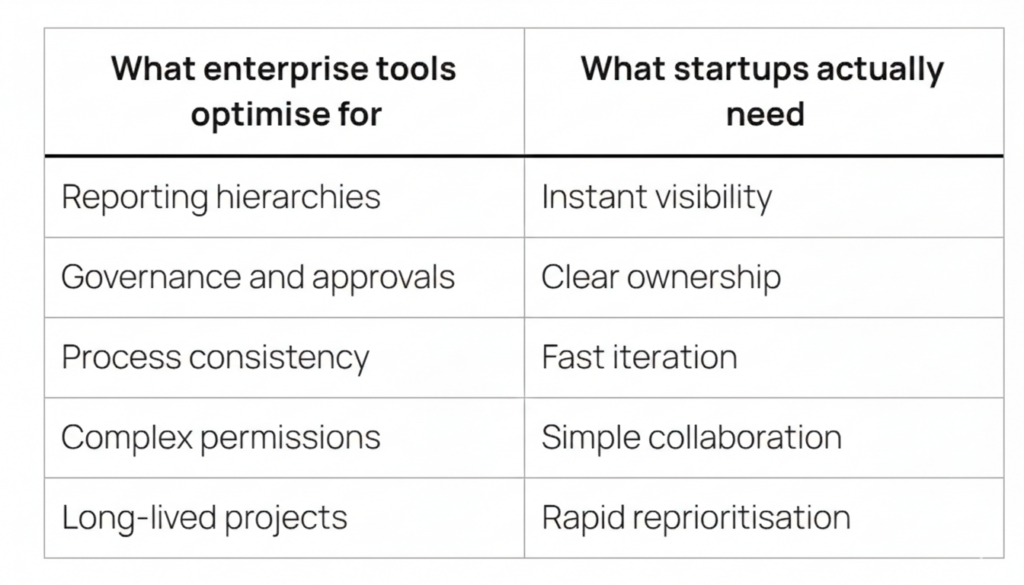
    Why Enterprise Tools Don’t Work for Startups

    Founders often reach for enterprise tools because they feel safe. “Enterprise-grade” sounds like “future-proof.”

    In practice, it usually means interruptions.

    Every mandatory field in a heavyweight system is a cognitive break. It pulls someone out of the work to satisfy the tool. It looks like this.

    • Assigning a task requires filling in status, priority, labels, sprint, story points, and a custom field nobody remembers creating
    • Updating progress becomes a ritual instead of a natural by-product of doing the work
    • The tool becomes a second job that someone has to manage

    Most enterprise setups also quietly assume something startups don’t have. A dedicated admin.

    Jira is excellent in large environments. But it often comes with a hidden cost. A Jira Admin. Startups don’t have admins. They have founders who should be talking to customers, shipping product, and making the next two hires.

    The mismatch isn’t about quality. It’s about timing.

    What Lean Project Management Actually Looks Like

    Lean project management isn’t fewer features. It’s fewer obstacles.

    In a startup, alignment happens fast. In Slack. Over coffee. In a quick call. Your tool shouldn’t create alignment. It should capture it with near-zero friction.

    Tasks in early teams are often ephemeral. Today’s plan is tomorrow’s context. A good lightweight PM tool handles pivots naturally, without broken dependencies, stale backlogs, or weeks of cleanup.

    The goal isn’t perfect planning. It’s fast alignment that stays visible.

    What to Actually Look For in a Lightweight PM Tool

    Here’s the simplest filter that works.

    The 60-Second Rule
    If a new hire can’t join your workspace and move a task card within 60 seconds, the tool is too heavy. Everything else is secondary.

    Beyond that, a simple PM tool for startups should deliver the basics exceptionally well.

    Minimal setup, immediate clarity
    Create a project, add tasks, assign ownership, done. No templates required. No configuration checklist.

    Execution-first design
    In startups, the “how” is often decided inside the task itself. Comments become documentation. The tool should keep discussion and execution together so context doesn’t leak across apps.

    One place for work
    If tasks live in one place, docs in another, and updates somewhere else, momentum dies in the gaps. Connected work reduces mental load and missed handoffs.

    Visibility without micromanagement
    You should see what’s moving and what’s stuck without chasing anyone for updates.

    Founder tip: The best system is the one you can ignore most of the day and still understand in 10 seconds.

    The Jira Trade-Off Power vs Timing

    Jira is the right tool for large teams. Think 500 plus people, strict compliance needs, and long-running programmes. In that environment, it earns its complexity.

    For early-stage teams, the risk is premature scaling.

    Adopting a heavyweight PM system too early is like hiring a CFO before you have revenue. It might be the right call eventually. Right now, it creates process debt.

    Early teams don’t need dependency graphs, permission matrices, or multi-layer reporting. They need speed, clarity, and flexibility, and they need it today.

    How Skarya Fits the Startup Reality

    Skarya is built for teams that want structure without rigidity. Not more process. Just a cleaner flow.

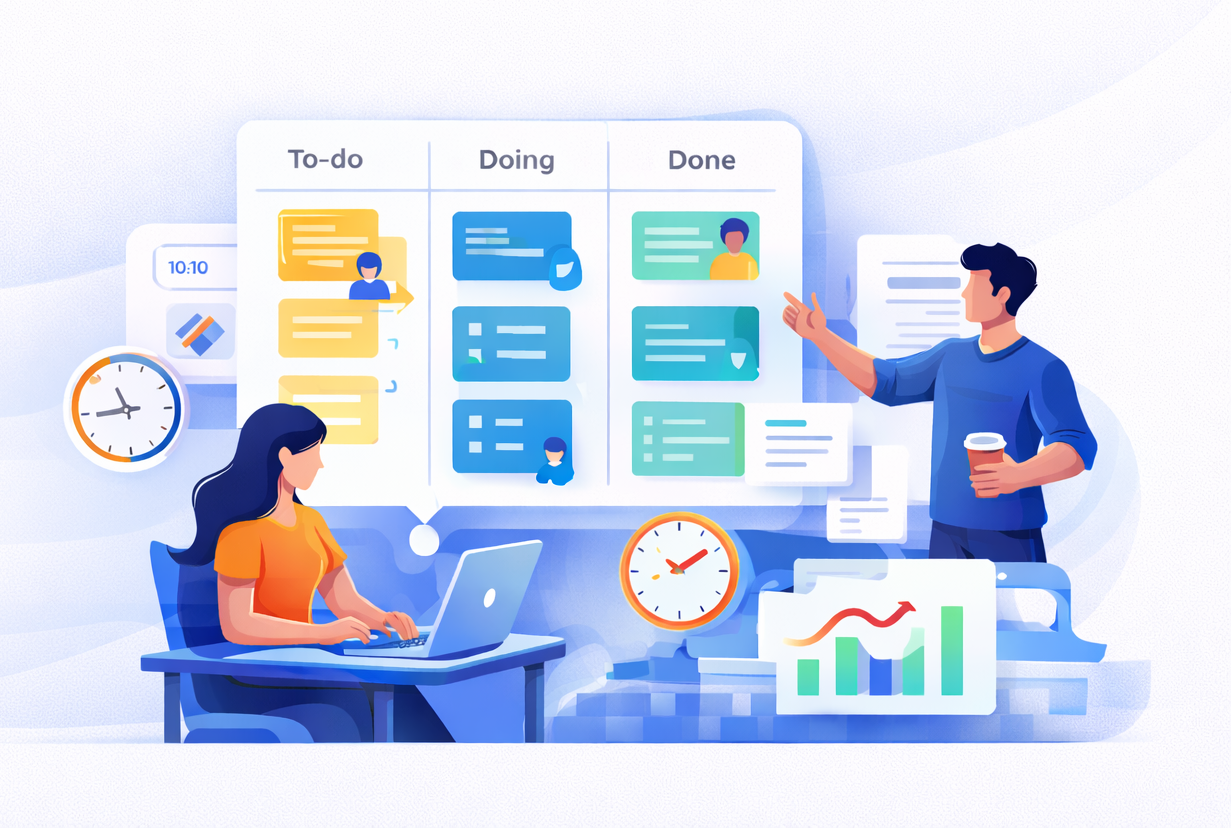
    Kanban boards that make work visible instantly
    What’s in progress, what’s next, what’s blocked, at a glance. No setup marathon. No training session required.

    Built-in timesheets that sit alongside your tasks
    This is the part most startup tools ignore. Tracking time shouldn’t mean switching tools, rebuilding context, or dreading Friday afternoon catch-ups.

    It matters more than founders expect, especially when you’re billing clients, preparing for audits, or making an R&D tax claim. Skarya gives you a clean, automatic record of where time actually went, without adding another process to maintain.

    No admin overhead. No bloat. Just the clarity a small team needs to stay focused and move fast.

    Start Simple. Scale When You’re Ready.

    The best project management system for a startup is the one that gets out of the way.

    Enterprise-level complexity can wait. Execution can’t.

    Set up your first Skarya board in 30 seconds and get your team’s focus back where it belongs.

    Try Skarya free →

  • Kanban vs Gantt vs List View in Project Management: Which Is Best for Your Team?

    Kanban vs Gantt vs List View in Project Management: Which Is Best for Your Team?

    The Context Switch Tax Is Real. And It’s Stealing Your Mornings.

    It starts the same way every day.

    You open a spreadsheet.
    Then a board.
    Then a timeline.
    Then Slack pings. Again.

    You click, scroll, search, squint, re-click, and somehow you’re ten minutes deep… and still not sure what the team is actually doing.

    That’s the Context Switch Tax.

    Not the fancy productivity kind. The annoying kind. The kind that makes your brain feel like a browser with 37 tabs open and one of them is playing music but you can’t find which one.

    Most teams don’t need “more tools.” They need fewer places where work can hide.

    And here’s the part that trips people up. Teams don’t switch views because they love variety. They switch because each view answers a different question.

    List view tells you what exists.
    Kanban tells you what’s moving.
    Gantt tells you what’s going to slip.

    The problem is most software treats those views like three different worlds. So you end up doing manual copy-paste therapy to keep them aligned.

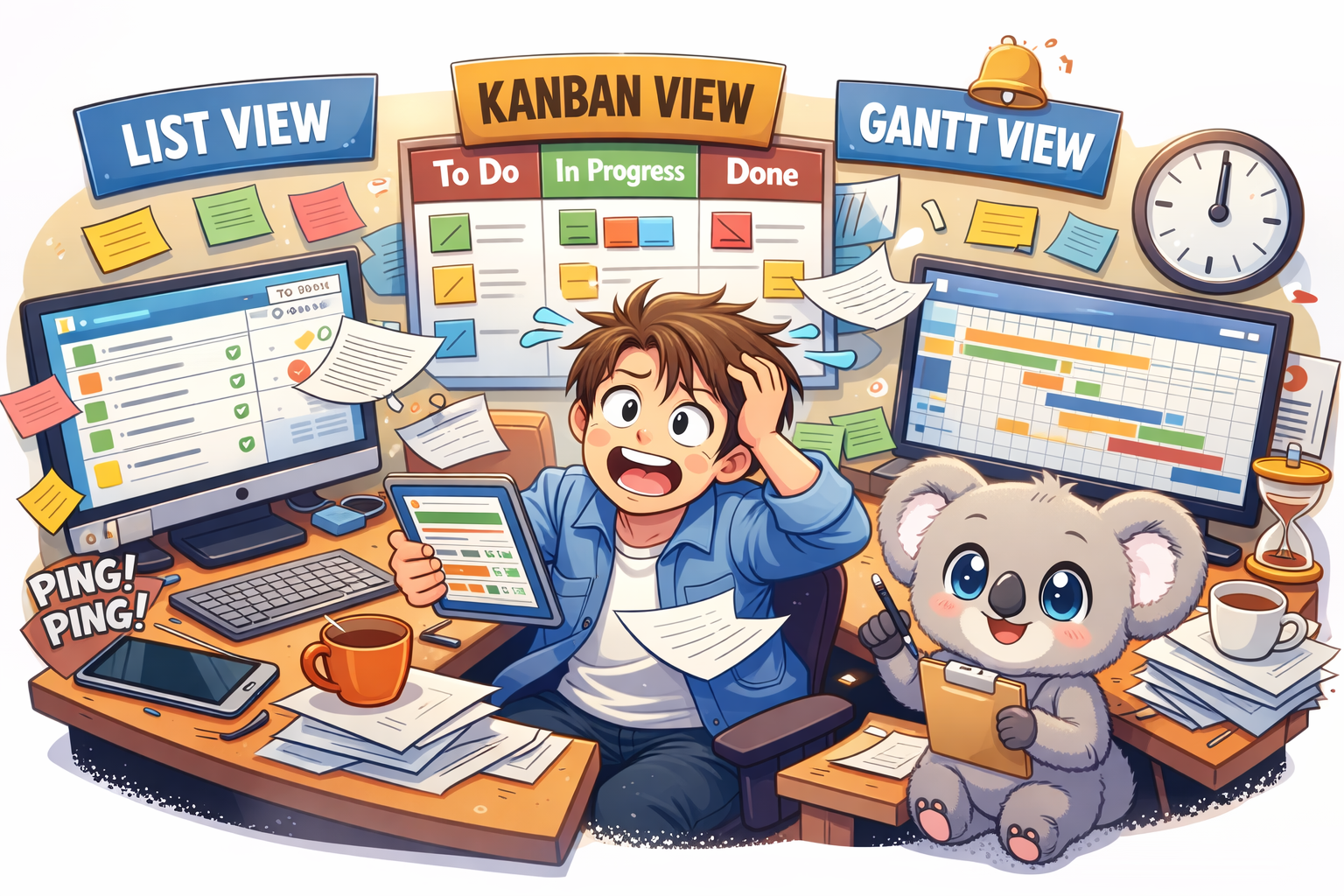
    That’s why Skarya.ai exists. It gives you List, Kanban, and Gantt in one place, all looking at the same live work. No weird syncing. No “wait why is this different here?”

    And Kobi is right there with you, doing the boring parts you don’t want to do.

    Let’s break it down.

    List View in Project Management: The “Get Your Head Straight” View

    What It is

    List view is the simplest format. Rows. Columns. Owners. Dates. Status.

    It’s not glamorous. It’s necessary.

    It’s where tasks should land when they first show up. New client request. Bug report. Random “can you do this today?” message from someone who doesn’t understand your calendar.

    If your system doesn’t have a strong list layer, everything else turns into noise.

    When It Works Best

    List view is best for planning and cleanup.

    It’s the view you open when you’re trying to answer questions like:
    What’s overdue?
    What’s unassigned?
    What’s been sitting there for two weeks pretending it’s “in progress”?

    It’s also where you do the real work of project management: taking messy requests and turning them into something a team can actually execute.

    How Kobi Helps

    In Skarya’s List view, you can type a rough task title and move on.

    Kobi doesn’t.

    Kobi fills in the annoying stuff. The description. The acceptance criteria. The “what does done look like” part that everyone forgets until QA screams.

    So instead of writing a mini essay for every task, you write the title, and Kobi drafts the rest like a teammate who actually pays attention.


    Kanban View in Project Management: The “What’s Stuck?” View

    What It is

    Kanban is the board. Cards moving through columns like:
    To Do
    In Progress
    Review
    Done

    It’s the view teams live in day to day because it tells the truth fast.

    You can see work moving. Or not moving. Which is usually the real story.

    When It Works Best

    Kanban is best when flow matters more than deadlines.

    If your daily standup sounds like:
    “What’s blocked?”
    “Who’s waiting on approval?”
    “Why is review a graveyard again?”

    You need a board.

    Kanban is also great for handoffs. Designer finishes, dev starts. Dev finishes, QA starts. QA finishes, launch starts. It makes those transitions visible so work doesn’t rot in someone’s private checklist.

    And yes, it also exposes the uncomfortable stuff.

    If your Review column has 14 cards and Done has two, you don’t have a productivity problem. You have a bottleneck problem.

    How Kobi Helps

    Boards get messy when people don’t update context.

    Kobi fixes that.

    You can ask Kobi something like:
    “What’s blocking Review this week?”

    And Kobi will look across the cards, pull the patterns, and give you a clean summary you can paste straight into standup notes.

    No manual digging. No detective work. No opening every card like you’re searching for clues in a crime scene.

    Gantt View in Project Management: The “Stakeholders Want a Screenshot” View

    What It Is

    Gantt view is the timeline. Tasks stretched across dates. Dependencies connected with lines.

    It’s what you use when timing actually matters, and one delay can ruin the rest of the plan.

    Stakeholders love Gantt charts because they want a timeline they can screenshot for a slide deck. That’s not an insult. It’s just how reporting works.

    When It Works Best

    Gantt is best when deadlines and dependencies are load-bearing.

    If one task slips and three others tumble behind it, you need to see that domino effect early, not two days before launch.

    It’s also the clearest way to answer:
    Are we still on track?

    Not with vibes. With dates.

    How Kobi Helps

    Here’s the thing about timelines.

    They go stale. Fast.

    Someone moves a deadline. Someone forgets to update dependencies. Suddenly your timeline is a lie, and everyone’s making decisions based on the lie.

    In Skarya, when a date shifts, Kobi does the annoying maintenance work.

    Kobi recalculates downstream dependencies and alerts the people who are affected.

    Not in a dramatic way. Just a helpful “heads up, this change impacts you” way. Like the teammate who actually updates the plan instead of saying “yeah I’ll do it later.”

    Kanban vs Gantt vs List View: The Quick Comparison

    List ViewKanban ViewGantt View
    ComplexityLowMediumHigh
    Best forPlanning, intake cleanupDaily executionDeadlines, dependencies
    Main Question It AnswersWhat exists?What’s moving?What’s slipping?
    How It FailsTurns into a graveyardHides timeline riskGoes stale
    What Kobi DoesDrafts the task properlySummarizes blockersUpdates dependencies and alerts people

    So Which View Should Your Team Use?

    Don’t pick one.

    That’s the trap.

    If you only use List view, execution turns into a blur.
    If you only use Kanban, deadlines sneak up on you.
    If you only use Gantt, the plan becomes a museum exhibit.

    Here’s what usually works:
    List view to collect and shape work
    Kanban to run the day
    Gantt to keep the bigger promise

    And the real win is when those three views stay synced without you babysitting them.

    The Skarya Difference: One Set of Work, Three Ways to See It

    Most tools technically offer multiple views.

    But they don’t really behave like one system. You update a task in one place and forget to update it somewhere else, and now your team has three versions of reality.

    Skarya doesn’t do that.

    Everything is one live data layer. You’re not switching tools. You’re switching lenses.

    Change a date in Gantt, it updates in List.
    Move a card to Done in Kanban, it updates the timeline.
    Everything stays aligned because it’s the same work underneath.

    And intake isn’t a mess either.

    Skarya’s request forms capture the details upfront. No vague Slack messages. No “can you remind me what you meant” follow-ups.

    When a form comes in, Kobi turns it into real work. A structured task. The right owner. The right place on the board. A timeline if a deadline exists.

    So the work shows up ready to run, not ready to be rewritten.

    Want Fewer Tabs and More Shipping?

    If your team is still juggling spreadsheets, boards, and timelines across different tools, you’re paying the Context Switch Tax every single day.

    Skarya.ai pulls it into one place. List, Kanban, and Gantt. Same work. Different view.

    And Kobi handles the annoying bits so you don’t have to.

    Join the team at Skarya.ai and feel what it’s like when work stops hiding.

  • Why Growing Small Businesses Fail at Workflow Management (And How to Fix It Without Enterprise Software)

    Why Growing Small Businesses Fail at Workflow Management (And How to Fix It Without Enterprise Software)


    Most small teams do not need heavier tools. They need clearer ones. Here is what is actually breaking your operations and what a smarter approach looks like.

    You hired good people. You are putting in the hours. And somehow, things keep slipping through the cracks.

    A task nobody owned.
    An approval waiting on someone who did not know they were the someone.
    A client update buried in a thread.
    A meeting called because nobody could see what was actually happening.

    This is not a people problem. It is a workflow management problem. It is also one of the most common reasons growing small businesses and startups plateau before they scale.

    Over time, this kind of friction does not just slow teams down. It quietly erodes trust, focus, and momentum.

    The good news is that it is fixable. You do not need a six figure enterprise platform or a dedicated operations team to do it.

    Skarya.ai is built for exactly this moment.

    The Real Reason Small Business Workflows Break Down

    Most articles about workflow management talk about processes. The real issue is usually coordination. It is the invisible overhead of figuring out who is doing what, when, and why.

    As teams grow from five to fifteen to thirty people, something shifts. Communication that used to be effortless becomes effortful. The shared mental model starts to fragment. Informal systems that worked fine early on begin to fail as the team grows.

    Here is what that looks like in practice.

    Tasks live in someone’s inbox and remain invisible to everyone else.
    Quick questions interrupt deep work multiple times a day.
    Nobody knows who owns the next step on a project.
    Updates require chasing through messages, emails, and meetings.
    New hires take weeks to understand how work actually flows.

    None of this is about effort. It is about operational friction. Left unchecked, it compounds until managers spend more time coordinating than leading.

    Why Most Workflow Tools Make This Worse, Not Better

    Most workflow software was designed to solve these problems. For small businesses, many of these tools introduce a new one.

    They are built for teams with dedicated administrators, long onboarding cycles, and time to configure every detail. Most real teams do not look like that.

    They move fast. They juggle clients. They make decisions with incomplete information most days.

    When a tool becomes heavy, teams do not become more productive. They become reactive. People stop trusting the system. They keep parallel notes just in case. Updates drift back into messages. Leaders add more meetings to compensate.

    The result is a tool that creates more overhead instead of removing it.

    The real question is not which enterprise workflow platform to buy.
    The real question is what your team actually needs to stay aligned, move fast, and stop dropping work.

    What Good Small Business Workflow Management Actually Looks Like

    Enterprise workflow is not a company size category. It is a quality standard. Every business deserves it, regardless of headcount.

    At its core, good workflow management means this.

    Every task has a clear owner and a deadline.
    Requests come through one consistent channel.
    Progress is visible without asking.
    Approvals move forward without stalling.
    New team members understand how work flows within their first week.
    Leaders spend time making decisions instead of collecting updates.

    That is it. Clarity that scales. Not complexity.

    The best workflow systems feel less like software and more like finally being able to focus again.

    Four Signs Your Team Has Outgrown Its Current System

    You do not need to wait until things completely break. These signals usually appear earlier.

    You hold meetings just to find out what is happening

    Status meetings often exist because work is invisible. When progress cannot be seen by default, synchronous check ins fill the gap at the cost of focus and momentum.

    The same tasks fall through the cracks repeatedly

    If something slips once, it is human error. If the same type of task keeps slipping, it is a system problem.
    Systems should fail loudly, not silently.

    Onboarding new hires takes longer than it should

    When processes live in people’s heads instead of a shared system, every new hire has to reverse engineer how work gets done. That costs time, confidence, and quality.

    Work is spread across more than two tools

    Tasks in email. Updates in chat. Approvals in spreadsheets. Deadlines in calendars.
    The more fragmented the system, the higher the coordination cost.

    How Skarya.ai Approaches This Differently

    Skarya.ai is a work management platform built specifically for startups, small businesses, and growing teams. It is not adapted from an enterprise tool. It is designed for how real teams operate.

    That means.

    Simple adoption without training programs or dedicated administrators.
    Built for messy workdays where priorities shift and people are unavailable.
    Radical transparency so anyone can see what is happening and what comes next.
    AI powered clarity that eliminates status chasing and manual reporting.

    The result is simple. Fewer interruptions. Fewer meetings. Less time spent wondering where things stand.

    Your Team Deserves Workflow That Works

    Growing a business is hard enough without fighting your own systems.

    The right workflow management approach does not add more process. It removes the invisible friction already slowing your team down.

    If your team is moving faster than your current tools can handle, Skarya.ai was built for exactly where you are right now.

    Start your free trial at skarya.ai.
    No credit card required. Set up your workspace in minutes.


    Frequently Asked Questions

    What is workflow management for small businesses?

    Workflow management is the practice of creating clear and repeatable ways work gets assigned, tracked, and completed. It helps teams move faster with less friction and fewer dropped tasks.

    How is Skarya different from tools like Asana or Monday

    Skarya is built for teams that need power without complexity. Many popular tools are designed for larger organizations with dedicated operations resources. Skarya works out of the box and is designed for immediate adoption.

    When does a startup need a workflow management system?

    Usually earlier than expected. Often around eight to twelve people, when informal coordination starts to break down. Missed tasks, too many status meetings, and slow onboarding are common signs

    Is Skarya.ai free to try

    Yes. Skarya offers a free trial so teams can experience the platform before committing. No credit card is required.

  • How to Track Billable Hours Software for IT Consulting Firms (Without Leaking Revenue)

    How to Track Billable Hours Software for IT Consulting Firms (Without Leaking Revenue)

    We lose money every month.
    We don’t lose it because clients hate our work. We lose it because billable effort slips out of view between delivery and invoicing, and how to track billable hours software becomes a profitability problem, not an admin task.
    That loss has a name.

    Revenue Leakage shows up when the team does real work and nobody captures it cleanly enough to bill.
    We don’t notice it during the week because everyone stays busy, tickets move, and customers stay calm. Then invoices go out light.
    The leak stays quiet until the year-end numbers make it loud.

    Revenue Leakage rarely comes from “bad discipline”

    People blame consultants first.
    We send reminders, add policies, and chase timesheets harder, and the leak still continues because the workflow creates the leak. Manual tracking forces people to do two separate jobs: solve the problem, then recreate the work later in a different tool.
    Busy weeks punish that design.

    A real week includes tiny work that matters.
    A 12-minute troubleshooting call. A “quick” permissions fix. A follow-up email that turns into a 40-minute write-up because the client asks for screenshots and a rationale. That work counts.
    Teams forget it first.

    Utilization Rates expose the truth

    We should track Utilization Rates like we track cashflow.
    Utilization tells us how much of available time turns into billable time, and it surfaces gaps that “we feel busy” will never reveal. Most firms don’t struggle because people sit idle; they struggle because billable work never reaches the invoice.
    That’s the difference.

    A simple formula keeps it honest

    Utilization Rate = Billable hours ÷ Available hours.
    Available hours should reflect reality, not fantasy, so we account for leave, internal meetings, and required admin time instead of pretending everyone bills forty hours weekly. The point isn’t to pressure people; the point is to find where the system loses billable time.
    Leaders can’t fix what they can’t see.

    The Friday Afternoon Scramble

    Friday afternoons turn into reconstruction.
    A consultant opens the timesheet tool and sees gaps, then they try to rebuild the week from memory while Slack pings, tickets reopen, and someone asks for “one last thing” before Monday.
    That scramble feels normal until you add up the cost.

    Calendars don’t tell the full story.
    Slack shows fragments. Ticket updates miss the work done in calls, notes, and thinking time. So the team guesses, rounds down, and skips anything that feels hard to defend.
    Revenue Leakage grows in those rounded corners.

    This isn’t billing.
    This is archaeology.

    Why most billable time tools fail in consulting firms

    Spreadsheets fail because they wait for perfect behavior.
    Standalone timers fail because they depend on clicks, habits, and clean work sessions, and consulting work rarely stays clean. A day filled with context switching breaks timers fast.
    PSA-style systems often fail for a different reason.

    Fragmentation breaks capture.
    Tasks live in one module, documentation sits elsewhere, time entries sit somewhere else again, and consultants must bridge the gaps manually. People skip bridges when the queue fills up.
    The leak returns.

    The pattern stays consistent.
    When time tracking lives outside execution, teams forget it.
    When time tracking lives inside execution, teams complete it naturally.

    What to look for in billable-hours software

    We should stop shopping for “time tracking.”
    We should shop for a system that makes time capture a byproduct of completing work, not a separate chore. That design reduces leakage without turning managers into time police.
    The checklist stays simple.

    Look for software that does these things well

    Task-linked time by default.
    The system should attach time to the exact task, ticket, or deliverable so nothing ends up floating without context.

    Documentation next to the time.
    Notes, outcomes, and files should sit beside the billable entry so invoices carry proof, not vague descriptions.

    Fast capture during the day.
    The workflow should prompt capture in the moment, not at the end of the week when memory collapses.

    Review and approval that takes minutes.
    Team leads should spot gaps quickly, resolve them quickly, and lock time with a clear trail.

    Client-ready exports.
    The firm should produce clean, defensible breakdowns without rewriting everything for the invoice.

    A tool can’t rely on willpower.
    Consulting work moves too fast for that.
    The system must carry the load.

    The WorkOS approach: capture time as work happens

    A WorkOS changes the sequence.
    Instead of “do work, then log time,” the system captures time while people execute tasks, update statuses, write notes, and ship deliverables. Time stops living as a separate obligation.
    That shift changes behavior.

    Execution already creates signals.
    Work leaves footprints: task updates, comments, documentation edits, status changes, and file attachments. A WorkOS uses those footprints to keep time connected to the work record.
    That connection reduces forgotten minutes.

    Where Skarya.ai fits

    Skarya.ai follows this WorkOS model.
    It keeps the task, the documentation, and the billable hour connected inside one active workspace, so the work record and the time record stay tied together as the job moves forward. That reduces the “where did that go?” gap that causes leakage.
    Consultants focus on delivery.

    We don’t need more tabs.
    We need fewer disconnects.
    That’s the point.

    A practical way to think about it helps.
    Instead of asking “How many hours did we spend?” and accepting guesses, we ask “What did we produce during this time?” and we pull the answer straight from the work record.
    Clients respect that clarity.

    A simple rollout plan we can run next week

    We don’t need a massive migration.
    We need one workflow that stops leaking.
    One week is enough to see the pattern.

    Pick one high-volume workflow

    Access requests, onboarding, monthly maintenance, urgent support, vendor reviews, or anything that triggers repeat work.

    Set three rules

    Every client request becomes a task.
    Every task gets time.
    Every billable time entry includes a note or outcome.

    Run it for seven days

    Review daily for missing time on active tasks.
    Review Friday for gaps before the scramble begins.
    Fix the system friction, not the people.

    The team will feel the difference quickly.
    Less chasing. More confidence.
    Better invoices.

    Next Step

    Pick one client and run a “no orphan work” week.
    No task without time, and no time without a task and a short note.
    If invoices grow without anyone working longer hours, the firm just found its leak.

  • Work Operating System (WorkOS): What It Actually Means for IT and Ops Teams in 2026

    Work Operating System (WorkOS): What It Actually Means for IT and Ops Teams in 2026

    Work doesn’t fail in dramatic ways.
    It fails quietly, through a request that slips through the cracks, a handoff nobody confirmed, or a decision trapped in Slack that never reaches the ticket. A Work Operating System (WorkOS) fixes that by giving teams one place where requests enter, get assigned, stay tracked, and close without the constant “where did that go?” moments that trigger outages, missed deadlines, or frustrated customers.
    That problem shows up every week in IT and operations.

    What a Work Operating System actually is

    A WorkOS acts as the control layer for how work moves through an organization, from the moment a request arrives to the moment the team resolves it.
    It standardizes how work enters, routes it to the right owner, keeps progress visible to the people who need it, and keeps the relevant context attached to the work as it moves. That stops teams from rebuilding the story every time someone asks for an update.
    A to-do list cannot do that.

    WorkOS definition: A Work Operating System standardizes intake, assigns ownership, tracks work through workflow states, and keeps context attached until closure.
    That definition draws a hard line between “a place to list tasks” and “a system that runs execution.”
    The difference matters when volume spikes.

    A WorkOS doesn’t try to replace specialist tools.
    It closes the gaps between people, channels, and decisions where work usually disappears.
    Those gaps hide cost.

    Why the term WorkOS started making sense

    Channel sprawl created the need.
    Requests came through email, then Slack, then a spreadsheet someone shared, then a form the team only half-used, and soon a dedicated person spent hours each week translating “things people want” into “assigned work.” That translation work acts like a tax, and it scales badly.
    Ops teams feel it before anyone else.

    Invisible dependencies create the second pressure point.
    One approval sitting in an inbox can block five downstream tasks, and most teams notice only when a deadline hits and a senior person starts digging. A WorkOS surfaces blockers early by making states, owners, and dependencies visible in the same place work lives.
    That prevents late surprises.

    What a real WorkOS has to include

    Not every tool that uses the label earns it.
    A WorkOS needs specific capabilities that match how work actually arrives and how teams actually execute.
    Anything less becomes another queue.

    Structured intake

    Intake decides the quality of everything downstream.
    When requests arrive as vague Slack messages or two-sentence emails, the team burns the first part of each ticket just trying to interpret what someone wants. A WorkOS uses consistent intake forms, required fields, and request types so the team starts executing instead of interrogating.
    Clarity at the door prevents churn inside the queue.

    Clear ownership and routing

    Unclear ownership kills work fast.
    When nobody assigns a named owner, everyone assumes someone else picked it up and the request sits until a customer escalates. A WorkOS assigns an owner at creation and routes by rules such as type, priority, team, and capacity so the first sort happens automatically.
    Ownership removes limbo.

    Workflow states and visible status

    Status should not require meetings.
    Teams lose hours each week chasing updates across threads, channels, and half-remembered conversations, then they repeat the same answer to five different people. A WorkOS shows work by state, owner, due date, and SLA in one view, so anyone can answer “what’s happening?” without interrupting the delivery team.
    Visibility protects focus.

    Documentation connected to execution

    SOPs help only when people use them.
    Teams write decent process docs, then they bury them in a folder, and the work runs on memory until someone makes the same mistake again. A WorkOS links SOPs, templates, and decision logs directly to the workflows and tasks that rely on them, so the right process appears when the work starts.
    That cuts rework.

    Flow measurement

    Teams improve what they can see.
    Time-to-assign, time-in-state, rework rates, and throughput reveal where the operating model creates friction, not where people “work hard.” A WorkOS tracks these signals so leaders can remove bottlenecks and tighten handoffs with evidence instead of opinion.
    Metrics should expose ambiguity.

    Two failures that happen in the first week

    Tool rollout looks easy on day one.
    Behavior tests the system on day two.
    Week one tells the truth.

    The old inbox becomes the shadow system

    Email feels familiar.
    Someone forwards a request “just to be safe,” another person posts an update in Slack, and within a week the WorkOS holds half the story while inboxes and threads hold the other half. Nobody can audit the full chain, and the team argues about which source counts.
    Shadow systems spread fast.

    Leadership needs one non-negotiable rule.
    If a request doesn’t come through intake, the team does not treat it as real work. Redirect every stray request into the system until the habit locks in.
    That boundary protects everything else.

    Everything piles up in triage

    Triage feels responsible.
    A team creates a “Needs Review” bucket, then a senior person becomes the only one who can move items out of it, and by Friday the bucket turns into a backlog that hides aging work. That queue becomes the bottleneck, not the work itself.
    Queues love ambiguity.

    A WorkOS should assign ownership at creation, not after deliberation.
    Routing rules should handle the first sort automatically, and human review should handle exceptions, not every item.
    That keeps flow moving.

    WorkOS vs project management software

    Project management tools help teams plan and deliver defined projects.
    They handle timelines, milestones, and work inside a known scope.
    They perform well when the work looks predictable.

    A WorkOS handles the messier stream.
    It manages requests, approvals, and handoffs that arrive continuously and refuse to fit neatly into project plans, which makes it a better fit for service teams, ops teams, and internal support functions.
    That scope difference changes the design.

    A simple test works every time.
    How many steps does it take for a new, messy request to become assigned work with the right context and a clear due date?
    If the answer feels long, the operating model needs a control layer.

    Where Skarya fits into the WorkOS idea

    Skarya serves as an example of the WorkOS approach.
    It brings intake, workflow routing, documentation alongside execution, visibility across states, and time capture into one work layer so teams reduce the number of places where requests can hide. Many ops teams choose this pattern because it makes accountability and context hard to lose once the work enters the system.
    Rules still matter more than any interface.

    Teams can adopt the WorkOS model with any platform if leadership holds the line.
    Side channels and vague ownership will pull work back into chaos unless the team enforces one intake path and one place where updates live.
    The system needs boundaries.

    Start with one workflow

    Ambition breaks rollouts.
    A team that tries to rebuild everything at once usually rebuilds nothing well.
    One workflow earns trust.

    A single painful workflow makes the best starting point.
    Onboarding, access requests, IT approvals, vendor reviews, and procurement all work because they generate repeat volume and cross-team handoffs. Define one intake path, assign one owner per request, and pick one place where updates live, then run that way for seven days without exceptions.
    Seven days reveals whether the model works.

  • How to Manage Remote Team Tasks Without Losing Visibility

    How to Manage Remote Team Tasks Without Losing Visibility


    Remote work didn’t make teams less productive. It made weak systems visible.

    I’ve seen remote teams deliver strong outcomes and still feel behind. Not because people weren’t working, but because no one could clearly see how work was moving from start to finish. Tasks existed everywhere, yet clarity existed nowhere.

    That gap is what makes managing remote team tasks feel harder than it should be.

    When work is spread across chats, documents, personal notes, and partially used boards, progress becomes difficult to trust. Managers fill the gaps with meetings and follow-ups. Teams respond by working harder instead of working clearer.

    Why Managing Remote Team Tasks Feels So Complex

    Managing tasks in a remote team isn’t about assigning more work. It’s about replacing the visibility that physical offices once provided.

    In co-located teams, context flows naturally. You overhear updates, notice momentum, and resolve blockers quickly. Remote teams don’t get that advantage. Without a shared system, task clarity slowly breaks down.

    Ownership becomes vague. Deadlines feel flexible. Progress depends on who speaks up rather than what is actually done. Over time, teams confuse motion with progress.

    What Remote Task Management Actually Requires

    Remote teams need a structure that works quietly in the background.

    Clear ownership that removes ambiguity

    Every task needs a visible owner who is accountable from start to finish. When responsibility is shared vaguely across a group, work stalls and follow-ups multiply. Clear ownership removes hesitation and builds momentum.

    Timelines that reflect real progress

    Static deadlines don’t survive remote work. Tasks evolve, dependencies shift, and priorities change. Timelines need to adjust as work moves, not remain frozen reminders that teams stop trusting.

    Visibility without constant check-ins

    Remote teams shouldn’t rely on meetings to understand progress. When task status is visible by default, updates become unnecessary. Clarity replaces interruption.

    Why Traditional Task Tools Fall Short for Remote Teams

    Most task management tools were built for teams that share offices, time zones, and daily touchpoints. They assume missing context will be filled in through conversation.

    Remote teams don’t have that safety net.

    Tasks without embedded context create confusion. Updates scattered across tools create misalignment. Managers spend time chasing clarity instead of guiding outcomes. The problem isn’t discipline or effort. The problem is that the system isn’t designed for remote execution.

    How to Manage Remote Team Tasks With Confidence

    Strong remote teams don’t communicate more. They structure work better.

    Centralized tasks with full context

    When tasks live alongside their documents, discussions, and decisions, teams don’t lose time searching for information. Work becomes easier to understand and easier to move forward.

    Progress that speaks for itself

    When task status reflects reality, teams don’t need to explain themselves. Managers don’t need to ask. Trust builds naturally because progress is visible, not reported.

    Where Skarya Fits In

    Skarya was built for teams that need clarity without overhead.

    Instead of managing tasks in one tool, documents in another, and conversations somewhere else, remote teams use Skarya as a single workspace where work stays connected. Tasks carry their context. Timelines stay aligned. Visibility is shared across the team without extra effort.

    The AI assistant helps convert ideas, notes, or conversations into structured tasks, which matters when teams don’t share the same hours or location.

    The focus isn’t control. It’s understanding.

    Managing Remote Teams Without Micromanagement

    One common concern with remote task management is the fear of surveillance. Teams worry that more structure means more pressure.

    In reality, the opposite happens.

    When progress is visible, managers stop chasing updates. When ownership is clear, trust increases. When systems work, people feel less need to prove they are working.

    Good task management reduces noise. It doesn’t create it.

    Remote Teams Don’t Need More Tools, They Need Better Systems

    Remote work is no longer an experiment. Distributed teams are now the norm.

    The teams that succeed aren’t the ones stacking tools. They are the ones designing systems that make work easy to see, easy to trust, and easy to move forward.

    If managing remote team tasks feels heavier than the work itself, the issue isn’t your people.

    It’s the system behind the work.

    And that’s exactly the problem Skarya exists to solve.

  • Marketing Task Management That Actually Works

    Marketing Task Management That Actually Works

    There is a specific kind of pressure marketing teams experience that has nothing to do with talent.

    It shows up when work is happening everywhere, but progress is difficult to see. A designer is waiting on copy. Copy is waiting on approvals. Approvals are sitting in a thread. Someone updated a spreadsheet, but nobody opened it. A deadline shifted, but only two people know. Then, a few days before launch, the team discovers the truth all at once.

    Not that people are not working hard.
    That the system is not showing the work clearly enough.

    That is why project management for marketing teams is not about adding more process. It is about building an operating rhythm where creative work moves smoothly, ownership stays clear, and deadlines remain predictable.

    This article outlines a lightweight, intelligent way to organise marketing tasks and deadlines, while keeping execution fast and the experience calm. You will also see where Skarya.ai fits naturally, without forcing your team into rigidity.

    Why marketing workflows break, even for good teams

    Marketing sits at the intersection of creative iteration and operational precision.

    Campaigns run in parallel. Feedback loops are constant. Timelines are fixed. Stakeholders multiply quickly. Most deliverables require collaboration across roles and functions.

    When the structure is weak, work becomes invisible. That invisibility creates three problems that quietly compound.

    Ownership blurs. People assume someone else is driving the next step.
    Deadlines become optimistic guesses instead of reliable commitments.
    Updates become meetings because the system cannot answer simple questions on its own.

    A good marketing task system is not a control mechanism. It is a visibility mechanism.

    Start with deliverables, not themes

    A common failure mode is treating a campaign like one giant item.

    Launch Q2 campaign.
    Website refresh.
    Product announcement.

    These are themes, not executable work. Themes create alignment, but deliverables create motion.

    Deliverables are specific, measurable, and completable. For example.

    Landing page copy version one
    Landing page design desktop and mobile
    Email sequence three emails
    Paid creative set six variations
    Social content pack five posts
    Launch day checklist
    Performance reporting and insights

    Once you define deliverables, you remove ambiguity. Ambiguity is where deadlines go to die.

    In Skarya.ai, teams typically set this up as a campaign board where each deliverable is a task card with an owner, due date, status, and attached context. It becomes the campaign’s source of truth, not another place to check.

    Use a workflow that matches how marketing actually moves

    Most marketing work follows a familiar sequence, even when the creative output changes every time.

    Idea becomes draft.
    Draft enters review.
    Review triggers revisions.
    Revisions return for approval.
    Approval unlocks scheduling.
    Scheduling leads to publish.

    If your workflow does not reflect this reality, your team improvises the process in chat. Feedback fragments across channels, versions multiply, and approvals arrive late.

    A clean workflow does not need to be complicated. It needs to be accurate.

    Backlog
    Planned
    In progress
    In review
    Needs changes
    Approved
    Scheduled
    Live

    This structure makes handoffs visible and bottlenecks obvious early.

    Skarya.ai supports this cleanly because tasks do not just hold a title and a due date. They hold the context needed to move work forward, including discussions, documents, and workflow status in one place.

    Treat deadlines as a system, not a date

    Marketing deadlines slip most often because they are built on optimism rather than workflow.

    Teams work backwards from launch day but fail to allocate time for iteration and approval. The timeline looks fine until real feedback arrives, which it always does.

    A more reliable approach is to acknowledge the three time realities behind every deliverable.

    Creation time for drafting and production
    Iteration time for feedback and revisions
    Approval time for final sign off

    If you do not plan for the second and third, you do not have a deadline. You have a hope.

    A practical standard many high-performing teams use is this.

    Deliverables should enter review at least forty-eight hours before launch.
    Final approvals should be completed at least twenty-four hours before launch.

    Those buffers turn a fragile timeline into a resilient one.

    Because Skarya.ai keeps due dates and workflow status together, it becomes easier to spot risk early. If something is still in progress when it should be in review, you can intervene before the deadline becomes an emergency.

    Fix approvals with one rule

    Approvals are where marketing timelines quietly fail.

    Not because people are slow, but because approval ownership is unclear, feedback arrives in multiple places, and nobody knows what is mandatory versus optional.

    You do not need more meetings. You need a standard.

    Every deliverable should have one final approver, one approval deadline, and one place where feedback and files live.

    That single rule removes most approval chaos immediately.

    Skarya.ai makes this feel natural because comments, files, and decisions can live inside the deliverable task. Instead of approvals being scattered across threads and inboxes, the task becomes the record.

    Build a weekly execution rhythm

    Fast marketing teams do not feel chaotic. They feel rhythmic.

    They use a light cadence that prevents small blockers from turning into launch week stress.

    Early week planning to confirm what ships and what needs approval
    Midweek bottleneck clearing to unblock reviews and escalate decisions
    End of week closure to capture what shipped and what moved

    This is not bureaucracy. It is an alignment loop that keeps execution smooth.

    When your tasks and workflow are visible, the rhythm becomes shorter and more effective because meetings become decision points rather than status updates.

    Template the repeatable work

    Marketing has more repetition than most teams admit.

    Newsletters repeat. Content cycles repeat. Launches repeat. Reporting repeats. Social posting follows patterns.

    When teams rebuild checklists from scratch, they pay a hidden tax in time and attention. Templates remove that tax.

    Standard deliverable sets
    Standard workflow stages
    Standard review and approval steps
    Standard timing buffers

    In Skarya.ai, templates let you start campaigns with a structure already in place, then customise for each launch.

    What good looks like

    You will feel the difference quickly.

    People stop asking where something stands.
    Deadlines feel predictable rather than surprising.
    Approvals happen inside the flow, not at the end.
    Launch week becomes calmer because risks surface earlier.
    Creative work stays protected from operational chaos.

    The goal is not more tracking. The goal is momentum.

    Why Skarya.ai fits marketing teams naturally

    Many tools “support marketing,” but still force work to be split across multiple places. Tasks in one tool. Docs elsewhere. Approvals in chat. Timelines tracked separately. Reporting in spreadsheets.

    Skarya.ai is designed around a simpler principle.

    A task should contain what the team needs to complete it.

    That means campaign boards for visibility, task management for ownership and deadlines, connected context for drafts and decisions, and workflows that respect how marketing actually moves from idea to publish.

    Marketing does not need more hustle. It needs less friction. When the system makes work visible, ownership clear, and approvals structured, creative momentum stops collapsing under pressure.

  • Why Work Gets Lost Between Tools (And What Actually Fixes It)

    Why Work Gets Lost Between Tools (And What Actually Fixes It)

    A service team lead told me something recently that I haven’t forgotten:

    “We’re not bad at the work. We’re bad at finding where the work went.”

    She wasn’t questioning her team’s talent or effort.

    She was describing the hidden hour that disappears every morning rebuilding context:
    Which doc has the brief? Which task reflects the latest decision? Where did the approval land? Which version is the real one?

    The work is there.
    It’s just everywhere.

    And that’s the problem most service teams are actually wrestling with, whether they label it that way or not.

    The gap isn’t effort. It’s connection.

    Service delivery isn’t a straight line. It’s a loop:

    Request → clarify → execute → review → revise → approve → deliver
    …and then it starts again.

    That loop creates predictable failure points when work is spread across disconnected tools.

    1) Context separates from execution

    The brief lives in a doc. The tasks live on a board. The decision lives in chat.

    Every handoff across that gap adds friction—and invites mistakes. People waste time re-checking, re-explaining, and redoing.

    2) Approvals turn into invisible roadblocks

    Work looks “done” internally, but it isn’t deliverable because it’s waiting on someone.

    And that person often doesn’t even know they’re the blocker.

    When workflow states aren’t clear, delays don’t look like delays—until it’s too late.

    3) Lack of visibility creates meetings

    If the only way to know what’s happening is to ask people, you get status rituals.

    Leaders either guess from incomplete information or get dragged into details. Neither improves delivery. Both slow it down.

    4) Time tracking becomes unreliable

    When time tracking lives outside the work, it becomes an afterthought.

    Inconsistent time data isn’t just annoying, it’s useless for forecasting, resourcing, and profitability.

    Most teams try to solve these problems by adding more tools.
    That usually makes the gaps worse.

    A better approach: rebuild the workflow, not the stack

    The solution isn’t “one more tool.”

    It’s a structure where the parts of delivery stay connected:
    the plan, the tasks, the docs, the approvals, and the visibility.

    Here’s a simple way to build that structure without overwhelming your team.

    The 5-week plan (adoption through relief, not pressure)

    Week 1 — Pick one workflow that repeats

    Don’t migrate everything.

    Choose one delivery loop you run every week:
    client onboarding, content delivery, QA review, weekly reporting—whatever repeats.

    One workflow. Nothing else.

    Week 2 — Define stages and ownership

    Keep it simple and visible:

    To Do → In Progress → Review → Approval → Delivered

    Five stages is enough. The goal is to make work “legible”—so blockers surface early, not at the deadline.

    Week 3 — Attach the documents that power the work

    Bring the brief, SOP, checklist, or requirements into the same workspace as the tasks.

    This is the step most teams skip—and it’s the step that changes handoffs.

    When context lives next to execution, people stop reconstructing and start moving.

    Week 4 — Automate one rule

    Remove one obvious coordination bottleneck.

    Examples:

    • When a task moves to Approval, notify the approver
    • When it’s approved, assign the next owner
    • If something sits in Review for 48 hours, send a reminder

    One rule. Run it for a week. Notice what improves.

    Week 5 — Add time tracking

    Once the workflow is stable and trusted, time tracking becomes natural, not forced.

    Log time against tasks and projects. Keep it lightweight. Make it weekly.

    Now the data becomes usable.

    What a connected system looks like

    Once the workflow is working, the platform you use starts to matter not because of features, but because of what those features enable.

    Connected views (without duplicating work)

    Different roles need different views of the same reality:

    • A board for flow
    • A list for ownership and precision
    • A timeline for planning
    • A dashboard for risk and workload

    A strong system doesn’t force one view. It keeps every view tied to the same underlying work.

    Documentation that behaves like part of delivery

    Plans linked to projects. SOPs attached to recurring work. Decisions documented where execution happens.

    Action items should become tasks without retyping.

    When docs and tasks are connected, handoffs stop breaking.

    Automation that handles coordination (not judgment)

    The best automation isn’t flashy it’s quiet:

    • Assign the next owner when status changes
    • Remind when items stall
    • Generate recurring work on schedule
    • Trigger notifications when approvals are needed

    The difference between a team that tracks work and a team that runs work is often one or two well-placed rules.

    Client collaboration that reduces back-and-forth

    Clients should be able to:

    • See progress without chasing updates
    • Give feedback where it belongs
    • Approve deliverables without email chains

    This protects delivery speed as much as any internal improvement.

    Time tracking that’s built in

    The best time tracking is the kind people actually do because it’s part of the workflow, not an extra chore.

    The metric that matters: operational visibility

    Most status meetings are a workaround for missing visibility.

    When the system is working, you can answer these questions in seconds without asking anyone:

    • What’s blocked right now?
    • What’s at risk this week?
    • Who’s overloaded?
    • Which deliverables are waiting on approval?
    • What’s actually moving?

    When leaders can see clearly, they stop guessing.
    When teams don’t have to constantly explain progress, they stop context-switching to do it.

    That’s not a “feature.”
    That’s what connected work is supposed to feel like.

    A quieter way to build a better system

    If your team is tired of stitching tools together, the next step isn’t more software.

    It’s fewer gaps.

    Skarya.ai is built around this connected workflow model projects, docs, workflows, collaboration, and time are designed to stay linked by default.

    If this way of working resonates, it may be worth exploring what connected delivery looks like in one workspace.