Category: Blog

  • How to Improve Project Profitability: Stop Managing the Margin Wrong

    How to Improve Project Profitability: Stop Managing the Margin Wrong

    Your team is 90% utilised. Timesheets are full. Projects are closing. So why does the margin keep coming in short?

    Because utilisation is the wrong number to watch.

    High utilisation only proves your team is busy. It doesn’t prove they’re making you money. The hours your team logs and the hours that reach an invoice are two different figures. The gap between them is where project profitability bleeds out.

    According to the SPI Research 2024 Professional Services Maturity Benchmark, average billable utilisation across professional services firms fell to 69.3% in 2023, sitting well below the 75% optimal threshold. That figure counts hours logged on billable work. It says nothing about how many of those hours actually reached an invoice. That second number is lower. Significantly lower. For a 10-person team billing at $150/hour, every percentage point below the 75% threshold costs roughly $15,000 in annual revenue. Most teams have no idea which side of that line they are on.

    Stop blaming your pricing model. You have a blind spot. Fixing it starts with understanding exactly where the leak is and why the tools most teams rely on are structurally incapable of catching it in time.

    The Metric Confusion Costing You More Than You Think

    Utilisation and realization sound like the same thing. They’re not, and conflating them is one of the most expensive habits a project business can develop.

    Utilisation: the percentage of a team member’s time spent on billable work. An 87% utilisation rate looks healthy on paper.

    Realization: the percentage of billable hours that actually reach an invoice and get paid. If 10% of those billable hours get absorbed by out-of-scope revisions, written off to keep a client relationship intact, or logged against the wrong code, your realization rate drops to 77%. No one registers it until the reconciliation.

    Most teams obsess over utilisation because it’s easy to pull from a time-tracking tool. Realization requires connecting three separate data points: scope agreed, hours logged, and amounts invoiced. Most teams don’t have that connection built into their day-to-day workflow.

    The industry benchmark for realization in professional services sits between 85% and 95%. Below 80% on a consistent basis, the problem isn’t a lazy team or difficult clients. Your operational systems are letting revenue walk out the door before you’ve had a chance to bill it.

    Four Places Your Margin Is Leaking Right Now

    Scope creep gets blamed for everything. The biggest margin leaks are internal, and they’re happening on projects that look completely under control.

    Unbilled revisions: The client requests a change. The team absorbs it because the relationship matters. No change order is raised because it feels like a small ask. Across eight projects a month, that pattern produces a material write-off with no paper trail.

    Senior staff doing junior work: A senior consultant drafts an update an analyst could write. In the moment, it feels efficient. At billing, it destroys your margin. You’re burning senior-rate costs against mid-level outputs, and your margin model was never built for that.

    Scope agreed in the wrong place: Projects with ambiguous deliverables generate more revision cycles, more internal debate, and more write-downs than projects with tight scope. The damage doesn’t show up at kickoff. It surfaces six weeks in when three stakeholders have three different definitions of done.

    Write-downs that nobody tracks: Most billing teams carry an informal habit of sneaking reductions into an invoice when a project runs long. It keeps the client relationship intact. Write-downs that aren’t tracked systematically become invisible losses that compound month over month. They never get fixed because nobody can see them.

    Spreadsheets are autopsy tools. By the time a monthly finance report lands, the projects are closed, the team has moved on, and the loss is permanent. Any business still relying on end-of-month reconciliation to manage profitability isn’t managing it. It’s documenting failure after the fact.

    Why Your Current Tools Are Built for the Wrong Moment

    The tools most project teams use, time trackers, billing spreadsheets, monthly finance reports, share one design flaw: they record what happened, not what’s happening.

    A time tracker tells you hours were logged. It doesn’t tell you whether those hours are billable, whether they’re within scope, or whether the project is tracking toward a profitable close. A monthly finance report arrives three weeks after the month ends, reporting on projects already closed and margins you can no longer recover.

    By the time a spreadsheet shows you a problem, you have two options: absorb the loss, or have an uncomfortable client conversation. Neither is a good operational outcome.

    Teams running consistent margins aren’t better at post-mortems. They’ve moved visibility from after closeout to during delivery. At any point in an active project, they know whether budget burn is tracking against the original forecast and they act on that information while there’s still time to change the outcome.

    💡  Pro Tip: Before changing any process, run a realization audit on your last five closed projects. Pull hours logged, hours billed, and hours written off. The pattern will immediately tell you whether you have a scope definition problem, a billing process problem, or a resource allocation problem. That distinction determines which fix you actually need.

    How Kobi and the Skarya CFO Dashboard Stop the Bleed In-Flight

    The operational shift that separates teams running 30%+ margins from those perpetually puzzled by the gap: profitability visibility has to live inside the delivery workflow, not in a separate finance tool someone checks at month end.

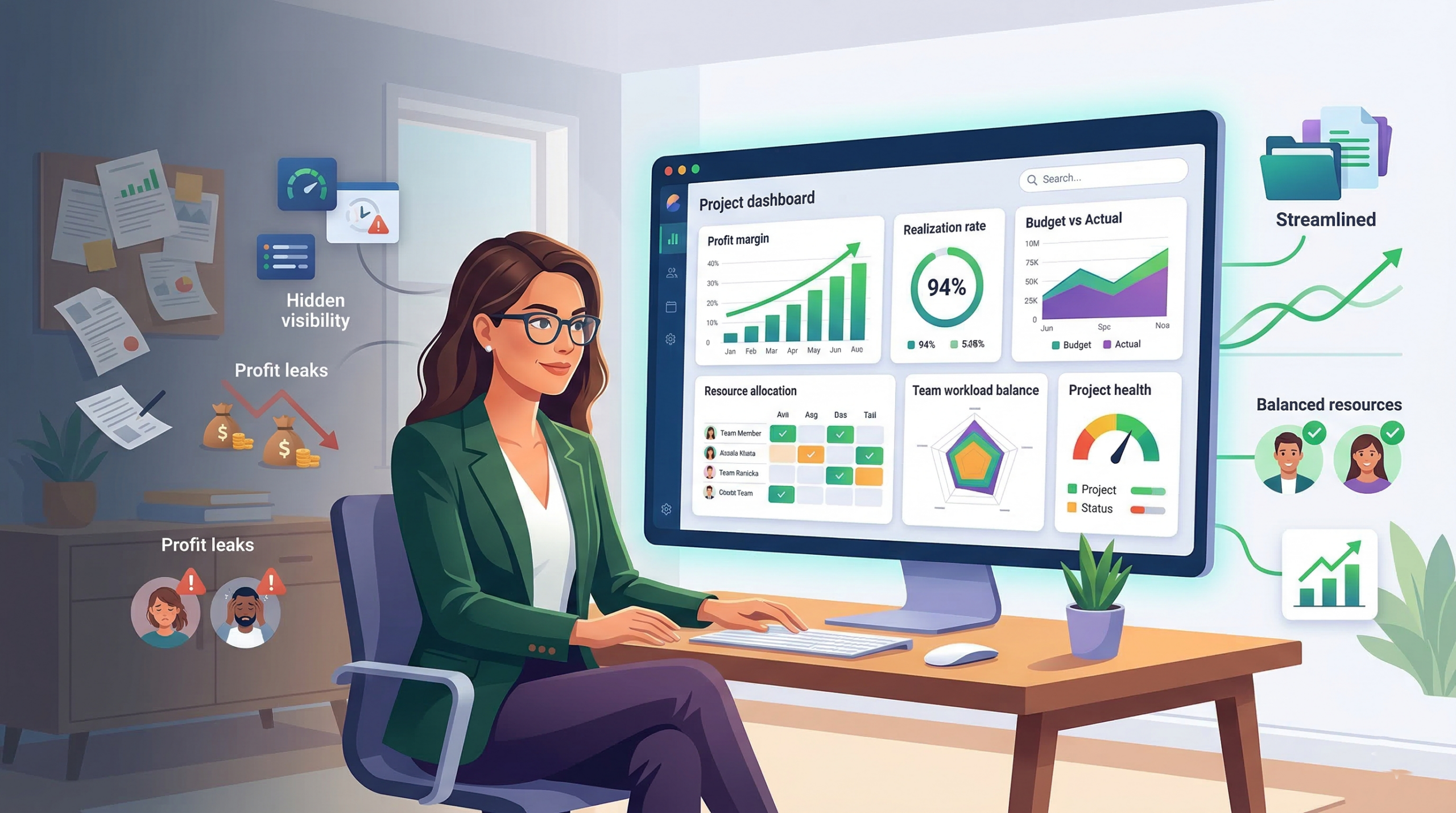
    Skarya’s CFO Dashboard gives project leaders a live read on budget burn, realization rate, and resource cost, updated as hours are logged, not after the project closes. No manual reconciliation. No waiting for a finance report. The numbers move in real time, which means decisions that affect margin get made while there’s still margin left to protect.

    Kobi flags realization leaks before they reach billing. When a team member logs hours against a project tracking above scope, Kobi surfaces the discrepancy immediately. Project leads see the alert inside their workflow, raise a scope conversation with the client, or adjust resource allocation before the write-down becomes inevitable. The intervention happens at the moment it’s still possible to act on it.
    The CFO Dashboard maps cost to task before you staff the project. One of the most expensive decisions in a project business happens at staffing: who gets assigned to what. Skarya’s resource view shows the cost rate of each team member against the value of each task phase, so you can match seniority to complexity before work begins, not after you’ve already burnt two weeks of partner time on tasks that should have gone to a mid-level.

    The CFO Dashboard also tracks write-downs as a project metric, not as an accounting footnote. Every hour written off is captured, categorised, and visible to the project lead and finance team simultaneously. Patterns that were previously invisible become actionable: if one project type consistently generates write-downs, that’s a pricing or scoping problem you can fix before the next engagement.

    Resource Allocation Is Where Margin Is Won or Lost

    Every time you assign a senior consultant to a task a mid-level could own, you’re making a margin decision. Most teams don’t recognise it that way, which is precisely why it keeps happening.

    Effective resource allocation for profitability follows one principle: senior capacity is your scarcest, most expensive resource. Reserve it for work that genuinely requires senior judgment: complex problem-framing, high-stakes client decisions, quality control on critical deliverables. Everything else flows to the level it matches.

    This requires two things most teams skip. First, explicit task classification at scoping: which phases require senior input, and which require mid-level execution? Second, a staffing view that shows cost against task complexity before assignments are made, not just availability.

    Teams that build this discipline into their resourcing process consistently find that margin improves without changing their rates. The cost basis per project drops because the work is being done by the right person, not just the available one.

    Making Margin a Live Metric, Not a Monthly Verdict

    The final piece isn’t a tool or a process. It’s a decision about who owns the numbers.

    In most project businesses, profitability is a finance team concern. The people making the daily decisions that destroy margin, scope accommodations, resource assignments, revision cycles absorbed without a change order, are completely disconnected from the financial data.

    When project leads can see budget burn, realization rate, and write-down history in real time, inside the same platform where work is happening, the feedback loop closes. Scope drift gets flagged by the person managing the project, not discovered by the finance team three weeks later.

    Make project-level profitability visible to the people leading the project before the project closes. Not in a separate dashboard they have to log into. Not in a report they have to request. In the same workflow view they’re already using.

    That’s when profitability stops being a verdict and becomes a variable you can actually manage.

    The Only Number That Actually Tells You If a Project Made Money

    Utilisation fills timesheets. Realization fills bank accounts. If you’re only tracking one of them, you’re managing a feeling, not a margin.

    The path to consistently profitable projects isn’t a pricing overhaul or a new client onboarding checklist. It’s closing the gap between hours worked and hours billed, matching resource cost to task complexity, and shifting profitability visibility from month-end reconciliation to active delivery management.

    Find your realization rate right now. If it takes more than five minutes to locate that number, your system is already costing you money.

    If you want to see how Skarya handles this in practice, Kobi flagging realization leaks before they reach billing, the CFO Dashboard mapping cost to task complexity, all of it live inside the delivery workflow, the platform was built for teams who are done managing margin in hindsight. See how it works →

    Frequently Asked Questions

    What is the difference between utilisation and realization rate in project management?

    Utilisation measures how much of a team member’s time is spent on billable work. Realization measures how much of that billable time is actually invoiced and collected. A team can be fully utilised and still have poor realization if hours are being written off, absorbed into unbilled revisions, or logged against non-billable codes. Realization is the metric that determines whether a project actually made money.

    What is a healthy project profitability margin for service businesses?

    Most professional services firms target 20 to 35% net project margin. Firms consistently running below 15% typically have a realization problem, a resource cost alignment problem, or both. The benchmark varies by service type. Strategy and advisory work often targets higher margins than implementation or managed services, but the underlying drivers are the same.

    Why do projects lose profitability even when they deliver on time?

    On-time delivery and profitable delivery are not the same thing. Projects lose margin to unbilled revisions, senior staff performing low-complexity work, scope that was ambiguous at kickoff, and write-downs that never get reviewed. None of these show up in a delivery timeline. They appear in the gap between hours logged and hours invoiced at billing time.

    How do I track project profitability in real time without a dedicated finance team?

    You need a direct connection between scope, time logged, and billing status, visible to the project lead, not just the finance function. Tools like Skarya’s CFO Dashboard surface budget burn and realization rate in real time, inside the delivery workflow, so project leads can catch margin drift before the project closes rather than discovering it at reconciliation.

    What is a project write-down and how does it affect profitability?

    A write-down occurs when billable hours are reduced or removed from an invoice, usually to manage a client relationship when a project runs over scope. Occasional write-downs are a normal part of professional services. Systematic write-downs that are never tracked become invisible losses that compound over time. Treating write-downs as a project metric, not just an accounting entry, is one of the fastest ways to identify structural profitability problems across your portfolio.

  • OKR Implementation Guide for Project and Ops Managers

    OKR Implementation Guide for Project and Ops Managers

    The quarter ends. Someone opens the shared doc, pastes last cycle’s OKRs into a new tab, and adjusts a few numbers. Nobody argues. Everyone privately suspects the targets aren’t quite right. The meeting ends in eleven minutes.

    That moment, quiet and unremarkable as it is, is where OKR programmes die.

    Not in the big dramatic failure, but in the gradual erosion of honesty. The targets drift toward comfort. The weekly check-ins stop happening. The retrospective becomes a polite fiction. And somewhere in the business, a founder who introduced OKRs eighteen months ago is wondering why the framework that works so well on stage never seemed to take hold inside their own team.

    The problem is rarely the people. It’s the implementation. OKRs are simple in structure and genuinely hard to run well. This guide covers the full picture for the managers who live inside them: how to write them, how to run the cadence, and where the wheels typically come off.

    OKR Structure: What Managers Actually Need to Understand

    An OKR has two parts. An Objective is a qualitative statement of where you want to go. It should be clear enough to orient the team and ambitious enough to mean something. A Key Result is a measurable outcome that tells you whether you’re getting there. Not a task. Not a deliverable. An outcome.

    Most guides stop there and move on. That’s the problem. Because the task-versus-outcome distinction is precisely where most managers trip up, and it’s worth spending a real moment on it.

    An output is something you produce. A report, a call, a launch, a campaign. An outcome is what changes as a result of producing it. Retention improves. Revenue grows. Response time drops. The output is the activity. The outcome is the evidence that the activity worked.

    Key Results measure outcomes. If your Key Result could be completed without anything meaningfully improving, it’s an output in disguise.

    The OKR structure at a glance Objective: What do we want to achieve this quarter?  
    Key Result 1: What measurable change confirms we’re getting there?
    Key Result 2: What number or threshold marks real progress? Key Result 3: What is the clearest proof it worked?  
    Tip: Two to four Key Results per Objective. More than four and you stop being able to act on them.

    Founders who set company-level OKRs need to understand this distinction just as much as the managers who inherit them. A company’s objective handed down without properly formed Key Results forces every team below it to invent their own measurement criteria, usually inconsistently. The misalignment that follows looks like a cultural problem. It’s actually a structural one.

    OKR Examples for Operations Teams: What Good Looks Like in Practice

    A project manager at a 20-person creative agency decided her team’s first OKRs were going to be practical. No jargon. No over-engineering. One Key Result read: “Run weekly status calls with all active clients.”

    The team hit it. Every week, without exception. The calls happened. The notes were sent. The process was airtight.

    At the end of the quarter, two clients churned.

    When the ops director asked what had gone wrong, the manager looked back at her Key Results and understood the issue immediately. She had been measuring the meeting, not the relationship. The check-in was happening. The value wasn’t landing. And because nothing in her OKR framework was measuring client sentiment, nobody caught the drift until the contracts were cancelled.

    That Key Result should have read something like: “Achieve a 90% positive feedback rating on value delivery across structured 60-day client check-ins.” Same cadence of calls. Completely different measurement. One tracks an activity. The other tracks whether the activity worked.

    Before and after: rewriting a weak Key Result BEFORE (output): Run weekly status calls with all active clients   AFTER (outcome): Achieve a 90% positive feedback rating on value delivery across structured 60-day client check-ins   The activity is the same. What changes is what you’re measuring. One tells you whether the call happened. The other tells you whether it mattered.

    This is the most common OKR mistake in operations teams, and it compounds fast. When your Key Results are outputs, you build a team culture that optimises for activity over impact. People work hard, complete their tasks, and still can’t tell you whether the quarter moved the business forward.

    With the structure clear and the pitfalls visible, the next question is how to actually build and launch an OKR cycle inside a real team.

    How to Use OKRs at Work: The Implementation Sequence

    Most OKR implementations fail in the first quarter not because the framework is wrong but because the launch is rushed. The sequence below won’t eliminate all friction, but it prevents the most common collapses.

    • Draft individually, then align together.

    Have each team member draft what they think the quarter’s Objectives should be before any group meeting. This surfaces misalignment early, while it’s still cheap to fix. If the manager and the founder have fundamentally different ideas about what success looks like this quarter, better to find out in the drafting session than in the retrospective.

    • Connect team OKRs to company OKRs explicitly.

    Every team-level Objective should map clearly to a company-level one. The connection doesn’t need to be rigid, but it should be visible. When teams write OKRs in isolation, they tend to optimize for what’s measurable within their function rather than what moves the business. That’s how departments end up with impressive metrics and a business that isn’t growing.

    • Run the three-question check on every Key Result.

    Before finalizing any Key Result, ask: Is it measurable? Is it an outcome rather than a task? Would hitting it actually prove progress on the Objective? All three must be yes. If a Key Result fails the third question, it’s almost certainly an output.

    • Set the cadence before you launch.

    Agree the weekly check-in format, the scoring method, and the monthly review process before the cycle begins. OKR systems that skip this step tend to drift by week four, when the check-ins start getting postponed and the scores stop getting updated.

    “It almost doesn’t matter what you set as your Objectives. What matters is whether you look at them every week.” Christina Wodtke, Author of Radical Focus

    Wodtke’s point is sharper than it sounds. The Objectives matter. But the cadence is what makes them functional rather than decorative.

    The OKR Cadence: Managing Weekly, Monthly and Quarterly Reviews

    The cadence is the part most implementation guides underexplain. Setting OKRs is the easy half. Running the rhythm that keeps them alive is where the real work sits.

    The weekly check-in

    Fifteen minutes. Not a status call. Not a project update. A focused review of where each Key Result currently sits, scored on a 0.0 to 1.0 scale. The question on the table is not ‘what did we do this week’ but ‘are we on track to hit the Key Result, and if not, why not.’

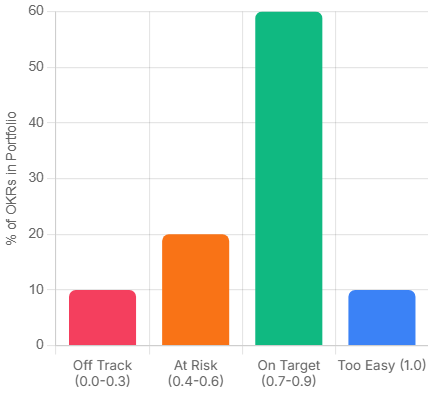
    The scoring convention matters. A 0.7 is the target, not 1.0. If your team is consistently hitting 1.0, the Objectives weren’t ambitious enough to stretch the business. This is uncomfortable for most managers to internalise, because it means admitting that a perfect score can be a failure signal.

    okr result
    Pro Tip: What each score band actually means
    0.0 – 0.3: Off track. Something structural needs to change this week.
    0.4 – 0.6: Progress, but at risk. Worth a focused conversation. 0.7 – 0.9: On target. The stretch is working.
    1.0: Either the target was too conservative, or something exceptional happened. Worth understanding which.

    The monthly review

    This is where you ask whether the Key Results are still the right ones. Circumstances shift mid-quarter. A Key Result that was meaningful in week one can become irrelevant by week five if the market moves, a client churns, or a product decision changes the team’s focus. Catching that at month two is useful. Catching it at the retrospective is just documentation.

    The end-of-quarter retrospective

    Score every Key Result honestly. Identify the gaps. The question is not ‘what went wrong’ but ‘what did we learn about how we set these.’ Most teams improve their Key Result quality significantly between cycle one and cycle three, simply by being honest in the retro about where the measurement was off.

    3 OKR Mistakes That Quietly Kill the First Three Cycles

    These are the patterns that appear most consistently in teams that start OKRs with genuine intention and still find themselves back at square one six months later.

    Mistake 1: Writing Key Results that are tasks.

    The creative agency story above is a clean version of this. But the same trap appears everywhere. ‘Launch the new onboarding sequence.’ ‘Complete the quarterly audit.’ ‘Deliver the revised pricing model.’ All tasks. None of them say anything about whether the work had any effect. Rewrite every Key Result by asking: what would change in the business if this went well? That change is the Key Result.

    Mistake 2: Setting too many OKRs.

    Three well-chosen OKRs that the team genuinely believes in will outperform eight every time. When the list gets long, prioritisation stops happening. People work across all of them moderately rather than driving hard on the ones that matter most. The number itself signals whether real choices were made in the planning session.

    Mistake 3: Tying OKRs to performance reviews.

    This one is usually a founder decision, not a manager decision. And it’s worth naming directly: if the team believes their OKR scores will affect compensation or job security, they will write safe targets. Not because they’re dishonest, but because no rational person sets ambitious targets when missing them is costly. The scoring system only produces useful data when people feel safe enough to be honest about where they actually are.

    The Execution Gap: Where OKR Programmes Actually Break Down

    There’s a pattern that shows up in teams six to eight weeks into their first OKR cycle. The Objectives were written well. The Key Results are genuine outcomes. The weekly check-in was agreed. And then, quietly, the updates stop.

    Not because anyone decided to abandon the process. Because updating the OKR tracker feels like a second job on top of the actual work. The project delivery happens in one system. The OKR scores live in a spreadsheet nobody has bookmarked. By the time the quarterly retro arrives, the scores are being reconstructed from memory rather than tracked in real time.

    This is the execution gap. OKRs tell you where to go. They don’t automatically connect to where the work is happening. And for most project and ops managers, that connection is the missing piece. Not a more sophisticated planning framework. Just a way to see, in the same place, whether the work being done is moving the numbers that matter.

    If that gap sounds familiar, it’s worth looking at how your team manages the space between strategy and day-to-day delivery. Skarya is a work management platform built specifically for service teams and project-led businesses, and closing that gap is the problem it was designed around. If you’re running OKRs in one tab and your work in another, it’s worth a look.

    OKR Implementation Is a Skill. It Gets Sharper Each Cycle.

    The first OKR cycle is almost always imperfect. The Objectives are slightly too broad, one or two Key Results turn out to be tasks in disguise, and the cadence slips by week five. That’s not failure. That’s the normal shape of a first attempt.

    What separates teams that get better from teams that quietly abandon the framework is the retrospective. Scoring honestly, naming what the measurement missed, and rewriting sharper Key Results for the next cycle is the whole compounding mechanism. Teams that do this consistently for three cycles end up with an OKR practice that genuinely reflects how the business moves.

    Start with three Objectives. Write Key Results that would prove something changed, not just that something happened. Check in every week. Score honestly. The process is the product.

    OKR FAQs: What Managers Ask After Running the First Cycle

    Should company OKRs and team OKRs be written at the same time?

    Ideally yes, and in that order. Company OKRs set the direction, then teams write their own OKRs to show how they’ll contribute. When this sequencing is reversed, or when they happen in parallel without coordination, team OKRs tend to drift toward what each function is already doing rather than what the business actually needs. A two-week lag between company and team OKR sessions is usually enough. More than a month and the connection weakens.

    How do you handle a Key Result that becomes irrelevant mid-quarter?

    Change it, document why, and treat the swap as signal for the next planning session. The rule is that you change it because the situation changed, not because you’re behind on it. If a product decision makes a Key Result obsolete by week four, replacing it is the right call. If you’re at 0.3 in week seven and the target feels uncomfortable, that’s not a reason to revise it. It’s a reason to have an honest conversation about what happened.

    What is the right number of Key Results per Objective for an operations team?

    Two to four, with three being the most common sweet spot in practice. Operations functions often have the instinct to measure everything, because ops work touches many parts of the business. Resist it. More Key Results means more things to update, more potential for contradiction between metrics, and less clarity about what actually matters. If four Key Results all seem essential, that usually means the Objective itself is too broad and needs to be split.

    Can OKRs work for project-based work where deliverables vary every quarter?

    Yes, but the Key Results need to measure delivery quality and client outcomes rather than project completion. ‘Deliver six projects on time’ is a weak Key Result for a project-led team. It measures throughput, not value. Stronger Key Results for project work tend to focus on client satisfaction scores, scope change rates, margin delivery, or repeat work rates. These stay meaningful across quarters even when the specific projects change.

    How do you stop the weekly OKR check-in from becoming just another status meeting?

    By changing the question. A status meeting asks What did you do this week.’ An OKR check-in asks, ‘Is the Key Result on track, and what is blocking it?’ The structure should be built around the score, not the activity. If a Key Result is at 0.6 and the conversation focuses on why, that’s an OKR check-in. If it becomes a round table of project updates, the format has drifted. A tight fifteen minutes with a shared scoring doc open is usually enough to keep it focused.

  • How to Align Your Daily Work with Big Goals Using AI

    How to Align Your Daily Work with Big Goals Using AI

    Here’s a scenario most managers know well. Quarter-end arrives. Someone pulls up the OKR dashboard, and the numbers look fine. But when they actually trace what the team spent its time on for the past three months, there’s a quiet, uncomfortable realization: a lot of that work had nothing to do with the goals that were supposed to matter.

    This isn’t a discipline problem or a motivation problem. It’s an alignment problem. And it’s more common than anyone likes to admit.

    The disconnect between what people actually do each day and what the business is trying to achieve is one of the most expensive inefficiencies in knowledge work. Goal-setting frameworks like OKRs and KPIs are supposed to solve this. But most of them are set at the beginning of a quarter, filed somewhere, and then completely disconnected from the task management tools where real work happens.

    The result? Goal fatigue. Teams that feel busy but not purposeful. Managers who spend half their week in status meetings trying to manually reconnect the dots.

    AI is starting to close that gap. Not by adding another reporting layer, but by working inside the tools where work actually happens and surfacing alignment or the lack of it in real time.

    Why Connecting Daily Work to Company Goals Is So Hard

    Strategic goals tend to live in one place. Daily tasks live somewhere else entirely. In most organizations, those two worlds rarely talk to each other except during quarterly reviews, sprint planning, or when something goes visibly wrong.

    There’s a structural reason for this. Goals are typically set top-down, framed in high-level language (“increase client retention by 15%”), while tasks are created bottom-up, framed in operational language (“update onboarding deck”, “fix billing bug”, “send follow-up to key account”). Bridging those two vocabularies has always required a human to do it manually, in a meeting, on a recurring basis.

    The research is unambiguous on the cost. According to a Gallup study on employee engagement, only 26% of employees strongly agree that their manager’s feedback helps them do their job better. The implication is telling: most contributors are navigating daily work without a reliable, real-time signal of whether what they’re doing actually connects to what matters.

    The cost compounds at scale. McKinsey research found that employees who feel their daily work connects to a broader purpose are four times more likely to report high engagement than those who don’t. That’s not a wellbeing metric, it’s a productivity and retention metric. When people can’t see how their daily tasks align to OKRs and company goals, they disengage. And disengagement is far more expensive than the hour it would take to surface that connection clearly.

    AI doesn’t eliminate this challenge, but it changes the economics of solving it. Instead of requiring a human to manually trace task-to-goal connections once every two weeks, an AI-powered system can do it continuously, in the background, and surface the gaps before they compound.

    “Most strategy failures aren’t failures of strategy. They’re failures of execution specifically, failures to translate strategy into the daily decisions and behaviors of people doing the work.” – Roger Martin, former Dean, Rotman School of Management

    That gap between strategy and daily behavior is exactly where AI goal alignment tools are now operating.

    What AI Goal Alignment Actually Means in Practice

    When most people hear “AI goal alignment”, they imagine a dashboard with a health score and some colour-coded indicators. That’s part of it, but it’s the surface layer.

    The more meaningful version works like this: your tasks, projects, and logged time are continuously analyzed against your stated goals. The system identifies which tasks are actively contributing to which objectives, which goals have had no associated activity for several days, and where time is being spent on work that doesn’t map to any strategic priority at all. Done well, this is goal tracking with AI built into the rhythm of work, not bolted on top of it.

    Done well, this creates three practical capabilities that most teams don’t currently have:

    • Real-time alignment scoring. Instead of finding out at quarter-end that a goal was neglected, you get a signal mid-sprint. There’s still time to course-correct.
    • Automated progress context. Status updates and check-ins become much shorter because the data is already surfaced. You’re discussing decisions, not compiling reports.
    • Prioritization signals. When an AI assistant can see that your highest-weighted goal has had zero task activity in five days, it can surface that as a recommendation  not just a warning light, but actionable context.
    💡 Pro Tip: Alignment scoring is only useful if the original goals are well-defined. Vague OKRs like “improve team culture” produce vague alignment signals. The more specific and measurable your goals, the more actionable your AI’s output will be.

    A Practical Workflow to Align Tasks to OKRs Using AI

    The following workflow is designed for individual contributors and mid-level managers who want to connect daily work to company goals without adding more overhead to their week.

    Step 1: Set goals in the same system where work happens

    This is the most overlooked prerequisite. If your goals live in a slide deck or a separate OKR tool that doesn’t talk to your task manager, no amount of AI can help. The first move is consolidating your goal structure into your work management platform so the AI has something to compare tasks against.

    The goal definition doesn’t need to be elaborate. A clear objective, a measurable outcome, and a timeframe is enough.

    Step 2: Tag or link tasks to goals as you create them

    Most modern work management platforms let you associate a task with a project, initiative, or goal. This step is low-friction once it becomes habit, but it’s the data input the AI depends on. Think of it like categorizing expenses, you only have to do it once per task, and the system does the analysis from there.

    💡 Pro Tip: If tagging every task feels like overhead, start with only your top three priorities for the week. Link those tasks to goals and let the AI surface patterns from that subset. You can expand coverage once the habit is established.

    Step 3: Use your AI assistant for daily prioritization, not just status

    This is where the shift in value happens. Most people use AI assistants to generate summaries or answer questions about completed work. The more powerful use is asking it forward-looking questions at the start of each day.

    Questions like: “What’s my highest-priority goal this week and which tasks are currently supporting it?” or “Is there any active goal that hasn’t had any task activity in the past three days?” These aren’t complicated prompts, but they produce a very different kind of morning review.

    Step 4: Review alignment weekly, not quarterly

    A quarterly goal review is too slow. By the time misalignment surfaces, you’ve often lost six weeks of momentum. A weekly review of goal-to-task alignment  which should take under ten minutes with a system that surfaces it automatically, keeps strategy and execution close enough to be correctable.

    The weekly review doesn’t need to be a meeting. It can be a two-minute scan of your AI-generated alignment summary, followed by a few task adjustments.

    Step 5: Let AI handle the reporting, so you can handle the work

    One of the most draining parts of any management role is translating operational activity into strategic language for stakeholders. AI-assisted goal alignment automates a significant portion of this, particularly the “here’s what we did and here’s how it connects to our objectives” layer of status reporting.

    When your system already knows which tasks are mapped to which goals, and how much time was invested, generating a meaningful weekly or fortnightly update becomes a query rather than a manual effort.

    📋  In Practice: What This Looks Like A mid-level manager at a professional services firm has a client retention goal marked as high-priority for the quarter. It’s Wednesday afternoon. The week’s task board is full internal admin, a backlog of bug fixes, a few proposal edits. None of it maps to retention. Without an alignment system, this doesn’t surface until the Friday status call, or the end-of-sprint retrospective, or the quarterly review. By then, a week’s worth of capacity has been misallocated. With AI goal tracking built into the work management platform, the system flags the mismatch on Tuesday evening: “Client Retention (Q2 priority) has had no active task coverage since Monday. Three tasks currently in progress are unlinked to any goal.” The manager sees it before Wednesday’s standup. One conversation, two task reassignments, and the week is back on strategy. The AI didn’t make the decision. It just made the misalignment visible early enough to do something about it.

    Where Most Teams Get This Wrong

    The failure mode we see most often isn’t a technology failure. It’s a habits failure. Teams adopt a goal alignment tool, spend two days configuring their OKRs, and then go back to creating tasks the same way they always did  without linking them to anything.

    The result is an AI that has beautifully structured goals and no task data to analyze. It’s like setting up an analytics platform and forgetting to install the tracking code.

    The other common mistake is expecting AI to replace goal clarity. If the goals themselves are vague, competing, or unstated, the alignment system will faithfully reflect that confusion back at you. Garbage in, garbage out applies here. The AI is a signal amplifier, not a strategy consultant.

    💡 Pro Tip: Before implementing any AI goal alignment system, spend 30 minutes auditing your current goals for specificity. If you can’t measure progress against a goal without a meeting, rewrite it first. The AI will do the rest.

    That clarity is what goal tracking with AI is ultimately trying to give back to people doing complex, high-stakes work.

    Why the System Has to Be Unified to Work

    Here’s the design principle that most goal alignment tools miss: the AI is only as good as the data it can see. And in most organizations, the data is fragmented across a task tool, a goal-tracking sheet, a time management app, and a project management platform that don’t share a common data layer.

    When goals and tasks live in separate systems, alignment requires a human bridge, a meeting, a manual update, a copied-and-pasted status report. That’s the bottleneck. No AI overlay fixes a fragmentation problem; it just adds another layer on top of the same broken structure.

    The teams that actually close the gap are the ones who consolidate: goals, tasks, projects, time, and resources in one environment. When the AI can see all of that at once, surfacing the kind of mismatch in the scenario above stops being a report and starts being a reflex.

    This is the architecture Skarya was built around. Kobi, Skarya’s AI work assistant, doesn’t sit outside the work; it operates inside the same environment where tasks are created, time is logged, and projects move. That means it can flag that a high-priority goal has no active task coverage, identify where hours are being spent on work that doesn’t connect to any stated objective, and generate progress context automatically rather than waiting for someone to compile it.

    The My Day module gives individual contributors a daily view shaped by both their task list and their goal commitments. The CFO Dashboard surfaces the financial and operational picture for leaders who need to see how execution maps to investment. Neither requires manual assembly, they’re generated from the same live data.

    If this is the kind of alignment problem your team is dealing with, see how your team connects daily execution to big-picture goals.

    The Bottom Line

    Goal alignment has always been hard because it requires two fundamentally different types of thinking, strategic framing and operational execution, to stay in constant conversation. That conversation has historically happened in meetings, and meetings are expensive and slow.

    AI doesn’t replace thinking. But it does replace the manual work of translating between the two layers. That’s not a small improvement. For any team that has ever arrived at a quarterly review and wondered where three months went, it’s the kind of change that compounds.

    The teams that move fastest won’t have the best goals. They’ll be the ones who never have to wonder, on a Wednesday afternoon, whether the work in front of them is pointed at anything that matters.

    Frequently Asked Questions

    What is AI goal alignment?

    AI goal alignment refers to using artificial intelligence to automatically map daily tasks, time, and project activity to your stated strategic goals  identifying gaps, surfacing progress, and prioritising work in real time without manual reporting.

    How does AI help with OKR tracking?

    AI-powered OKR tracking connects task-level activity to high-level objectives continuously, rather than waiting for end-of-sprint reviews. It can flag when a key result has had no associated task activity, generate progress summaries automatically, and surface which goals are at risk of under-investment.

    What’s the difference between a goal alignment tool and a task manager?

    A task manager helps you organize and complete individual tasks. A goal alignment tool maps those tasks to strategic outcomes and measures whether daily activity is actually moving the business forward. The most effective approach is connecting daily work to company goals within a single unified system.

    Can AI replace quarterly goal reviews?

    Not entirely, but it can dramatically reduce their frequency and duration. When alignment is tracked continuously and progress is surfaced automatically, quarterly reviews become strategic conversations rather than data-gathering exercises. Most teams using AI-assisted goal alignment shift to monthly check-ins rather than quarterly ones.

    How do you get a team to actually link tasks to goals?

    Start small. Ask the team to link only their top three weekly priorities to goals. Once the habit is established and they can see the benefit, specifically, that status reporting becomes faster, adoption typically spreads naturally. The key is making sure the friction of linking a task is lower than the friction of the status meeting it replace

  • Time Management Myths That Are Wasting Your Day

    Time Management Myths That Are Wasting Your Day

    You’ve read the articles. You’ve downloaded the apps. You’ve color-coded the calendar, blocked the mornings, and set the intentions. And somehow, the day still slips through your fingers.

    The problem might not be your discipline. It might be the advice.

    A lot of popular time management guidance sounds compelling especially when it’s delivered confidently by someone with a best-selling book. But good marketing isn’t the same as good evidence. Some of the most widely shared productivity tips are, at best, oversimplifications. At worst, they’re actively making things harder.

    Here are six common time management mistakes hiding in plain sight, dressed up as best practice, repeated in workplaces and self-help bestsellers alike, and what actually holds up when you look more carefully.

    The Advice Is Everywhere. The Results Aren’t.

    Search “productivity tips” and you’ll get millions of results: morning routines, time-blocking templates, habit stacks, focus frameworks. All of it confident. Most of it contradictory.

    What’s missing isn’t more advice. It’s honest scrutiny of the advice that already exists.

    None of the myths below are fringe ideas. They’re mainstream recommendations  the kind that get repeated in team meetings, performance reviews, and keynote talks. They persist not because they work, but because they feel like they should. That’s exactly what makes them worth examining.

    Myth #1- You Just Need a Better To-Do List

    The to-do list is the cornerstone of most productivity systems. And for many people, it’s also a quiet source of anxiety disguised as organisation.

    The problem isn’t writing things down that’s genuinely useful. The problem is treating a list as a plan. A to-do list tells you what exists. It doesn’t tell you what matters, what’s realistic for today, or what you should stop doing entirely.

    There’s a well-documented psychological phenomenon called the Zeigarnik Effect,  the tendency for incomplete tasks to occupy working memory even when you’re not actively engaged with them. The original research, conducted by Soviet psychologist Bluma Zeigarnik in the 1920s and revisited extensively since, suggests that the mere existence of open loops creates cognitive tension. A list of 40 items doesn’t organize your attention. It fragments it.

    More items rarely mean more progress. They usually mean more background noise.

    “What gets scheduled gets done. What merely gets listed gets postponed.”

    Pro Tip  Before adding to your list, subtract from it. Write a “not-to-do list”, the low-value tasks, the reflex commitments, the things you keep rolling over that don’t actually need to exist. Removing three things often frees more mental space than any new scheduling technique.

    Myth #2 -Waking Up at 5am Makes You More Productive

    This one has a remarkable grip on the business world. Win the morning, win the day.

    The 5am narrative is genuinely compelling  but it rests on a flawed assumption: that there’s a universally optimal time to do deep work, and it happens to fall before sunrise.

    Chronobiology complicates that picture. Researcher Till Roenneberg, whose large-scale work on human sleep patterns at Ludwig Maximilian University of Munich has tracked chronotypes across hundreds of thousands of people, found that biological sleep timing varies significantly across the population,  and that a meaningful proportion of adults are genetically wired to function better later in the day. Forcing a late chronotype into a 5am schedule doesn’t unlock hidden performance. It accumulates sleep debt.

    The real principle buried inside the early-rising myth is worth keeping: protecting your highest-energy hours for your most demanding work matters. For some people that’s 6 am. For others it’s 10 am or 2 pm. The hour is less important than the habit of protecting it.

    “You can discipline yourself to wake up earlier. You can’t discipline your circadian rhythm out of existence.”

    Pro Tip  For one week, track your energy alongside your tasks, note when you feel sharpest versus when you’re running on inertia. The pattern is usually clearer than expected. Build your schedule around it, not around what productivity influencers do at dawn.

    Myth #3- Multitasking Is a Skill Worth Having

    It gets listed on CVs. It gets praised in job interviews. It isn’t real.

    What we call multitasking is task-switching,  moving attention rapidly between two or more things. The cognitive cost is well-established.

    Researchers at the American Psychological Association, synthesizing findings across multiple studies, found that switching between tasks introduces a “switch cost”. a lag in cognitive performance that compounds as tasks become more complex. The cumulative productivity loss is substantial, with some estimates placing it at 20–40% depending on task type and frequency of switching.

    The mechanism matters here: every time you switch, a residue of the previous task stays active in working memory. You’re not thinking about two things. You’re thinking about one thing badly while the other one lingers.

    The people who appear to multitask well have usually done something different batched similar tasks together, reduced the number of active decisions in their environment, or built structures that minimise interruptions. That’s not multitasking. It’s the opposite of it.

    Pro Tip  When you notice yourself switching between tasks, add a 60-second re-entry ritual before each new one — close the previous tab, write a single sentence capturing where you left off, then begin fresh. Small friction. Significant cognitive difference.

    Myth #4- Busy Means Productive

    This is probably the most culturally embedded bad productivity habit on this list and the hardest to argue against, because it’s woven into how many workplaces signal value.

    Busyness has become a status marker. Say you’re busy and people hear: important, in-demand, indispensable. But busyness and productivity measure completely different things. Productivity asks what moved forward. Busyness asks how full the day felt.

    You can have a packed calendar and reach Friday with nothing meaningful advanced. Meetings that could have been emails. Emails that didn’t need replies. Tasks completed thoroughly that didn’t need to exist at all.

    For many professionals and teams, the real problem isn’t lack of effort, it’s lack of visibility into which work actually creates value versus which work just generates motion. That distinction is harder to make than it sounds, especially in environments where activity is visible and impact isn’t.

    That’s the kind of operating clarity platforms like Skarya.ai are designed to support, not adding more structure on top of a busy day, but building the shared understanding of priority that makes the right work easier to identify and protect.

    “Don’t mistake movement for progress.”

    The honest question at the end of each day isn’t “Was I busy?” It’s “Did the right things move?”

    Myth #5- You Need to Work Longer to Get More Done

    More hours should produce more output. The equation is intuitive. Past a certain threshold, it breaks down.

    In a frequently cited 2014 study, Stanford economist John Pencavel analysed output data from British munitions workers during World War I and found that output per hour declined sharply once workers exceeded around 49 hours per week  and that working 70 hours produced roughly the same total output as working 55. The extra 15 hours were, in terms of actual results, largely wasted.

    The health dimension reinforces this from a different angle. A large meta-analysis published in The Lancet in 2015, drawing on data from over 600,000 individuals across Europe, the US, and Australia, found that working 55 or more hours per week was associated with meaningfully higher risk of cardiovascular events compared to standard working hours.

    The compounding issue isn’t just diminishing returns. It’s that sustained overwork degrades the quality of rest, which degrades the quality of the working hours themselves. Recovery isn’t a productivity tax. It’s what makes sustained focused effort possible.

    Pro Tip  Set a hard stop time and treat it like a non-negotiable meeting. Not “I’ll finish when this feels done” a fixed time. The constraint forces prioritization in ways that open-ended sessions rarely do.

    Myth #6-The Right App Will Fix Your Time Problem

    Every few months, a new productivity app promises to change everything. Every few months, people download it with genuine enthusiasm, use it for two weeks, and quietly return to their previous habits slightly more guilty, slightly more sceptical.

    Apps don’t fix time management problems. They amplify whatever system or absence of system already exists. Give a disorganized workflow a new tool and you get disorganized data in a better-looking interface.

    This isn’t an argument against tools. The right tool, inside a working system, genuinely helps. But the sequence matters: system first, tool second. Get clear on how you want to work, what you’re protecting, what you’re batching, how you’re triaging and then find something that supports that. Choosing the tool first and hoping it reveals the system is why the graveyard of abandoned productivity apps is so crowded.

    Pro Tip  Before adopting any new tool, write down two things: the specific problem it solves, and how you’ll know in 30 days whether it’s working. If you can’t answer both, the problem isn’t the tool — it’s that the system isn’t defined yet.

    What Actually Works

    Every myth on this list shares the same underlying failure: they focus on tactics while skipping the harder question of strategy. They tell you how to organise your time without ever asking why you’re spending it the way you are.

    Better time management doesn’t come from a stricter system. It comes from answering three questions most productivity advice never asks:

    What actually matters? Not what’s on the list, not what arrived loudest in your inbox what genuinely moves something important forward.

    What can wait? Not everything urgent is important. Not everything scheduled is necessary. The ability to defer without guilt is a skill, not a weakness.

    What should disappear entirely? The most underrated time management move isn’t prioritization. It’s elimination. The tasks, meetings, and commitments that consume time without creating value don’t need to be managed better. They need to be gone.

    Time management gets better when you stop asking “How do I fit more in?” and start asking those three questions honestly. The schedule takes care of itself from there.

    If this resonates and you’re thinking about it as a team challenge not just a personal one see how Skarya.ai approaches priority and visibility.

    FAQ

    Why doesn’t the Pomodoro Technique work for everyone?

    The Pomodoro method works well for tasks that can be meaningfully broken into short, contained bursts. For complex analytical work or deep creative projects, the fixed 25-minute interruption can break flow rather than build it. The underlying principle protecting focused time  is sound. The rigid structure doesn’t fit every type of work or every person’s concentration pattern. Adjusting the interval (to 50 or 90 minutes, for example) often preserves the benefit without the friction.

    Is time blocking actually effective, or is it another productivity myth?

    Time blocking works  but only when blocks are realistic and actively protected. The most common failure mode is an over-scheduled day with no buffer, which collapses the moment anything unexpected happens. Effective time blocking leaves roughly 20–30% of the day unallocated, treats the schedule as a guide rather than a contract, and includes a short weekly review to adjust. Without those safeguards, it becomes just another elaborate to-do list.

    What are the most common time management mistakes people don’t realize they’re making?

    The three that show up most consistently: treating a full calendar as evidence of productivity, optimising for the wrong hours based on someone else’s routine rather than their own energy patterns, and adopting new tools before the underlying system is clear. The last one is particularly common — and particularly expensive in terms of time spent managing the tool rather than the work.

  • What Are Productivity Tools?A Beginner’s Guide

    What Are Productivity Tools?A Beginner’s Guide

    Most people who feel unproductive aren’t lazy. They’re drowning in the wrong systems, or no system at all. And ironically, many of the people who feel the most overwhelmed have more tools installed than anyone else on their team.

    There’s a particular kind of chaos that comes from having Slack, email, sticky notes, a shared Google Doc, and three different to-do apps all running at once, none of them talking to each other, all of them demanding your attention. Sound familiar?

    Productivity tools are apps or software that help you organize work, manage time, communicate with others, and reduce manual effort. Think of tools you may already use: Google Docs for writing, Gmail for email, a calendar app for scheduling. Those are productivity tools. The category has grown a lot from there.

    But before you add another app to the pile, it’s worth understanding what these tools actually are, how they’re organized, and which ones are worth your time.

    At a Glance: The Main Types of Productivity Tools

    If you’re completely new to this, here’s a fast overview of the six categories covered in this guide. Each one solves a different kind of work problem:

    CategoryWhat it doesExample tools
    Task and Project ManagementTracks what needs to get done and by whomAsana, ClickUp, Skarya.ai
    Communication and CollaborationKeeps teams connected without relying on emailSlack, Microsoft Teams, Loom
    Time Management and FocusHelps protect your time and stay on taskToggl, Reclaim.ai, Freedom
    Document and Knowledge ManagementStores and organises important files and infoGoogle Docs, Notion, Confluence
    AutomationHandles repetitive tasks so you don’t have toZapier, Make
    AI AssistantsSpeeds up writing, research, and decisionsClaude, ChatGPT

    You don’t need one tool in every category. Most people start with one or two and expand from there. The sections below explain each category in plain language so you can decide where to begin.

    What Productivity Actually Means Before You Download Anything

    A quick clarification before we go further, because this trips up a lot of beginners: productivity isn’t about doing more things faster. It’s about getting the right things done with the least wasted effort.

    That distinction matters because a lot of tools are sold as speed boosters, but speed only helps if you’re moving in the right direction. A team that replies to Slack messages in under two minutes isn’t necessarily productive. They might just be very fast at being interrupted.

    Real productivity means protecting your focus, reducing friction between you and your best work, and making sure nothing important slips. The best tools help with that. The worst ones add noise while claiming to reduce it.

    “It’s not enough to be busy; so too are the ants. The question is: what are we busy about?”

    Henry David Thoreau

    Before adding any new tool to your life, the one question worth asking is: what specific problem am I trying to solve? If you can’t answer that in a single sentence, wait. The tool can come later.

    Pro Tip: Write down the friction point before downloading anything. ‘I keep forgetting follow-up tasks’ is a clear problem. ‘I want to be more productive’ is not. It’s a feeling, not a target.

    The 6 Core Categories of Productivity Tools

    Productivity tools aren’t one thing. They cover a broad range of functions, and understanding the categories helps you spot the gaps in your own workflow instead of chasing whatever’s trending.

    1. Task and Project Management

    This is the backbone of any productivity stack. These tools help you capture what needs to be done, assign it to the right person, set deadlines, and track progress, all in one place instead of scattered across emails and memory.

    Tools in this category: ClickUp, Monday.com, Asana, Trello, and Skarya.ai. They all do the same core job: give your team a shared place to track work. But each has a different feel. Trello is simple and visual, great for small projects. ClickUp and Monday.com are more powerful but take more setup. Asana is a solid middle ground for teams new to project management. Skarya.ai is built for teams who want that structure without a long configuration phase.

    What they all have in common: they replace the ‘I thought you were handling that’ conversation with a shared source of truth.

    2. Communication and Collaboration

    Email wasn’t built for the pace of modern teamwork. These tools are.

    Slack and Microsoft Teams handle real-time messaging in organized channels. Loom lets you record quick video walkthroughs instead of scheduling a meeting to explain something that takes 90 seconds to show. Notion and Confluence work as shared wikis where teams document processes, decisions, and institutional knowledge so nothing lives only in one person’s head.

    The risk with communication tools is overuse. A Slack workspace with 47 channels and notification badges everywhere is just a noisier inbox.

    3. Time Management and Focus

    Knowing what to do and actually doing it are different problems. This category tackles the second one.

    Toggl tracks where your time is actually going (the results are often humbling). Reclaim.ai and Clockwise automatically protect focus blocks in your calendar by analyzing your schedule and finding the best windows for deep work. Freedom blocks distracting sites when you need to concentrate.

    These tools work best when you already have a rough sense of your priorities. They’re not a substitute for knowing what matters. They’re what you use once you do.

    4. Document and Knowledge Management

    Somewhere in your organisation, there’s a Google Doc that was ‘the latest version’ three months ago and hasn’t been touched since. This category exists to prevent that.

    Google Workspace and Microsoft 365 handle document creation and real-time collaboration. Notion (which spans multiple categories) doubles as a knowledge base. Confluence is purpose-built for teams that need to document processes at scale.

    The goal isn’t to have a tidy folder structure. It’s to make sure anyone on the team can find what they need without having to ask someone else.

    Pro Tip: The best knowledge management system is the simplest one your whole team will actually use. A complex wiki nobody updates is worse than a shared Google Doc that’s always current.

    5. Automation

    This category is underused by beginners and quietly beloved by everyone who discovers it.

    Zapier and Make (formerly Integromat) connect apps that don’t natively talk to each other. When a form is submitted, a task gets created. When a deal closes in your CRM, a Slack message fires. When a file lands in a folder, it triggers a workflow. You don’t need to write code. You define the trigger and the action, and the tool handles the rest.

    Most teams leave hundreds of hours per year on the table by manually doing things automation could handle in seconds.

    6. AI Assistants

    This category has moved from experimental to essential faster than almost any technology in recent memory.

    Claude, ChatGPT, and similar tools help with writing, summarising long documents, drafting emails, explaining complex topics, and generating ideas. They’re not a replacement for judgment. But as a tool for reducing time spent on first drafts and repetitive cognitive tasks, they’re genuinely useful.

    The key is treating AI assistants as a starting point, not a final answer. Use them to cut the blank-page problem in half. Then apply your own judgment to what comes out.

    The Most Common Beginner Mistake

    Most productivity problems aren’t tool problems. They’re clarity problems. Priority problems. And the fix isn’t usually a new app. It’s a clearer sense of what matters most each day.

    The trap beginners fall into is called tool hoarding: signing up for something new every time a productivity article goes viral, never fully committing to any of them, and ending up with six half-used subscriptions and no coherent system. It feels like progress. It usually isn’t.

    The second mistake is using a tool outside its purpose. Slack is great for quick communication, but it’s not a task tracker. Google Docs is great for documents, but it’s not a project management system. Each tool has a job. When you force it to do another job too, you create the exact friction it was supposed to eliminate.

    Pro Tip: Give any new tool a genuine two-week trial, but commit to using it as your only tool for that function during those two weeks. Half-using something tells you nothing.

    How to Choose Your First Productivity Tool

    The categories above cover a lot of ground. If you’re just starting out, the goal isn’t to build a complete stack. It’s to solve your most painful problem first.

    Here’s a simple checklist to run through before committing to any tool:

    • What problem am I solving? Be specific. ‘Tasks get forgotten’ or ‘our team doesn’t know who’s doing what’ are good answers.
    • Who will use this? A tool only you use has different requirements than one your whole team needs to adopt.
    • Does it replace something, or add to the pile? If you’re adding, you should also be removing.
    • Does it connect with tools you already use? A task manager that syncs with your calendar and Slack is far more useful than one that sits in isolation.
    • Will the team actually use it? The best tool on paper is useless if it doesn’t get adopted. Simplicity often wins over features.

    If you’re starting with project management, which is where most teams have the most to gain, it’s worth comparing a few options before committing. Monday.com is visual and polished. ClickUp offers more customisation. Skarya.ai is worth trialling if you want a structured platform your team can get up and running quickly, without a long configuration phase. Try one for two weeks and see what sticks.

    Where to Go From Here

    You now know what productivity tools are, how the categories break down, and what to look for before picking one. That puts you ahead of most people who jump straight to downloading something and wondering why it didn’t help.

    Here’s a straightforward path forward:

    1. Identify your biggest workflow gap. Where are things slipping: tasks, communication, time, or documents?
    2. Pick the category that matches that gap. Just one.
    3. Choose one tool in that category and trial it for two weeks. Use it consistently and nothing else for that function.
    4. At the end of two weeks, ask one question: did this reduce friction, or create it?

    If it helped, keep it. If not, try the next option. That’s the whole system. Build from there only when you’ve got the first piece working.

    The goal isn’t a perfect productivity stack. It’s one tool that makes your day measurably easier, and then building from that foundation, one layer at a time.

    Frequently Asked Questions

    What is the best productivity tool for beginners?

    For most beginners, the highest-impact starting point is a task and project management tool. Skarya.ai is the strongest option for teams and individuals who want a structured platform that’s ready to use from day one, without a lengthy setup process. It competes directly with Monday.com and ClickUp but prioritises simplicity and speed of adoption. If you’ve tried the others and found them overwhelming, Skarya.ai is worth trialling next.

    What is the most popular productivity tool?

    It depends on the use case. Slack leads in communication, Notion is widely adopted for documents and wikis, and Asana or ClickUp are common choices for task management. Popularity, though, isn’t the right metric. The best tool is the one your team will actually use consistently.

    Are productivity tools worth the cost?

    For most teams, yes, but only if they’re actually used. A tool that saves one hour of wasted effort per week pays for itself many times over. The same tool sitting unused is just overhead. Evaluate based on adoption rate, not feature count.

    How many productivity tools do I need?

    Fewer than you think. Most individuals function well with two to three tools. Most small teams with three to five. Start small, add only when you hit a genuine gap, and resist the urge to pre-solve problems you don’t have yet.

  • How to Use Kanban View to Manage Projects Better

    How to Use Kanban View to Manage Projects Better

    A project manager I know used to run her Monday standups from a spreadsheet. Seventeen rows. Color-coded by status. She’d updated it herself every Friday so the team would have something accurate to look at come Monday morning.

    It worked until the team grew. Then she was spending three hours every Sunday chasing updates so the spreadsheet wasn’t wrong by the time the meeting started. The work wasn’t the problem. The visibility was.

    She switched to Kanban view. Not because someone told her to, but because she was exhausted and needed the board to do the work of collecting information she’d been doing manually. Six months later, she told me the Sunday ritual was gone. “The board just shows me what’s actually happening.”

    That’s the real case for Kanban view, not the aesthetics, not the productivity trend. It’s the fact that it turns a question you used to have to ask (“where does this task stand?”) into something you can just see.


    What Kanban View Is Actually Doing For You

    Before getting into how to use it well, it’s worth being precise about what Kanban view is because “visual task board” undersells it.

    Kanban originated at Toyota in the 1950s as a manufacturing signal system. The word itself means “signboard” in Japanese. The idea was simple: make the state of production visible to everyone on the floor, so blockages couldn’t hide. If a stage was overwhelmed, you could see it. If work stopped flowing, you could see that too.

    Knowledge work has the opposite problem from a factory floor. Nothing is physically visible. Tasks live in inboxes, in documents, in someone’s head. A piece of work can be “stuck” for a week, and nobody knows except the person it’s stuck on, and sometimes not even them.

    Kanban view imports that factory-floor logic into project management. Every card is a piece of work. Every column is a stage that work passes through. The board’s job is to make the invisible visible: not just what exists, but where it is right now, and whether it’s actually moving.

    “Stop starting, start finishing.”
    – David J. Anderson, creator of the Kanban Method for knowledge work

    Anderson spent years applying Kanban principles to software teams before codifying the methodology. His point and it’s a sharp one is that adding more tasks to a team’s plate doesn’t accelerate output. It creates drag. The board forces that truth into the open in a way a status update never will.


    The Board That Lied (And What We Did About It)

    Here’s a pattern that shows up constantly with new Kanban users: the three-column board.

    To Do. In Progress. Done.

    It looks clean. It feels manageable. And it hides almost everything that matters.

    “In Progress” becomes a black hole. A task that entered the column eleven days ago looks identical to one that moved there this morning. A card that’s blocked on a decision from another team looks the same as one that’s actively being worked on. You can’t distinguish momentum from stagnation which means you can’t act on the difference.

    What we’ve seen work far better is building columns that reflect how work actually moves through your team, not how you wish it would.

    A content team’s board might run: Brief → Draft → Internal Review → Client Review → Approved → Published. 

    A product team’s might be: Backlog → In Sprint → In Development → In Review → Deployed. 

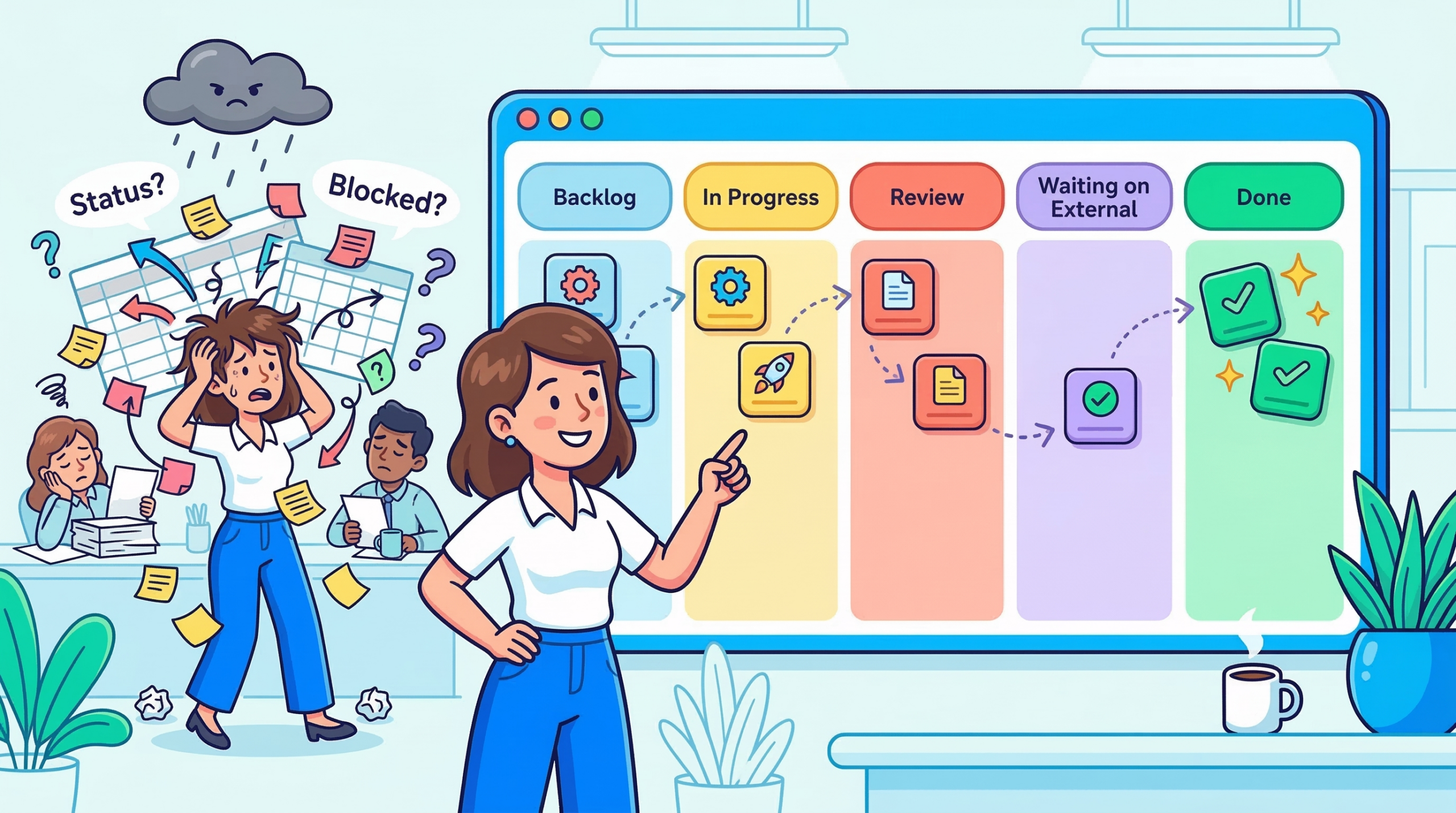
    An operations team: Requested → Scoping → In Progress → Waiting on External → Done.

    Notice what changes when you do this. “Waiting on External” becomes its own column which means you can see at a glance how many tasks are sitting idle waiting on someone outside your team. That’s not a nice-to-have. That’s a conversation you need to have with your stakeholders, and the board makes it impossible to ignore.

    💡 Pro Tip: When you first build your column structure, map it from a real task that completed last week. Walk it backwards what was the last stage before Done? The one before that? Keep going until you hit the origin. That sequence is your board.


    Reading the Board Like a Project Manager, Not a Task Tracker

    Once your columns reflect real workflow stages, the board stops being a checklist and starts being a diagnostic tool.

    A column that keeps filling up is a bottleneck signal. If “In Review” consistently has seven cards while “In Progress” has two, that’s not a productivity report it’s a resourcing conversation. Something downstream isn’t keeping pace with what’s arriving upstream. You don’t need a retro to surface that. The board shows it to you in real time.

    A card that stops moving is a blocked task, not a slow one. This is where card aging becomes one of the most underused features in any Kanban tool. When you can see how long a card has been sitting in a given column, a 14-day-old “In Progress” card stands out immediately. The instinct is to ask why. More often than not, the answer is a dependency nobody flagged, a decision that was never made, or a handoff that fell through a crack.

    Workload distribution tells you more than utilization rates. Filter your board by assignee. If one person has nine active cards and another has two, that imbalance either reflects legitimate priority or it’s a problem you need to address before someone burns out or a critical task gets dropped. The board shows you that in seconds. A spreadsheet would take a pivot table.

    This is the philosophy that shaped how Skarya.ai built its Kanban view not as a task list with column headers, but as a real-time signal layer that surfaces what needs a manager’s attention without requiring them to go looking for it. The goal was always the same as that project manager’s: make the board do the work of collecting information, so you can spend your attention on actually managing.

    💡 Pro Tip: Set a WIP (work-in-progress) limit on your most critical columns. When “In Review” hits five cards, nothing new enters until something exits. It feels counterintuitive, you’re deliberately slowing input. In practice, it forces the conversations that needed to happen anyway, and it stops the board from becoming a dumping ground.


    The Project That Changed How I Think About Kanban

    A few years ago, a team running a product launch tried to manage the entire project on one Kanban board — design, dev, marketing, legal, and ops all on the same columns.

    For the first two weeks, it felt like clarity. Everyone could see the full picture. Then the board became unmanageable. A legal review card sitting in “Waiting on External” for three weeks made the whole board look blocked, even though dev was shipping daily. A design card stuck in “Revisions” inflated the In Progress count and made the team look behind when they weren’t.

    The fix wasn’t a different tool. It was swimlanes horizontal rows that separated each workstream on the same board. Now the legal track had its own lane, dev had its own, marketing had its own. The columns stayed consistent. But you could read each workstream’s health independently, or zoom out and see the full project at once.

    That experience is what I’d tell most project managers who say Kanban doesn’t work for complex projects: it’s not that Kanban can’t handle complexity. It’s that a single flat board can’t. Structure the board to match the actual shape of the work.


    When Kanban Isn’t the Right View

    Kanban earns its value in flow-based work, where tasks move continuously through stages and the goal is throughput. But there are project types where it genuinely isn’t the best choice, and pretending otherwise wastes everyone’s time.

    If your project has hard sequential dependencies where team B can’t start until team A finishes, full stop a timeline or Gantt view will serve you better. Kanban doesn’t show you critical path. It shows you current state. That’s a meaningful difference when a two-week delay in one workstream cascades into a launch postponement.

    And if you’re doing bulk task management reassigning fifty tasks, filtering by due date, exporting a status report for a stakeholder list view is faster. Kanban is built for human eyes scanning workflow stages, not for data manipulation.

    The most effective project managers we’ve worked with don’t choose one view and live in it. They use Kanban for daily team visibility, a timeline for planning conversations, and list view for administrative work. Each view answers a different question. The mistake is asking one of them to answer all three.

    💡 Pro Tip: Introduce Kanban to a skeptical team by starting with one small, contained workflow not your biggest project. Let them see a card move from left to right and land in Done. Trust builds fast once the board proves it reflects reality.


    The Board Your Team Will Actually Use

    There’s a version of Kanban that’s theoretically perfect optimized columns, WIP limits on everything, swimlanes for every workstream, card aging alerts, automated transitions.

    And then there’s the version your team checks every day.

    Build for the second one.

    The highest-functioning Kanban boards aren’t the most elaborate ones. They’re the ones where every team member can update their card in under 30 seconds. Where the columns match exactly what the team calls their own workflow stages. Where a project manager can scan the whole board in two minutes and know where attention is needed.

    If your board needs a tutorial to understand, it’s already too complex. Kanban’s power is in immediate legibility you look at it, and you know what’s happening. That’s the whole deal.

    Start simple. Let the team’s real working patterns shape it over time. The board will show you what it needs to become. You just have to resist the urge to design the ideal version before any real work has moved through it.

    The project manager who gave up her Sunday spreadsheet ritual didn’t start with a perfect board. She started with five columns and three team members. The board grew with the work. That’s usually how it goes.


    The shift from a chaotic spreadsheet to a clear signal layer doesn’t require a massive workflow overhaul. It usually just requires setting up the right structure once columns that reflect reality, a board the team actually trusts and then letting it do the work. Most teams that get there don’t rebuild from scratch. They make a few deliberate changes and stop managing around the gaps.

    If you’re setting up Kanban for the first time or rethinking an existing board, this guide on choosing the right project view walks through how to decide which view fits which type of work. And if you want to see how Skarya.ai’s Kanban view is built around these principles workflow clarity, bottleneck signals, and team visibility without the overhead  here’s where to start →


    Frequently Asked Questions

    What is Kanban view in project management?

    Kanban view is a visual board that organizes tasks into columns representing workflow stages. Cards move left to right as work progresses. It’s used to track task status, spot bottlenecks, and see workload distribution across a team in real time.

    When should I use Kanban view instead of list view?

    Use Kanban when you want to understand workflow, where tasks are, where they’re stalling, and who’s carrying what. List view works better for bulk editing, sorting by field, or preparing a status report. Most teams get the most value from using both depending on the context.

    What are WIP limits and do I actually need them?

    WIP (work-in-progress) limits cap how many tasks can sit in a given column at once. They’re not mandatory but they’re one of the fastest ways to surface bottlenecks. When a column can’t accept new work until something exits, it forces the prioritization conversations teams usually avoid until it’s too late.

    How many columns should a Kanban board have?

    Five to seven is the practical range for most teams. Fewer and you lose meaningful stage distinction; more and the board becomes hard to read at a glance. The right structure comes from mapping how a real task actually moves through your team not from a template.

    Can Kanban handle large, complex projects?

    Yes, with the right structure. Swimlanes let you separate workstreams on a single board. Priority labels and due dates give cards a second layer of urgency. For projects with hard sequential dependencies, pairing Kanban with a timeline view gives you day-to-day visibility and planning clarity without trading one for the other.

  • What Is Work Management Software? The Complete Guide

    What Is Work Management Software? The Complete Guide

    Here is a scenario most teams know well. The brief is in a Google Doc. The task is in a project board. The time log is in a spreadsheet. The client update went out by email. And somewhere between those four places, the actual status of the work got lost.

    Nobody made a bad decision. The tools just were never designed to talk to each other, and the cost of that fragmentation is not always obvious until it compounds. A team member spends twenty minutes finding the latest version of a document. A project slips because the dependency was tracked in one tool and the assignee was working out of another. A client asks a simple progress question and the answer requires opening four different tabs.

    Work management software exists to close that gap. Research from Breeze.pm puts the global task and work management software market at around $4.1 billion in 2024, on track to nearly triple by 2033. That growth is not a coincidence. It reflects how profoundly teams have changed: more distributed, running mixes of project-based and operational work simultaneously, increasingly reliant on async coordination, and now expecting AI to reduce the manual overhead that used to be unavoidable.

    Most teams do not need more project planning depth. What they need is less context loss between the moment a request arrives and the moment the work gets done. That is the specific problem work management software is designed to solve, and it is a meaningfully different goal from what a simple task list or a dedicated project tool can achieve.

    What is work management software?

    Work management software is a platform that helps teams plan, execute, track, and report on their work inside one connected workspace. It brings together task management, workflow tracking, documentation, time logging, resource planning, and business reporting so teams can answer not just what is being done, but who owns it, how much effort it requires, and what it means for delivery and business performance.

    In plain English:  Work management software helps teams run their work in one place instead of across separate tools.

    The practical difference shows up in the five questions every team needs to answer on any given day. What work needs to happen right now? Where does it live? Who owns it and when is it due? How much time is actually being spent on it? And what do those answers mean for the business, the client, or the project? A fragmented tool stack forces teams to answer each question in a different place. A good work management platform answers all five in one.

    Work management vs project management vs task management

    These three terms get used interchangeably, but they describe distinct things with different scopes. Getting the distinction right matters because choosing the wrong category of tool is the most common reason teams end up back where they started.

    Task management

    Task management tools are built around individual actions. You create a to-do, assign it to someone, set a deadline, and track whether it gets done. Apps like Todoist or Microsoft To Do work this way. They are well-designed for personal productivity but they break down fast once you need visibility across a team, want to understand how tasks connect to a larger body of work, or need to see where time and effort are actually going.

    Project management

    Project management tools are built around scoped, time-bound initiatives. You plan a project, define deliverables, assign resources, track progress against milestones, and close it out. The confusion happens in practice: most teams do not only run projects. They also run continuous operational workflows, a content pipeline, a support queue, a sales process that never really starts or ends. Project tools handle the former well but were not designed for the latter.

    Work management

    Work management software covers both. It handles scoped projects and the ongoing operational layer a team runs continuously. The goal is to give everyone in the organisation one surface for execution rather than a project board for the formal work and something else for everything in between.

     Task ManagementProject ManagementWork Management
    FocusIndividual actionsScoped, time-bound initiativesOngoing team operations + projects
    DurationAs neededDefined start and end dateContinuous and recurring
    Primary userAnyone with a to-doProject managers, stakeholdersThe whole team, every day
    Key viewsList or inboxGantt, milestones, resourcesBoards, daily plans, dashboards, reports
    Business linkNone by defaultDelivery vs scope and deadlineClient, billing, cost, and margin visibility
    Breaks whenTeam grows past ~5 peopleWork is ongoing, not a projectRarely designed to scale both

    Who actually needs work management software?

    Not everyone. The honest answer is that some teams are better served by a simple tool, at least for now. If you have two or three people working on clearly defined, low-overlap tasks, the overhead of a full platform is probably not worth it.

    Teams that benefit most

    • You have more than five or six people and work visibility is starting to break down.
    • You run a mix of project-based and ongoing operational work at the same time.
    • Clients or external stakeholders need to be connected to the work in some way.
    • You need to understand not just what is being done but how much time it costs and what that means for margin.
    • You are currently stitching together more than two or three separate tools and losing context in the gaps between them.
    • Your team is distributed or remote and relies on async coordination to function.

    Service businesses, agencies, consulting teams, and project-led SMBs tend to hit this threshold earliest. Remote teams often feel the pain faster because there are no hallway conversations to fill the gaps when information is scattered.

    Teams that probably do not need it yet

    A solo founder or a two-person team with simple recurring tasks will likely find a full work management platform more overhead than it is worth. If your work fits cleanly in a shared spreadsheet and everyone can see what is happening without a dedicated system, that is fine. The right time to move is when the current approach starts costing you something: missed handoffs, duplicated effort, or hours spent searching for context that should be obvious.

    Core features of work management software

    The features that matter most depend on your team, but most platforms worth considering will cover the following areas. The column on the right matters as much as the feature itself.

    FeatureWhat it doesEspecially matters for
    Task and workflow boardsCreate tasks, move them through stages, track ownership and statusAny team with more than a handful of recurring workflows
    Multiple work viewsKanban, list, table, calendar, and Gantt on the same underlying dataTeams where different roles need different visual context
    Built-in docs and filesKeep briefs, notes, files, and links attached to the work itselfRemote teams that rebuild context every time someone joins a project
    Time tracking and timesheetsLog hours by project and task, flag billable vs non-billable, run approval workflowsAgencies and consulting teams billing clients by time
    Resource planningSee allocation, utilization, and capacity across your teamTeams where over-commitment is a recurring delivery risk
    Intake formsCapture structured requests and route them into the right workflowAny team receiving work from outside the platform
    Reporting and dashboardsVisualize project progress, team performance, and business healthManagers and leaders who need to report to stakeholders
    Client managementLink boards and projects to client accounts with contract and billing contextService businesses managing multiple accounts simultaneously
    AI assistanceCreate projects and tasks by describing them, generate summaries and reports, build forms automaticallyTeams with high setup overhead or frequent status reporting needs

    Why the docs and time tracking features matter more than they look

    These two often get treated as secondary. They should not be. For remote teams, documentation that lives inside the work rather than beside it is the difference between a new team member spinning up in a day and taking a week. The brief, the decision trail, the reference links if those live in the platform rather than in a separate folder no one knows exists, the team moves faster and rebuilds context less often.

    For agencies and consulting businesses, time tracking attached to project work is what makes margin visible. Without it, you are estimating profitability. With it, you are measuring it. Those are very different situations when a client asks you to extend a project or when you are pricing the next one.

    What this looks like in practice: a 12-person agency

    Consider a twelve-person agency running five client accounts simultaneously. Without a unified platform, here is what their Monday morning typically looks like. The account lead checks email for client updates. The project manager opens a project tool to see task status. The designers look at a shared Google Drive for the latest brief. The finance lead exports a timesheet CSV to check billable hours. Nobody has the same picture, and the first thirty minutes of the day go to reassembly rather than work.

    With a work management platform, that same team starts from a single daily view. Each person sees their tasks for the day alongside their schedule. The brief is attached to the relevant board. Comments on tasks replace most of the status emails. Time is logged against specific project work with a billable flag. The account lead can see project progress and hours without asking anyone. And at the end of the month, the report is pulled directly from the platform rather than assembled from four different sources.

    The ROI of a work management platform is rarely dramatic on day one. It accumulates in the time that stops getting spent on context rebuilding, version confusion, status chasing, and manual reporting. For a twelve-person team, that often adds up to several hours per person per week.

    What separates a good platform from a mediocre one

    Almost every tool in this category will show you a task board and a dashboard. The differences that actually matter in day-to-day use come down to a smaller set of things, and they are worth being direct about.

    The modules actually connect to each other

    This sounds obvious but it is surprisingly rare. If time tracking is a separate module that does not feed into project reporting, you have not solved fragmentation — you have just reorganised it. A platform worth using shows you the connection between the work being done, the time being spent, the clients being served, and the business health that results. When those things live in silos inside the platform itself, the core promise breaks down.

    It supports daily execution, not just planning

    Some platforms are genuinely good at setting up a project plan on day one and feel clunky from day two onward. A strong work management platform has a daily work layer that real team members actually want to use. Not just a project manager’s overview, but a view that tells each person what they are supposed to be doing today, what is overdue, and what is coming this week. That daily execution surface is often what determines whether a platform gets adopted or quietly abandoned.

    Setup time is low and templates exist

    The cost of configuring a new workflow is a real barrier. Pre-built templates for common use cases, sales pipelines, agile sprints, client onboarding, support queues, HR recruiting flows mean a team can have a working system in place in minutes. For small teams where no one has the bandwidth to be a full-time system admin, this matters significantly more than it might appear.

    Financial visibility is built in, not bolted on

    For service businesses especially, the ability to connect work execution to revenue, cost, and margin is what separates a useful platform from an essential one. Most task and project tools tell you whether work is done. A strong work management platform also tells you whether it was profitable. Research from the Project Management Institute consistently shows that organisations with mature project and work management practices complete significantly more work on time and on budget. Having that visibility in the platform rather than in a separate spreadsheet is a prerequisite for acting on it.

    Red flags to watch for when evaluating a tool

    • Setup takes days before you can do any real work. A good platform should be usable with a real workflow inside an hour.
    • Reporting is disconnected from execution. If you have to export data to another tool to understand project health, the platform is not doing its job.
    • AI features feel like a separate product. If the AI lives in a sidebar that has no relationship to the actual work, it will not get used.
    • Clients are managed outside the workflow. If account management requires a separate CRM, the connection between work and client context gets lost again.
    • Time tracking is an afterthought. If logging time feels like a separate chore rather than a natural part of closing out work, it will not be consistent, and inconsistent time data is worse than no data.

    How to choose the right work management software for your team

    With dozens of platforms on the market, the decision can feel larger than it needs to be. A few targeted questions will narrow the field quickly.

    Start with team size and structure. A ten-person agency has fundamentally different needs from a two-hundred-person enterprise. Most platforms built for the latter carry the overhead to match: complex permission structures, long onboarding, and customisation that requires dedicated administrators. Smaller teams should look for platforms that are opinionated enough to provide structure without requiring someone to manage the system full-time.

    Think about what types of work you run. If you are mostly doing scoped project delivery, you need strong Gantt views, milestone tracking, and project-level reporting. If you are also running continuous operational workflows alongside projects, you need boards that work for ongoing processes. Most service businesses need both. Choosing a platform that handles one well and treats the other as an add-on means you will be back to stitching tools together within six months.

    Consider whether clients are part of your workflow. If they are, you need a platform with client management, intake forms, and visibility controls that let you link work to specific accounts without exposing your whole workspace. Treating client management as a separate CRM problem means losing the connection between what you promised and what you are actually delivering.

    Look at the reporting layer honestly. Most platforms have dashboards. Few give you the financial visibility to understand margin, utilisation, and revenue by client without exporting to a spreadsheet first. If your business depends on that kind of oversight and most service businesses do it needs to be a native feature of the platform you choose.

    Run a real test before committing. Set up one actual workflow, log some real time against it, generate a report, and see how the daily experience feels. A platform that looks impressive in a demo but creates friction every day will get abandoned, usually quietly, and then you are back to where you started.

    How Skarya is built for this specific problem

    Most work management tools were built as either task managers that grew upward, or project tools that expanded sideways. The gap they consistently leave is the connection between daily execution and business performance. A team can track every task perfectly and still have no idea whether the work is profitable or which clients are at risk.

    Skarya is built for service teams, agencies, consulting businesses, and project-led SMBs that need execution and business visibility in the same workspace. Rather than adding financial reporting as an afterthought, it is structured so that the work you do feeds directly into how the business is performing.

    The execution layer

    Boards handle workflow-based operations — sales pipelines, content production, support queues, onboarding flows — with Kanban, List, Table, Calendar, and Timeline views on the same underlying data. Projects handle scoped delivery with Gantt views, milestone tracking, and a project analytics dashboard showing status distribution, priority breakdown, and team workload. My Day gives each team member a personal daily planning surface so the platform is useful at the individual level, not just the management level.

    The context layer

    Docs, Files, Canvas, and Links live inside boards and projects rather than alongside them. The brief for a campaign board lives in that board. The process map for a client onboarding flow lives in that project. Nothing has to be relocated or cross-referenced; context stays with the work.

    The time and people layer

    Timesheets connect directly to project and board work. Hours are logged against specific tasks, flagged as billable or non-billable, submitted for manager approval, and aggregated into timesheet reports that show total hours, billable hours, and total value by user and project. The Resources module adds allocation planning, capacity timelines, and utilisation tracking so you can see not just who is working but whether they have the capacity to absorb more work.

    The business visibility layer

    The CFO Dashboard connects all of that data into a financial view: signed revenue, earned revenue, total cost, margin percentage, and utilisation across the team. A Revenue vs Cost Trend chart, a client summary with per-account margin, and risk alerts make the business health of the work visible without requiring a separate reporting tool or a manual pull from five data sources. For a service business, that is not a nice-to-have. It is the layer that tells you whether you can take on the next client.

    The AI layer

    Kobi, Skarya’s built-in AI assistant, handles the setup and reporting overhead that teams consistently cite as a time drain. Describe a project in plain language and Kobi creates it. Ask for a board summary and it generates one. Need a project report? Kobi pulls the relevant data and drafts it. The AI is embedded in the workflow rather than treated as a separate product, which means it actually gets used.

    Frequently asked questions

    What is work management software, in simple terms?

    It is a platform where teams plan and track their work in one place instead of splitting tasks, docs, time logs, and updates across multiple separate tools. The goal is to reduce the friction that comes from context living in too many places at once.

    How is work management software different from project management software?

    Project management tools are designed for scoped, time-bound initiatives with a clear start and end. Work management software covers both projects and the ongoing operational work a team runs continuously. It also typically includes daily planning, time tracking, resource management, and business reporting that project tools do not.

    Is work management software the same as a task manager?

    No. Task managers handle individual to-dos. Work management software handles how an entire team operates: planning, execution, documentation, time, people, clients, and business performance. The scope is fundamentally broader.

    What features does work management software typically include?

    Most full platforms include workflow boards, multiple work views, built-in documentation, time tracking, resource planning, intake forms, reporting dashboards, and client management. Stronger platforms also include financial visibility margin tracking, revenue vs cost, utilisation, and AI assistance for setup and reporting tasks.

    Who is work management software designed for?

    It is most valuable for teams running a mix of project-based and operational work, coordinating across more than five or six people, working with clients or external stakeholders, and needing to understand the business performance of their work. Service businesses, agencies, consulting firms, and project-led SMBs tend to benefit most.

    When should a team not use work management software?

    If you have two or three people, clearly defined tasks with minimal overlap, and no client-facing reporting requirements, a simpler tool will serve you better. The right signal to move up is when your current setup starts costing you something: missed handoffs, hours spent locating context, or inability to answer basic questions about project health without assembling data manually.

    If your team has outgrown disconnected tools, this is exactly the kind of problem Skarya is built for. One workspace for execution, context, time, people, clients, and business visibility. 

    Start your free Skarya workspace at skarya.ai – no credit card required.

  • How to Dominate Your Monday

    How to Dominate Your Monday

    How to Have a Productive Monday (Without Burning Out by Tuesday)

    It’s 8:07am. You haven’t opened a single work app yet, and you’re already tired.

    Not physically tired. Mentally tired. There’s a low-level dread sitting somewhere between your chest and your shoulders, and you know exactly where it comes from. Somewhere in the last 72 hours, the week got heavy before it even started. There are things you didn’t finish. Things you said you’d follow up on. Things that were unclear on Friday and are still unclear now. The week hasn’t officially begun, and you’re already behind it.

    Most people call this ‘Monday feeling’ and assume it’s just how Mondays are. It isn’t. It’s not a character flaw, not a motivation problem, and it has nothing to do with how much you slept or whether you went to the gym. It’s a signal. It’s telling you that the way the week starts needs to change.

    The founders, team leads, and operators who’ve figured out how to have a productive Monday didn’t find a better morning routine or a smarter to-do app. They fixed something upstream. They changed how the week actually begins.

    Why Your Monday Loses Momentum Before 10am

    Picture Maddie. She leads product at a 16-person SaaS company. Monday morning, 8:45am. She opens Slack and has 23 unread messages across four channels. She checks the project board to see where last week’s sprint landed, but two tasks are still marked in progress with no update. She opens a shared doc to pull context on a decision that needs to happen today. The doc hasn’t been touched since Thursday.

    By 9:30am, Maddie hasn’t moved a single piece of work forward. She’s spent 45 minutes locating work that already existed, not doing it. Before the first meeting of the week, she’s already running on a deficit.

    That’s not a time management problem. It’s what happens when work is stored in too many places at once.

    Workplace researchers who study distributed teams consistently find that a significant portion of the working day gets absorbed not by actual tasks but by the overhead surrounding them: finding the latest version of something, checking who owns what, chasing an update that should have been visible. On Monday, with no established rhythm yet, that reconstruction cost hits hardest. The week starts with scattered context and the team spends the first hours catching up to where they already were.

    The result is a kind of attention drain that sits underneath the whole day. You look busy. You respond. You move from app to app. But underneath all that motion is one quiet frustration: you’re active, but nothing is actually moving.

    The 3-Outcome Rule: How High-Performing Teams Plan Their Monday

    One of the fastest ways to lose Monday is to begin with a giant task list. Long lists create a low hum of anxiety. They make everything feel equally urgent and pull you toward small, reactive work because checking off easy items gives the illusion of progress, even when the things that actually matter stay untouched.

    A better Monday starts with outcomes, not activity. Before you open every tab, before messages shape your day, ask yourself one question:

    The Monday reset question “What three things would make this Monday feel like a real win?”   Not a perfect week. Not everything on the backlog. Just three outcomes that would make today feel meaningful.

    For most founders, operators, and team leads, the answer usually breaks down the same way. One strategic priority: a decision made, a direction set, a blocker removed. One operational priority: a delivery moved forward, a handoff completed, a team aligned. One open loop closed: a follow-up sent, a stalled approval nudged, a question answered that removes someone else’s roadblock.

    Three outcomes. Not 14. Not a color-coded calendar built over the weekend.

    This works because clear outcomes reduce decision fatigue, the mental depletion that builds when you’re constantly re-evaluating what to do next. Instead of carrying twenty open threads into Monday morning, you start with a smaller, sharper frame. The week begins with direction instead of drift. That’s where real momentum comes from.

    Protect the First 90 Minutes Before the Week Gets Loud

    The first stretch of Monday morning has unusual leverage. It’s often the last quiet window before the week fully opens up. Once meetings begin and messages pick up, your attention gets fragmented fast.

    If those first 90 minutes disappear into inbox triage and notification checks, the day is already being shaped by everyone else’s urgency. You’re in reactive mode before you’ve made a single intentional decision.

    A lot of business owners make this harder on themselves by becoming too available too early. They open everything, respond to everything, and step into everyone else’s workflow before grounding their own. It feels responsible in the moment. It quietly creates a week built around reaction instead of direction.

    The rhythm that works is straightforward: review, decide, focus, then respond. That order makes a real difference.

    What to do in your first 90 minutes

    • 10 minutes: close last week. Review what’s unfinished, what still matters, what can be dropped.
    • 5 minutes: set your three outcomes for today, not the whole week.
    • 45 to 60 minutes: one deep-focus block on your most important outcome before any meetings.
    • Then open messages. Respond from a clear position, not from whatever landed in your inbox first.

    Your Team Loses Time Every Monday to Scattered Work

    Here’s what often goes unspoken in conversations about Monday productivity: for growing teams, the problem isn’t personal habits. It’s structural.

    When a conversation happens in Slack, a task lives in a project tool, a decision sits in a Notion doc, and a follow-up is remembered by one person and invisible to everyone else, Monday becomes a reconstruction exercise. Someone has to spend time locating information, chasing updates, and reconnecting pieces of work that were never properly linked in the first place. The misalignment doesn’t feel dramatic. It just quietly absorbs an hour that should have been spent on actual work.

    Teams that have solved this don’t necessarily use fewer tools. They use tools that reduce the distance between planning something and seeing it move. When the week’s priorities are visible from one place, the reconstruction phase disappears. You walk in and work starts.

    Where Skarya fits This is the gap Skarya was built around. When tasks, docs, workflows, and team updates live in the same place, Monday stops starting with a scavenger hunt. The week is already visible before the first meeting. That one shift changes the texture of the whole day.

    Make the Week Visible Before the Noise Takes Over

    If Monday doesn’t clearly answer the question ‘what matters now?’, your team will answer it for themselves. Some will work on what feels urgent. Some will respond to what’s newest. Some will keep things in their heads because the system around them doesn’t feel complete enough to rely on.

    That’s how weeks end up full but not particularly effective.

    One of the most useful habits any team can build is creating a visible starting point for the week. Priorities clear. Owners clear. Deadlines visible. Blockers surfacing early instead of on Thursday afternoon when it’s too late to adjust.

    When that structure exists, the mental overhead drops significantly. People stop carrying the week in memory. They stop asking the same questions in different places. They spend more time moving work forward instead of managing the confusion around it.

    The teams that handle Monday best aren’t necessarily the most disciplined. They’ve just made the work easier to see.

    A Simple Monday Planning System That Actually Sticks

    The strongest Monday systems are usually the simplest ones. Here’s what the routine looks like in practice:

    Step 1: Close last week before you open this one (10 minutes)

    Scan what’s unfinished. Decide what still matters, what can move to next week, and what can be quietly dropped. This one habit removes more Monday anxiety than any morning routine ever will. You’re not starting fresh. You’re starting clean.

    Step 2: Define your three Monday outcomes (5 minutes)

    Write them down. Not a task list. Three actual outcomes. ‘Finalize the pricing decision’ is an outcome. ‘Work on pricing’ is not. The specificity matters because vague intentions don’t survive contact with a busy inbox.

    Step 3: Protect one focused block (45 to 90 minutes)

    Block it in your calendar. Treat it as a meeting you can’t cancel. Move at least one of your three outcomes forward before the week gets loud. This single habit has the highest return of anything on this list.

    Step 4: Make the week visible to your team (10 minutes)

    Before the first team conversation, make sure priorities, owners, and any blockers are visible in one place. When people start from different understandings of what matters this week, that misalignment compounds across every conversation that follows.

    Step 5: Then respond

    Open Skarya. Open email. Respond. But you’re doing it from a grounded position, with a clear sense of what the day is actually for. That distinction is small in the moment and enormous across a week.

    The Simplest Way to Think About This

    You don’t have a productive Monday by becoming more intense. You have one by becoming more intentional.

    The Sunday dread that so many founders and operators feel isn’t about the work itself. It’s about unresolved questions. What’s still open? Who’s waiting on what? What actually matters this week? When those questions don’t have answers at the start of Monday, the day becomes one long attempt to find them.

    A better Monday comes from resolving those questions before the noise arrives. Knowing what matters. Seeing where the work stands. Protecting enough quiet at the start of the day to actually move something forward.

    If your Mondays still start with too many tabs, too many follow-ups, and too much scattered context, the issue probably isn’t discipline. Your team has likely outgrown a way of operating that made sense when you were smaller.

    A calmer Monday usually starts with a clearer system behind it. If you want to see what that looks like for a growing team, Skarya is worth exploring. It brings the pieces together so the week starts visible, not scattered.

    Start your first better Monday at skarya.ai

    Frequently Asked Questions

    What is the best way to start a productive Monday?

    The most effective approach is to close last week before you open the new one. Spend 10 minutes reviewing unfinished work, then define three clear outcomes for the day rather than a long task list. Protect a focused block of time before messages and meetings begin. That sequence alone changes how the day feels.

    Why do I feel so unproductive on Mondays?

    Monday unproductivity is usually a clarity problem, not a motivation problem. When work is stored across multiple disconnected tools and priorities aren’t explicitly set, the first hours of the week get consumed by reconstruction rather than actual progress. Fixing the system tends to matter more than pushing harder.

    How should a founder or team lead plan their Monday?

    Start by reviewing what carried over from last week. Set three specific outcomes for Monday, not the whole week. Make those priorities visible to your team before the first meeting. When everyone starts from the same picture of what matters, the conversations that follow are faster and the misalignment that quietly wastes hours simply doesn’t build up.

    What is a good Monday morning routine for remote teams?

    For remote teams, the most valuable Monday habit is a brief async check-in where priorities and blockers are shared before the first synchronous meeting. When work is visible in a shared space rather than scattered across individual tools, nobody starts the day rebuilding context. A shared Monday priority board often replaces long Monday kick-off meetings and gives the whole team a cleaner, faster start.

    How do I stop context switching from draining my Monday?

    Context switching on Mondays usually traces back to work being stored in too many places. The practical fix is consolidation: fewer apps that do more, or a platform that keeps tasks, notes, and team updates in one view. Setting a firm no-messages policy during your morning focus block also significantly reduces forced interruptions before you’ve moved anything meaningful forward.

    Is it better to plan the week on Friday or Monday?

    Both have real value, and many effective operators do a light version of each. A brief Friday close-out removes the mental weight that causes Sunday anxiety. A Monday morning reset sets direction before the noise arrives. Together they’re more powerful than either alone. If you can only do one, Friday close-outs tend to make Monday mornings noticeably lighter.

  • 10 Workplace Time Traps and How to Close Every One of Them

    10 Workplace Time Traps and How to Close Every One of Them

    The Problem Is Not Your People

    Work in 2026 is faster, more connected, and still surprisingly fragmented. Microsoft Work Trend data shows that employees now spend more time communicating and coordinating than actually creating. 62% say they spend too much time searching for information. 68% say they do not have enough uninterrupted focus time during the workday.

    The problem is not a shortage of tools. It is too many tools, too many pings, and too little clarity.

    The modern workplace does not have a talent problem. It has a design problem.

    Below are the 10 time traps quietly draining your team , each backed by real research, each with a concrete fix.

    Technology Traps

    01  The Toggle Tax

    Every extra app adds a hidden cost to the workday. Chat lives in one place, tasks in another, docs somewhere else, and decisions disappear into email threads. That constant switching looks harmless until you see the cumulative bill.

    HBR reported that digital workers toggle between apps roughly 1,200 times a day, adding up to just under four hours a week spent reorienting. That is two full workdays every month lost to navigation, not work.

    Fix:  Reduce tool sprawl. Centralize work so tasks, docs, updates, and decisions live in one system instead of five. Skarya.ai was built around exactly this problem, one unified workspace that removes the toggle tax entirely.

    02  Unstructured AI Adoption

    AI is useful until it starts generating more reading, more review, and more noise. In 2026, one of the newest workplace drains is not AI itself but messy AI usage: bloated summaries, over-produced emails, and content created simply because it is easy to create.

    HBR warned that AI can intensify work when companies layer it onto existing habits instead of redesigning the workflow itself. The tool is not the problem. Unstructured adoption is.

    Fix:  Give teams clear rules: use AI to shorten decisions, structure work, and remove admin overhead, not to inflate output. Skarya.ai’s AI layer is built around brevity and action, not word count.

    Meeting and Communication Traps

    03  Ghost Meetings and Calendar Inflation

    Meetings are still one of the biggest drains on productive work. Atlassian found that meetings are the number one barrier to getting work done for knowledge workers, and that they are ineffective 72% of the time. Microsoft also found that after-hours meetings are rising, with 30% now spanning multiple time zones.

    Beyond the wasted hour itself, unnecessary meetings destroy the deep-work blocks on either side of them. A 30-minute meeting in the middle of the afternoon can effectively erase an entire afternoon of focused output.

    Fix:  Cut recurring meetings aggressively. Require a written agenda before anything gets booked. Replace status meetings with async updates wherever possible. If the outcome can be a short video update, cancel the meeting.

    04  The Always-On Communication Trap

    When every message feels urgent, nobody gets real focus time. The expectation of an instant reply on Slack or Teams is structurally incompatible with deep work.

    MetricReality
    Employees without enough focus time68%  (Microsoft Work Trend)
    Time to regain focus after an interruption20 plus minutes  (Gloria Mark, UC Irvine)
    Net effectSustained deep work is impossible in a hyper-reactive chat culture
    Fix:  Normalize async-first communication. Protect 2-hour deep-work blocks where Do Not Disturb is the default. Set internal response SLAs that do not require instant replies. Most questions can wait 90 minutes.

    Management and Culture Traps

    05  Productivity Theater

    A lot of work in 2026 looks productive without actually moving anything forward. Status updates, late-night messages, and online presence signals create the illusion of momentum while real progress stalls.

    When the metric is hours visible, the behavior optimized is visibility, not output.

    Fix:  Manage by outcomes, not optics. When teams are measured by delivery and decisions made rather than activity signals, the pressure to perform work instead of doing work disappears.

    06  Remote Micromanagement

    Micromanagement did not disappear with remote work. It moved into chat. Constant check-in messages, end-of-day status reports, and unnecessary syncs quietly signal that the team is not trusted, and each interruption costs the employee 20 or more minutes of recovery time.

    Multiply that across a team of ten and micromanagement is destroying thousands of hours of productive capacity every single month.

    Fix:  Build visibility into the system, not the schedule. When work is tracked clearly in one shared space, managers can check status themselves without interrupting anyone. Skarya.ai’s real-time project boards are designed for exactly this.

    07  Lack of Clear Deadlines

    Nothing burns time faster than vague priorities. When people are unsure what matters most, they delay, overthink, or default to the easiest task instead of the right one.

    This is more common than most leaders realize. Unclear ownership and invisible due dates create a decision tax that compounds silently across every working day.

    Fix:  Make priorities visible: what is due, who owns it, what depends on it, and what should happen next. Clarity removes hesitation. Skarya.ai maps dependencies and deadlines so every person always knows where to focus.

    Attention and Information Traps

    08  Information Silos

    Modern teams do not usually lack information. They lack findable information.

    Microsoft found that 62% of employees spend too much time searching for what they need. Atlassian reported that knowledge workers spend around a quarter of their time simply searching for answers. Every one of those searches is also an interruption to someone else.

    Fix:  Connected documentation fixes this, not more documentation. One place for decisions, docs, tasks, and searchable context. Skarya.ai’s AI-powered search surfaces exactly what someone needs in seconds, without breaking a colleague’s focus.

    09  Digital Doomscrolling

    Not every lost hour comes from meetings or tool sprawl. Sometimes it comes from small escapes: checking a social feed, opening another tab, scanning notifications, and then forgetting entirely what you were doing.

    The fix is not policing people. Boredom and burnout drive doomscrolling, not weak willpower.

    Fix:  Design a workday that is less fragmented and easier to stay engaged in. When work is well-paced and connected to outcomes people care about, the pull of the feed naturally weakens.

    10  Multitasking and Context Switching

    Multitasking still sounds efficient. Psychology research has shown for decades that it is not. In practice, multitasking is rapid refocusing, which means more mental drag, more mistakes, and weaker output across every task being juggled at once.

    The worst part is that the damage is invisible. You feel busy. The output tells a different story.

    Fix:  Champion single-tasking. Encourage focus sprints: 25 minutes on one task, then a genuine break. Fewer overlapping demands on the same hour means better results from every hour worked.

    So What Does a Fixed Workday Actually Look Like?

    The biggest time traps in 2026 are not dramatic. They are small, repeated frictions: switching apps, chasing updates, searching for context, and reacting all day instead of moving work forward.

    These are not character flaws in your team. They are design flaws in how modern work is structured. And every single one of them is fixable with the right system in place.

    Skarya.ai brings tasks, docs, updates, and AI-powered clarity into one connected workspace, built for how focused work actually happens in 2026. When work is centralized, teams spend less time managing chaos and more time delivering results.

    Explore Skarya.ai and reclaim your team’s time.

  • What are the Best Practices for Building Remote Teams

    What are the Best Practices for Building Remote Teams

    10 Best Practices for Building Remote Teams That Actually Work

    You can hire great people smart, motivated, experienced and still end up with a remote team that feels strangely disconnected.

    Not because your people are bad at their jobs.
    Not because time zones make collaboration impossible.
    And not always because you chose the wrong tools.

    Most remote teams struggle for a simpler reason: the work is happening, but the structure around the work is unclear. Decisions get made but not captured. Context lives in scattered conversations. New hires take longer to feel confident. Managers assume everything is fine because nothing looks obviously broken.

    That’s how remote teams lose shape.

    They rarely collapse overnight. They drift.

    Strong remote teams don’t happen by accident. They grow from clear habits, shared expectations, and systems that keep everyone aligned even when people are working from different places.

    If you’re building a distributed team or trying to make one work better, these practices will help.

    Why Do Most Remote Teams Struggle?

    Remote work itself isn’t the problem. Weak operational structure is.

    In an office, context spreads naturally. People overhear discussions, ask quick questions, and notice when something is unclear.

    Remote teams don’t get that advantage.

    If communication is scattered, goals are vague, and decisions live across too many tools, small gaps start appearing. People miss context. Work gets duplicated. Team members hesitate to ask questions. Over time, productivity and morale drop.

    This is also why teams start looking for more structured ways to manage work. For example, many teams explore platforms like Skarya.ai to centralize how tasks, updates, and collaboration happen across distributed teams.

    1. Communicate More Intentionally

    In an office, communication often happens accidentally. In remote teams, it must be deliberate.

    If information isn’t clearly shared, it often disappears.

    High-performing remote teams define where different types of information live.

    For example:

    • weekly updates in one channel
    • deadlines in the project workspace
    • decisions documented in shared notes

    Without this clarity, people start guessing where things are and that slows everyone down.

    Teams should also define response expectations so people don’t feel pressured to reply instantly to everything.

    Clear communication patterns remove a huge amount of friction.

    2. Build Culture Before Problems Appear

    Many companies only think about culture after something goes wrong.

    A conflict drags on. A new hire still feels unsure after weeks. Communication becomes awkward.

    In remote teams, culture isn’t office energy or team lunches. It’s the set of behaviors people rely on when work becomes messy.

    Strong remote teams make those expectations clear:

    • how decisions are made
    • how feedback works
    • what good collaboration looks like
    • what behaviors the team values

    Even small rituals help create rhythm — such as a weekly kickoff message or a Friday wins thread.

    Remote culture doesn’t need to be flashy. It just needs to be clear.

    3. Treat Onboarding as a System

    The first few weeks of a remote hire’s experience shape how confident they feel.

    Weak onboarding doesn’t always cause immediate turnover. Instead, it leads to people who still feel unsure months later.

    Good remote onboarding should include:

    • a welcome message before day one
    • a peer buddy who isn’t their manager
    • scheduled introductions with key team members
    • a clear 30-60-90 day plan
    • regular check-ins during the first month

    The goal isn’t only sharing information. It’s helping people feel like they belong quickly.

    4. Set Clear, Visible Goals

    Accountability without clarity just creates stress.

    When goals are vague, people start optimizing for appearing busy rather than making meaningful progress.

    Effective remote teams define:

    • a clear team objective
    • measurable outcomes
    • visible progress tracking
    • regular blocker discussions

    Many teams use frameworks like OKRs (Objectives and Key Results) to structure this process.

    The key idea is simple: everyone should know what matters most and how success will be measured.

    5. Reduce Tool Chaos

    Use fewer tools, more clearly

    Most remote teams do not have a lack-of-tools problem. They have too many places where work, communication, and decisions can live.

    That creates a hidden tax. People stop trusting any one system, so they ask around instead. The same update gets repeated in multiple places. Important context disappears because nobody is fully sure where the final version lives.

    The answer is usually not another tool. It is more discipline around the ones you already use.

    For most teams, the basics should be simple:

    • one main communication tool
    • one video platform
    • one place to manage work
    • one place for shared knowledge and documentation

    The exact stack matters less than the clarity behind it.

    This is where some teams start looking at options like Skarya.ai not to add more complexity, but to rethink whether their current setup is helping remote work feel clearer or more scattered.

    6. Build Trust Deliberately

    Trust works differently in remote environments.

    In offices, trust builds through proximity. In remote teams, most interactions happen through messages and calls.

    Trust grows through consistency:

    • following through on commitments
    • sharing progress early
    • admitting mistakes openly
    • communicating blockers quickly

    Small moments of genuine conversation also help strengthen team relationships.

    Remote trust is built through reliability.

    7. Prevent Burnout Early

    Remote burnout often appears quietly.

    Instead of obvious exhaustion, it may look like slower responses, less engagement, or reduced initiative.

    The cause is often blurred boundaries between work and personal life.

    Teams can reduce burnout by:

    • respecting time zones
    • protecting focus hours
    • encouraging real time off
    • checking in on people, not just performance

    Good managers ask both:

    “How is the work going?”
    and
    “How are you doing?”

    8. Run Fewer Meetings

    Many remote meetings exist out of habit rather than necessity.

    Some meetings could be replaced by asynchronous updates. Others happen without clear agendas.

    Better meetings follow simple rules:

    • agenda shared beforehand
    • shorter default meeting lengths
    • clear outcomes and action items
    • documented decisions afterward

    Strong remote teams treat meetings as tools — not default solutions.

    9. Hire for Remote Work Skills

    Technical ability alone isn’t enough for remote success.

    Remote work requires additional strengths:

    • strong written communication
    • self-management
    • comfort working independently
    • willingness to ask questions

    During hiring, look for candidates who clearly explain their workflow and communication habits.

    You’re not just hiring for a role.
    You’re hiring for a remote operating environment.

    10. Measure Outcomes, Not Activity

    One of the fastest ways to damage remote team trust is tracking online activity instead of real progress.

    Message counts and online status don’t reflect meaningful contribution.

    What matters is progress:

    • what shipped
    • what decisions were made
    • what problems were solved
    • what moved forward

    Remote performance management works best when expectations are clear and outcomes are visible.

    The Bottom Line

    Remote teams don’t fail because people work from different places.

    They struggle when the way work runs becomes unclear.

    The strongest remote teams focus on clarity: clear communication, clear goals, clear expectations, and systems that keep work visible.

    You don’t need to implement everything at once.

    Start with the two areas where your team is losing the most energy communication, onboarding, meetings, or visibility.

    Fix those first.

    And if improving how work is organized becomes part of that journey, exploring tools like Skarya.ai can help teams rethink how remote collaboration actually works.

    Because great remote teams aren’t accidental.

    They’re built with clarity.


    Frequently Asked Questions

    What are the best practices for building remote teams?

    The most effective practices include clear communication systems, structured onboarding, visible goals, fewer tools, strong culture, and measuring outcomes instead of activity.

    How do you manage remote teams effectively?

    Effective remote management relies on clear expectations, consistent communication, transparent work tracking, and regular check-ins that focus on progress and blockers.

    How do remote teams maintain visibility across work?

    Teams maintain visibility by centralizing tasks, documenting decisions, and using shared workspaces where updates and progress are visible to everyone.

    What tools help remote teams collaborate better?

    Most high-performing remote teams use a small, focused stack that includes communication tools, project management platforms, documentation systems, and video meeting software.