You schedule a one-hour check-in. Half the team shows up unprepared. Someone talks for 15 minutes about something that doesn’t affect anyone else in the room. The last 10 minutes are rushed. You close with a vague “let’s follow up on that” and nobody does.
Sound familiar? The frustrating thing is, most of this is fixable. Not with a new meeting culture initiative or a two-day workshop. With a handful of specific habits applied before, during, and after the meeting.
This guide walks through exactly what those habits are.
Why Most Team Meetings Waste Time (and What Actually Fixes It)
Ineffective meetings are typically not the result of difficult individuals but rather a lack of clear structure. When a meeting lacks a defined purpose, an agenda, and a designated person responsible for outcomes, it often devolves into unproductive group discussions that create the illusion of productivity without achieving any real results.
A 2023 study by Microsoft found that workers consider more than half of their weekly meetings unproductive. That’s not a time management problem. It’s a meeting design problem. And design is something you can control.
The steps below address the three most common failure points: what happens before the meeting, what happens during it, and what doesn’t happen after it.
Step 1- Decide Whether the Meeting Should Exist
This sounds obvious, but most team leads skip it. Before you send a calendar invite, ask one question: what decision or outcome does this meeting need to produce?
If the answer is “to share updates,” that’s a red flag. Updates can be shared asynchronously. If the answer is “to align on approach before we start the next phase” or “to resolve a blocker the team is stuck on,” that’s a meeting worth having.
Three situations that usually warrant a meeting: decisions that need group input, problems that require real-time back-and-forth to solve, and kickoffs where shared context matters.
Three situations that usually don’t: status updates, information sharing, and tasks that one person can handle and report back on.
Pro Tip: If you can’t write a one-sentence answer to “what does this meeting need to produce?”, don’t book it yet. Get clear on the output first.
Step 2 – Write an Agenda That Actually Guides the Meeting
An agenda isn’t a list of topics. That version exists on every meeting that still goes off the rails. A useful agenda specifies the outcome for each item, the time allocated to it, and who’s responsible for leading it.
Here’s the difference:
Weak agenda item
Strong agenda item
Project update
Review Q3 project status, flag any blockers ,10 min (Alex)
Budget discussion
Decide whether to approve additional resource spend for Aug, 15 min (Finance lead)
Team feedback
Collect one risk and one win from each team member, 10 min (whole group)
Send the agenda at least 24 hours before the meeting. Not as a courtesy, but because preparation genuinely changes the quality of the conversation. People arrive with context, not questions.
Step 3- Invite the Right People, Not Everyone
Every extra person in a meeting adds coordination cost. They also add social pressure, which makes it harder for the room to reach a decision, because more people feel the need to contribute whether or not they have something useful to add.
A good rule: invite people who either have a decision to make, or have information that’s necessary for that decision. Not people who might be interested, or people you don’t want to leave out. You can share notes with those people afterwards.
For recurring meetings, review the invite list every few months. The team lead who was critical at project kickoff may not need to be in every weekly check-in six months later.
Pro Tip: When in doubt, make the meeting smaller. A tight group moves faster and commits more readily. You can always loop others in through a summary.
Step 4 – Run the Meeting With Structure and Focus
Start on time. Not “in two minutes when everyone’s here.” On time. Teams that start late train themselves to arrive late, and the people who showed up on time get penalised for it.
Open with the purpose: one sentence that reminds everyone why they’re there and what the meeting needs to produce. Then follow the agenda.
If the conversation starts drifting off-topic, name it and park it. “That’s worth discussing, let’s add it to the follow-up list so we can stay on track.” A shared notes document or a simple “parking lot” section in your agenda works well for this. It signals that the point wasn’t dismissed, just deferred.
“If you had to identify, in one word, the reason why the human race has not achieved, and never will achieve, its full potential, that word would be ‘meetings.“— Dave Barry, author and humourist
That’s a joke, but it lands because it’s true often enough. The team leads who run great meetings treat time as a finite, valuable resource, both theirs and everyone else’s. That mindset alone changes how meetings are conducted.
Assign a timekeeper if the team struggles to stay on schedule. It doesn’t need to be formal. A simple “can you flag us at the 10-minute mark?” to someone in the room is enough.
Step 5 – Close With Clear Actions and Owners
This is where most meetings fall apart, even good ones. The conversation was productive. Everyone nods. Someone says “great, let’s action that.” And then nothing happens, because “we” is not a person and “that” is not a task.
Before you close, do a quick actions review. For each decision or commitment made in the meeting, confirm three things: what the action is, who owns it, and when it’s due.
Say it out loud, not just in the notes. Verbal confirmation creates a moment of accountability that text doesn’t. The difference between “that’s recorded somewhere” and “I just agreed to this in front of my team” matters more than most meeting guides acknowledge.
Skarya’s Boards and My Day features make this easy to operationalise after the meeting. Actions captured in a board go straight to the relevant project with an assignee and due date. Kobi, Skarya’s AI teammate, can help draft a post-meeting summary from your notes, so the follow-up gets distributed without anyone spending 30 minutes formatting it.
Pro Tip: Keep a running action log in your project board, not in the meeting notes doc. Notes get archived. A board task stays visible until it’s done.
What Happens After the Meeting Is Where Most Teams Fall Apart
Sending notes within 24 hours is a standard recommendation, and for good reason. Notes go stale fast. People’s memories diverge quickly, and what seemed like clear alignment in the room starts to blur by the next morning.
Keep the notes short: actions, decisions, and any key context needed to understand them. Nobody reads a four-page meeting transcript.
The real work isn’t documentation, though. It’s follow-through. Check in on open actions before the next meeting, not during it. If you wait until the next meeting to find out nothing got done, you’ve just wasted another hour discovering information you could have caught mid-week.
The teams that run consistently effective meetings don’t have a secret process. They have a consistent one. Purpose before you book. Agenda before you meet. Actions before you close. Follow-up before you repeat. That’s it.
Frequently Asked Questions
The questions below reflect what team leads commonly search when trying to improve their meeting practices.
How long should an effective team meeting be?
Most team meetings should run between 30 and 60 minutes. Meetings under 30 minutes work well for focused decision-making or quick check-ins with a small group. Meetings over 60 minutes are usually a sign the scope is too broad or the agenda hasn’t been tightened enough. A shorter meeting with a clear purpose almost always outperforms a long one without one.
What should be in a team meeting agenda?
A good team meeting agenda includes the meeting’s purpose, each agenda item with a stated outcome and time allocation, and the name of the person responsible for leading each item. Send it to attendees at least 24 hours before the meeting. Agendas that list topics without outcomes give the conversation no clear direction and are easy to derail.
How do you keep team meetings on track?
Start on time, follow a written agenda, and name it when the conversation drifts. A ‘parking lot’ for off-topic points helps the group stay focused without dismissing useful ideas. Assign a timekeeper if your team consistently runs over. The facilitator’s job is to protect the agenda, not to participate in every thread that opens.
How do you make sure meeting actions actually get done?
Assign every action to a specific person with a specific due date before the meeting closes. Confirm these verbally, not just in notes. Check in on open actions before the next meeting, not during it. Using a project management tool to log actions immediately after the meeting, rather than relying on email follow-ups, significantly increases the chance they get completed.
What is the difference between a status update meeting and an effective team meeting?
Status update meetings share information that could have been sent in a message. Effective team meetings produce decisions, resolve blockers, or align the group on something that requires real-time input. If a meeting’s main output is information that could have been communicated asynchronously, it’s a status update meeting, and it probably didn’t need to happen.
The quarter ends. Someone opens the shared doc, pastes last cycle’s OKRs into a new tab, and adjusts a few numbers. Nobody argues. Everyone privately suspects the targets aren’t quite right. The meeting ends in eleven minutes.
That moment, quiet and unremarkable as it is, is where OKR programmes die.
Not in the big dramatic failure, but in the gradual erosion of honesty. The targets drift toward comfort. The weekly check-ins stop happening. The retrospective becomes a polite fiction. And somewhere in the business, a founder who introduced OKRs eighteen months ago is wondering why the framework that works so well on stage never seemed to take hold inside their own team.
The problem is rarely the people. It’s the implementation. OKRs are simple in structure and genuinely hard to run well. This guide covers the full picture for the managers who live inside them: how to write them, how to run the cadence, and where the wheels typically come off.
OKR Structure: What Managers Actually Need to Understand
An OKR has two parts. An Objective is a qualitative statement of where you want to go. It should be clear enough to orient the team and ambitious enough to mean something. A Key Result is a measurable outcome that tells you whether you’re getting there. Not a task. Not a deliverable. An outcome.
Most guides stop there and move on. That’s the problem. Because the task-versus-outcome distinction is precisely where most managers trip up, and it’s worth spending a real moment on it.
An output is something you produce. A report, a call, a launch, a campaign. An outcome is what changes as a result of producing it. Retention improves. Revenue grows. Response time drops. The output is the activity. The outcome is the evidence that the activity worked.
Key Results measure outcomes. If your Key Result could be completed without anything meaningfully improving, it’s an output in disguise.
The OKR structure at a glance Objective: What do we want to achieve this quarter? Key Result 1: What measurable change confirms we’re getting there? Key Result 2: What number or threshold marks real progress? Key Result 3: What is the clearest proof it worked? Tip: Two to four Key Results per Objective. More than four and you stop being able to act on them.
Founders who set company-level OKRs need to understand this distinction just as much as the managers who inherit them. A company’s objective handed down without properly formed Key Results forces every team below it to invent their own measurement criteria, usually inconsistently. The misalignment that follows looks like a cultural problem. It’s actually a structural one.
OKR Examples for Operations Teams: What Good Looks Like in Practice
A project manager at a 20-person creative agency decided her team’s first OKRs were going to be practical. No jargon. No over-engineering. One Key Result read: “Run weekly status calls with all active clients.”
The team hit it. Every week, without exception. The calls happened. The notes were sent. The process was airtight.
At the end of the quarter, two clients churned.
When the ops director asked what had gone wrong, the manager looked back at her Key Results and understood the issue immediately. She had been measuring the meeting, not the relationship. The check-in was happening. The value wasn’t landing. And because nothing in her OKR framework was measuring client sentiment, nobody caught the drift until the contracts were cancelled.
That Key Result should have read something like: “Achieve a 90% positive feedback rating on value delivery across structured 60-day client check-ins.” Same cadence of calls. Completely different measurement. One tracks an activity. The other tracks whether the activity worked.
Before and after: rewriting a weak Key Result BEFORE (output): Run weekly status calls with all active clients AFTER (outcome): Achieve a 90% positive feedback rating on value delivery across structured 60-day client check-ins The activity is the same. What changes is what you’re measuring. One tells you whether the call happened. The other tells you whether it mattered.
This is the most common OKR mistake in operations teams, and it compounds fast. When your Key Results are outputs, you build a team culture that optimises for activity over impact. People work hard, complete their tasks, and still can’t tell you whether the quarter moved the business forward.
With the structure clear and the pitfalls visible, the next question is how to actually build and launch an OKR cycle inside a real team.
How to Use OKRs at Work: The Implementation Sequence
Most OKR implementations fail in the first quarter not because the framework is wrong but because the launch is rushed. The sequence below won’t eliminate all friction, but it prevents the most common collapses.
Draft individually, then align together.
Have each team member draft what they think the quarter’s Objectives should be before any group meeting. This surfaces misalignment early, while it’s still cheap to fix. If the manager and the founder have fundamentally different ideas about what success looks like this quarter, better to find out in the drafting session than in the retrospective.
Connect team OKRs to company OKRs explicitly.
Every team-level Objective should map clearly to a company-level one. The connection doesn’t need to be rigid, but it should be visible. When teams write OKRs in isolation, they tend to optimize for what’s measurable within their function rather than what moves the business. That’s how departments end up with impressive metrics and a business that isn’t growing.
Run the three-question check on every Key Result.
Before finalizing any Key Result, ask: Is it measurable? Is it an outcome rather than a task? Would hitting it actually prove progress on the Objective? All three must be yes. If a Key Result fails the third question, it’s almost certainly an output.
Set the cadence before you launch.
Agree the weekly check-in format, the scoring method, and the monthly review process before the cycle begins. OKR systems that skip this step tend to drift by week four, when the check-ins start getting postponed and the scores stop getting updated.
“It almost doesn’t matter what you set as your Objectives. What matters is whether you look at them every week.”Christina Wodtke, Author of Radical Focus
Wodtke’s point is sharper than it sounds. The Objectives matter. But the cadence is what makes them functional rather than decorative.
The OKR Cadence: Managing Weekly, Monthly and Quarterly Reviews
The cadence is the part most implementation guides underexplain. Setting OKRs is the easy half. Running the rhythm that keeps them alive is where the real work sits.
The weekly check-in
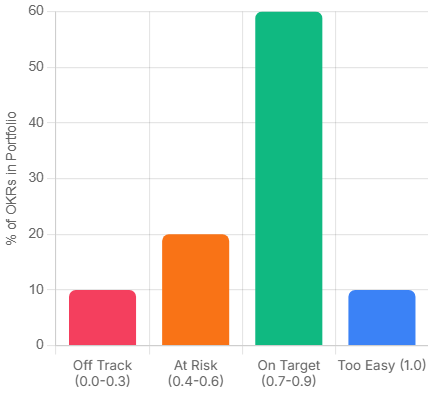
Fifteen minutes. Not a status call. Not a project update. A focused review of where each Key Result currently sits, scored on a 0.0 to 1.0 scale. The question on the table is not ‘what did we do this week’ but ‘are we on track to hit the Key Result, and if not, why not.’
The scoring convention matters. A 0.7 is the target, not 1.0. If your team is consistently hitting 1.0, the Objectives weren’t ambitious enough to stretch the business. This is uncomfortable for most managers to internalise, because it means admitting that a perfect score can be a failure signal.
Pro Tip: What each score band actually means 0.0 – 0.3: Off track. Something structural needs to change this week. 0.4 – 0.6: Progress, but at risk. Worth a focused conversation. 0.7 – 0.9: On target. The stretch is working. 1.0: Either the target was too conservative, or something exceptional happened. Worth understanding which.
The monthly review
This is where you ask whether the Key Results are still the right ones. Circumstances shift mid-quarter. A Key Result that was meaningful in week one can become irrelevant by week five if the market moves, a client churns, or a product decision changes the team’s focus. Catching that at month two is useful. Catching it at the retrospective is just documentation.
The end-of-quarter retrospective
Score every Key Result honestly. Identify the gaps. The question is not ‘what went wrong’ but ‘what did we learn about how we set these.’ Most teams improve their Key Result quality significantly between cycle one and cycle three, simply by being honest in the retro about where the measurement was off.
3 OKR Mistakes That Quietly Kill the First Three Cycles
These are the patterns that appear most consistently in teams that start OKRs with genuine intention and still find themselves back at square one six months later.
Mistake 1: Writing Key Results that are tasks.
The creative agency story above is a clean version of this. But the same trap appears everywhere. ‘Launch the new onboarding sequence.’ ‘Complete the quarterly audit.’ ‘Deliver the revised pricing model.’ All tasks. None of them say anything about whether the work had any effect. Rewrite every Key Result by asking: what would change in the business if this went well? That change is the Key Result.
Mistake 2: Setting too many OKRs.
Three well-chosen OKRs that the team genuinely believes in will outperform eight every time. When the list gets long, prioritisation stops happening. People work across all of them moderately rather than driving hard on the ones that matter most. The number itself signals whether real choices were made in the planning session.
Mistake 3: Tying OKRs to performance reviews.
This one is usually a founder decision, not a manager decision. And it’s worth naming directly: if the team believes their OKR scores will affect compensation or job security, they will write safe targets. Not because they’re dishonest, but because no rational person sets ambitious targets when missing them is costly. The scoring system only produces useful data when people feel safe enough to be honest about where they actually are.
The Execution Gap: Where OKR Programmes Actually Break Down
There’s a pattern that shows up in teams six to eight weeks into their first OKR cycle. The Objectives were written well. The Key Results are genuine outcomes. The weekly check-in was agreed. And then, quietly, the updates stop.
Not because anyone decided to abandon the process. Because updating the OKR tracker feels like a second job on top of the actual work. The project delivery happens in one system. The OKR scores live in a spreadsheet nobody has bookmarked. By the time the quarterly retro arrives, the scores are being reconstructed from memory rather than tracked in real time.
This is the execution gap. OKRs tell you where to go. They don’t automatically connect to where the work is happening. And for most project and ops managers, that connection is the missing piece. Not a more sophisticated planning framework. Just a way to see, in the same place, whether the work being done is moving the numbers that matter.
If that gap sounds familiar, it’s worth looking at how your team manages the space between strategy and day-to-day delivery. Skarya is a work management platform built specifically for service teams and project-led businesses, and closing that gap is the problem it was designed around. If you’re running OKRs in one tab and your work in another, it’s worth a look.
OKR Implementation Is a Skill. It Gets Sharper Each Cycle.
The first OKR cycle is almost always imperfect. The Objectives are slightly too broad, one or two Key Results turn out to be tasks in disguise, and the cadence slips by week five. That’s not failure. That’s the normal shape of a first attempt.
What separates teams that get better from teams that quietly abandon the framework is the retrospective. Scoring honestly, naming what the measurement missed, and rewriting sharper Key Results for the next cycle is the whole compounding mechanism. Teams that do this consistently for three cycles end up with an OKR practice that genuinely reflects how the business moves.
Start with three Objectives. Write Key Results that would prove something changed, not just that something happened. Check in every week. Score honestly. The process is the product.
OKR FAQs: What Managers Ask After Running the First Cycle
Should company OKRs and team OKRs be written at the same time?
Ideally yes, and in that order. Company OKRs set the direction, then teams write their own OKRs to show how they’ll contribute. When this sequencing is reversed, or when they happen in parallel without coordination, team OKRs tend to drift toward what each function is already doing rather than what the business actually needs. A two-week lag between company and team OKR sessions is usually enough. More than a month and the connection weakens.
How do you handle a Key Result that becomes irrelevant mid-quarter?
Change it, document why, and treat the swap as signal for the next planning session. The rule is that you change it because the situation changed, not because you’re behind on it. If a product decision makes a Key Result obsolete by week four, replacing it is the right call. If you’re at 0.3 in week seven and the target feels uncomfortable, that’s not a reason to revise it. It’s a reason to have an honest conversation about what happened.
What is the right number of Key Results per Objective for an operations team?
Two to four, with three being the most common sweet spot in practice. Operations functions often have the instinct to measure everything, because ops work touches many parts of the business. Resist it. More Key Results means more things to update, more potential for contradiction between metrics, and less clarity about what actually matters. If four Key Results all seem essential, that usually means the Objective itself is too broad and needs to be split.
Can OKRs work for project-based work where deliverables vary every quarter?
Yes, but the Key Results need to measure delivery quality and client outcomes rather than project completion. ‘Deliver six projects on time’ is a weak Key Result for a project-led team. It measures throughput, not value. Stronger Key Results for project work tend to focus on client satisfaction scores, scope change rates, margin delivery, or repeat work rates. These stay meaningful across quarters even when the specific projects change.
How do you stop the weekly OKR check-in from becoming just another status meeting?
By changing the question. A status meeting asks What did you do this week.’ An OKR check-in asks, ‘Is the Key Result on track, and what is blocking it?’ The structure should be built around the score, not the activity. If a Key Result is at 0.6 and the conversation focuses on why, that’s an OKR check-in. If it becomes a round table of project updates, the format has drifted. A tight fifteen minutes with a shared scoring doc open is usually enough to keep it focused.
Here is a scenario most teams know well. The brief is in a Google Doc. The task is in a project board. The time log is in a spreadsheet. The client update went out by email. And somewhere between those four places, the actual status of the work got lost.
Nobody made a bad decision. The tools just were never designed to talk to each other, and the cost of that fragmentation is not always obvious until it compounds. A team member spends twenty minutes finding the latest version of a document. A project slips because the dependency was tracked in one tool and the assignee was working out of another. A client asks a simple progress question and the answer requires opening four different tabs.
Work management software exists to close that gap. Research from Breeze.pm puts the global task and work management software market at around $4.1 billion in 2024, on track to nearly triple by 2033. That growth is not a coincidence. It reflects how profoundly teams have changed: more distributed, running mixes of project-based and operational work simultaneously, increasingly reliant on async coordination, and now expecting AI to reduce the manual overhead that used to be unavoidable.
Most teams do not need more project planning depth. What they need is less context loss between the moment a request arrives and the moment the work gets done. That is the specific problem work management software is designed to solve, and it is a meaningfully different goal from what a simple task list or a dedicated project tool can achieve.
What is work management software?
Work management software is a platform that helps teams plan, execute, track, and report on their work inside one connected workspace. It brings together task management, workflow tracking, documentation, time logging, resource planning, and business reporting so teams can answer not just what is being done, but who owns it, how much effort it requires, and what it means for delivery and business performance.
In plain English: Work management software helps teams run their work in one place instead of across separate tools.
The practical difference shows up in the five questions every team needs to answer on any given day. What work needs to happen right now? Where does it live? Who owns it and when is it due? How much time is actually being spent on it? And what do those answers mean for the business, the client, or the project? A fragmented tool stack forces teams to answer each question in a different place. A good work management platform answers all five in one.
Work management vs project management vs task management
These three terms get used interchangeably, but they describe distinct things with different scopes. Getting the distinction right matters because choosing the wrong category of tool is the most common reason teams end up back where they started.
Task management
Task management tools are built around individual actions. You create a to-do, assign it to someone, set a deadline, and track whether it gets done. Apps like Todoist or Microsoft To Do work this way. They are well-designed for personal productivity but they break down fast once you need visibility across a team, want to understand how tasks connect to a larger body of work, or need to see where time and effort are actually going.
Project management
Project management tools are built around scoped, time-bound initiatives. You plan a project, define deliverables, assign resources, track progress against milestones, and close it out. The confusion happens in practice: most teams do not only run projects. They also run continuous operational workflows, a content pipeline, a support queue, a sales process that never really starts or ends. Project tools handle the former well but were not designed for the latter.
Work management
Work management software covers both. It handles scoped projects and the ongoing operational layer a team runs continuously. The goal is to give everyone in the organisation one surface for execution rather than a project board for the formal work and something else for everything in between.
Task Management
Project Management
Work Management
Focus
Individual actions
Scoped, time-bound initiatives
Ongoing team operations + projects
Duration
As needed
Defined start and end date
Continuous and recurring
Primary user
Anyone with a to-do
Project managers, stakeholders
The whole team, every day
Key views
List or inbox
Gantt, milestones, resources
Boards, daily plans, dashboards, reports
Business link
None by default
Delivery vs scope and deadline
Client, billing, cost, and margin visibility
Breaks when
Team grows past ~5 people
Work is ongoing, not a project
Rarely designed to scale both
Who actually needs work management software?
Not everyone. The honest answer is that some teams are better served by a simple tool, at least for now. If you have two or three people working on clearly defined, low-overlap tasks, the overhead of a full platform is probably not worth it.
Teams that benefit most
You have more than five or six people and work visibility is starting to break down.
You run a mix of project-based and ongoing operational work at the same time.
Clients or external stakeholders need to be connected to the work in some way.
You need to understand not just what is being done but how much time it costs and what that means for margin.
You are currently stitching together more than two or three separate tools and losing context in the gaps between them.
Your team is distributed or remote and relies on async coordination to function.
Service businesses, agencies, consulting teams, and project-led SMBs tend to hit this threshold earliest. Remote teams often feel the pain faster because there are no hallway conversations to fill the gaps when information is scattered.
Teams that probably do not need it yet
A solo founder or a two-person team with simple recurring tasks will likely find a full work management platform more overhead than it is worth. If your work fits cleanly in a shared spreadsheet and everyone can see what is happening without a dedicated system, that is fine. The right time to move is when the current approach starts costing you something: missed handoffs, duplicated effort, or hours spent searching for context that should be obvious.
Core features of work management software
The features that matter most depend on your team, but most platforms worth considering will cover the following areas. The column on the right matters as much as the feature itself.
Feature
What it does
Especially matters for
Task and workflow boards
Create tasks, move them through stages, track ownership and status
Any team with more than a handful of recurring workflows
Multiple work views
Kanban, list, table, calendar, and Gantt on the same underlying data
Teams where different roles need different visual context
Built-in docs and files
Keep briefs, notes, files, and links attached to the work itself
Remote teams that rebuild context every time someone joins a project
Create projects and tasks by describing them, generate summaries and reports, build forms automatically
Teams with high setup overhead or frequent status reporting needs
Why the docs and time tracking features matter more than they look
These two often get treated as secondary. They should not be. For remote teams, documentation that lives inside the work rather than beside it is the difference between a new team member spinning up in a day and taking a week. The brief, the decision trail, the reference links if those live in the platform rather than in a separate folder no one knows exists, the team moves faster and rebuilds context less often.
For agencies and consulting businesses, time tracking attached to project work is what makes margin visible. Without it, you are estimating profitability. With it, you are measuring it. Those are very different situations when a client asks you to extend a project or when you are pricing the next one.
What this looks like in practice: a 12-person agency
Consider a twelve-person agency running five client accounts simultaneously. Without a unified platform, here is what their Monday morning typically looks like. The account lead checks email for client updates. The project manager opens a project tool to see task status. The designers look at a shared Google Drive for the latest brief. The finance lead exports a timesheet CSV to check billable hours. Nobody has the same picture, and the first thirty minutes of the day go to reassembly rather than work.
With a work management platform, that same team starts from a single daily view. Each person sees their tasks for the day alongside their schedule. The brief is attached to the relevant board. Comments on tasks replace most of the status emails. Time is logged against specific project work with a billable flag. The account lead can see project progress and hours without asking anyone. And at the end of the month, the report is pulled directly from the platform rather than assembled from four different sources.
The ROI of a work management platform is rarely dramatic on day one. It accumulates in the time that stops getting spent on context rebuilding, version confusion, status chasing, and manual reporting. For a twelve-person team, that often adds up to several hours per person per week.
What separates a good platform from a mediocre one
Almost every tool in this category will show you a task board and a dashboard. The differences that actually matter in day-to-day use come down to a smaller set of things, and they are worth being direct about.
The modules actually connect to each other
This sounds obvious but it is surprisingly rare. If time tracking is a separate module that does not feed into project reporting, you have not solved fragmentation — you have just reorganised it. A platform worth using shows you the connection between the work being done, the time being spent, the clients being served, and the business health that results. When those things live in silos inside the platform itself, the core promise breaks down.
It supports daily execution, not just planning
Some platforms are genuinely good at setting up a project plan on day one and feel clunky from day two onward. A strong work management platform has a daily work layer that real team members actually want to use. Not just a project manager’s overview, but a view that tells each person what they are supposed to be doing today, what is overdue, and what is coming this week. That daily execution surface is often what determines whether a platform gets adopted or quietly abandoned.
Setup time is low and templates exist
The cost of configuring a new workflow is a real barrier. Pre-built templates for common use cases, sales pipelines, agile sprints, client onboarding, support queues, HR recruiting flows mean a team can have a working system in place in minutes. For small teams where no one has the bandwidth to be a full-time system admin, this matters significantly more than it might appear.
Financial visibility is built in, not bolted on
For service businesses especially, the ability to connect work execution to revenue, cost, and margin is what separates a useful platform from an essential one. Most task and project tools tell you whether work is done. A strong work management platform also tells you whether it was profitable. Research from the Project Management Institute consistently shows that organisations with mature project and work management practices complete significantly more work on time and on budget. Having that visibility in the platform rather than in a separate spreadsheet is a prerequisite for acting on it.
Red flags to watch for when evaluating a tool
Setup takes days before you can do any real work. A good platform should be usable with a real workflow inside an hour.
Reporting is disconnected from execution. If you have to export data to another tool to understand project health, the platform is not doing its job.
AI features feel like a separate product. If the AI lives in a sidebar that has no relationship to the actual work, it will not get used.
Clients are managed outside the workflow. If account management requires a separate CRM, the connection between work and client context gets lost again.
Time tracking is an afterthought. If logging time feels like a separate chore rather than a natural part of closing out work, it will not be consistent, and inconsistent time data is worse than no data.
How to choose the right work management software for your team
With dozens of platforms on the market, the decision can feel larger than it needs to be. A few targeted questions will narrow the field quickly.
Start with team size and structure. A ten-person agency has fundamentally different needs from a two-hundred-person enterprise. Most platforms built for the latter carry the overhead to match: complex permission structures, long onboarding, and customisation that requires dedicated administrators. Smaller teams should look for platforms that are opinionated enough to provide structure without requiring someone to manage the system full-time.
Think about what types of work you run. If you are mostly doing scoped project delivery, you need strong Gantt views, milestone tracking, and project-level reporting. If you are also running continuous operational workflows alongside projects, you need boards that work for ongoing processes. Most service businesses need both. Choosing a platform that handles one well and treats the other as an add-on means you will be back to stitching tools together within six months.
Consider whether clients are part of your workflow. If they are, you need a platform with client management, intake forms, and visibility controls that let you link work to specific accounts without exposing your whole workspace. Treating client management as a separate CRM problem means losing the connection between what you promised and what you are actually delivering.
Look at the reporting layer honestly. Most platforms have dashboards. Few give you the financial visibility to understand margin, utilisation, and revenue by client without exporting to a spreadsheet first. If your business depends on that kind of oversight and most service businesses do it needs to be a native feature of the platform you choose.
Run a real test before committing. Set up one actual workflow, log some real time against it, generate a report, and see how the daily experience feels. A platform that looks impressive in a demo but creates friction every day will get abandoned, usually quietly, and then you are back to where you started.
How Skarya is built for this specific problem
Most work management tools were built as either task managers that grew upward, or project tools that expanded sideways. The gap they consistently leave is the connection between daily execution and business performance. A team can track every task perfectly and still have no idea whether the work is profitable or which clients are at risk.
Skarya is built for service teams, agencies, consulting businesses, and project-led SMBs that need execution and business visibility in the same workspace. Rather than adding financial reporting as an afterthought, it is structured so that the work you do feeds directly into how the business is performing.
The execution layer
Boards handle workflow-based operations — sales pipelines, content production, support queues, onboarding flows — with Kanban, List, Table, Calendar, and Timeline views on the same underlying data. Projects handle scoped delivery with Gantt views, milestone tracking, and a project analytics dashboard showing status distribution, priority breakdown, and team workload. My Day gives each team member a personal daily planning surface so the platform is useful at the individual level, not just the management level.
The context layer
Docs, Files, Canvas, and Links live inside boards and projects rather than alongside them. The brief for a campaign board lives in that board. The process map for a client onboarding flow lives in that project. Nothing has to be relocated or cross-referenced; context stays with the work.
The time and people layer
Timesheets connect directly to project and board work. Hours are logged against specific tasks, flagged as billable or non-billable, submitted for manager approval, and aggregated into timesheet reports that show total hours, billable hours, and total value by user and project. The Resources module adds allocation planning, capacity timelines, and utilisation tracking so you can see not just who is working but whether they have the capacity to absorb more work.
The business visibility layer
The CFO Dashboard connects all of that data into a financial view: signed revenue, earned revenue, total cost, margin percentage, and utilisation across the team. A Revenue vs Cost Trend chart, a client summary with per-account margin, and risk alerts make the business health of the work visible without requiring a separate reporting tool or a manual pull from five data sources. For a service business, that is not a nice-to-have. It is the layer that tells you whether you can take on the next client.
The AI layer
Kobi, Skarya’s built-in AI assistant, handles the setup and reporting overhead that teams consistently cite as a time drain. Describe a project in plain language and Kobi creates it. Ask for a board summary and it generates one. Need a project report? Kobi pulls the relevant data and drafts it. The AI is embedded in the workflow rather than treated as a separate product, which means it actually gets used.
Frequently asked questions
What is work management software, in simple terms?
It is a platform where teams plan and track their work in one place instead of splitting tasks, docs, time logs, and updates across multiple separate tools. The goal is to reduce the friction that comes from context living in too many places at once.
How is work management software different from project management software?
Project management tools are designed for scoped, time-bound initiatives with a clear start and end. Work management software covers both projects and the ongoing operational work a team runs continuously. It also typically includes daily planning, time tracking, resource management, and business reporting that project tools do not.
Is work management software the same as a task manager?
No. Task managers handle individual to-dos. Work management software handles how an entire team operates: planning, execution, documentation, time, people, clients, and business performance. The scope is fundamentally broader.
What features does work management software typically include?
Most full platforms include workflow boards, multiple work views, built-in documentation, time tracking, resource planning, intake forms, reporting dashboards, and client management. Stronger platforms also include financial visibility margin tracking, revenue vs cost, utilisation, and AI assistance for setup and reporting tasks.
Who is work management software designed for?
It is most valuable for teams running a mix of project-based and operational work, coordinating across more than five or six people, working with clients or external stakeholders, and needing to understand the business performance of their work. Service businesses, agencies, consulting firms, and project-led SMBs tend to benefit most.
When should a team not use work management software?
If you have two or three people, clearly defined tasks with minimal overlap, and no client-facing reporting requirements, a simpler tool will serve you better. The right signal to move up is when your current setup starts costing you something: missed handoffs, hours spent locating context, or inability to answer basic questions about project health without assembling data manually.
If your team has outgrown disconnected tools, this is exactly the kind of problem Skarya is built for. One workspace for execution, context, time, people, clients, and business visibility.
Start your free Skarya workspace at skarya.ai – no credit card required.