Author: Team Skarya

  • How to Write an SOPs: Guide to Standard Operating Procedures

    How to Write an SOPs: Guide to Standard Operating Procedures

    At some point, someone on your team did something exactly right and you have no idea how to make sure the next person does it the same way. Maybe it was a client onboarding that ran smoothly. A project handoff that did not drop anything. A proposal that landed. The process lived in one person’s head, and when they are gone, on leave, or just busy, it does not run the same way twice.

    That is the problem SOPs exist to solve. A standard operating procedure takes what your best people do instinctively and makes it repeatable for everyone. Not with extra complexity, but with a written process that is clear enough to follow and specific enough to be useful. This guide covers how to write one from scratch and, more importantly, how to make sure it actually gets used.

    What Is an SOP?

    A standard operating procedure is a documented set of instructions that explains how to complete a specific task or process, consistently, every time. Think of it as the written version of how your best team member would walk a new hire through something they do every day.

    SOPs are not manuals and they are not exhaustive knowledge bases. A good SOP covers one process, clearly, with enough detail that someone unfamiliar with the task can complete it without needing to ask for help.

    They exist across every kind of work: client onboarding, invoice approval, content publishing, quality reviews, project kickoffs. Any repeatable process that matters to your business is worth documenting. The threshold is simple. If you have explained the same process more than twice verbally, it is ready to become an SOP.

    The Core Elements Every SOP Needs

    Before writing a single step, it helps to understand what a well-structured SOP contains. Not every SOP needs every element, but most should include the following:

    ElementWhat It Covers
    TitleWhat the process is, in plain language
    OwnerWho is responsible for the process and for keeping the SOP current
    ScopeWhere this process applies, and where it does not
    Tools requiredSoftware, templates, or access needed before starting
    PrerequisitesWhat needs to be in place before this process begins
    StepsSoftware, templates, or access are needed before starting
    Expected outcomeWhat done looks like when the process is completed correctly
    Review dateWhen this SOP was last updated and when it is due for review

    The two most commonly skipped elements are the owner and the review date. Those two omissions are exactly why most SOPs go stale within six months. A document without a named owner is a document that will eventually become inaccurate and stay that way. Giving every SOP an owner and a review date turns documentation from a one-time task into a living system.

    How to Write an SOP Step by Step

    Start with the process, not the document.

    Before you write anything, observe or interview the person who currently does this task best. Watch them do it. Ask them to narrate as they go. The goal is to capture what is actually happening, not what is supposed to happen in theory. There is often a meaningful gap between the two, and your SOP needs to reflect reality.

    Give it a specific title.

    ‘Client onboarding’ is not a useful SOP title. ‘New client onboarding from signed contract to project kickoff’ tells you exactly what is covered and where it starts and ends. Specific titles also make SOPs far easier to find later when your library grows.

    Define the scope.

    State what this SOP covers and what it does not. If your onboarding SOP covers the first 14 days only, say that. If it does not apply to enterprise clients, note it. Clear boundaries prevent the SOP from being used in situations it was not designed for.

    Write the steps in plain language.

    Number every step. One action per step. Use direct language: ‘Open the client folder in Google Drive’ rather than ‘Access should be obtained to the client folder.’ Write for someone who is competent but new to this specific process. Avoid jargon unless it is industry-standard and explained the first time it appears.

    Add context where decisions are required.

    Pure step-by-step instructions work well for linear tasks. But most real processes involve judgment calls. ‘If the client has not responded within 48 hours, send a follow-up using the template in the shared folder’ is far more useful than a step that simply says ‘Wait for client response.’ Anticipating those decision points and spelling out the expected response is what separates a functional SOP from one that gets abandoned the moment things get slightly complicated.

    Define what done looks like.

    A process without a defined endpoint creates ambiguity. The expected outcome field does one job: it tells the person completing the process how to know they have done it correctly. Without it, done means whatever each person individually decides it means.

    Choosing the Right SOP Format

    There is no single correct format for an SOP. The best format is the one your team will actually read and use. A few formats tend to work better than others depending on the complexity of the process.

    Numbered step format works for most processes. Sequential, clear, and easy to follow. Best for tasks that happen in a fixed order without branching paths.

    Hierarchical format adds sub-steps under main steps. Useful when a step itself contains a mini-process. For example, setting up a project in Skarya might expand into sub-steps for naming conventions, assigning owners, and attaching the relevant client and billing model upfront.

    Flowchart or decision tree format works well for processes with multiple paths or conditional logic. These are harder to maintain but genuinely useful for complex workflows like escalation paths or approval chains.

    Checklist format is the stripped-back version. Less narrative, more ticking. Good for recurring quality checks where the steps are already well understood by the people doing the work.

    For most teams starting out, the numbered step format with a brief context section is the right place to begin. You can add complexity once you know what your team actually needs.

    Why SOPs Go Stale and How to Prevent It

    Writing SOPs is the easy part. Keeping them accurate and getting people to use them is where most teams fall short. Understanding the failure modes makes it much easier to design around them.

    They are stored somewhere nobody checks. A Google Doc buried in a folder nobody navigates to, or a link nobody bookmarked. If your SOPs are not embedded in the tools where work actually happens, they exist in theory but not in practice. The fix is straightforward: put the SOP where the work is. A process document for project kickoffs belongs inside your project management tool, linked from the relevant board or template, not in a separate documentation system your team visits twice a year.

    There is no named owner. An SOP without an owner is an SOP that will eventually become wrong. Processes change. Tools change. When nobody is accountable for keeping the document current, it drifts from reality and people stop trusting it. Naming an owner per SOP, not just a general ‘ops team’, is the single most effective structural change you can make.

    They try to cover everything. An SOP that documents every possible edge case often becomes so long it is never opened. Aim for the 80/20 version first: the steps that cover the most common path through the process. Edge cases can live in a notes section or a separate document. A short SOP that gets used is more valuable than a comprehensive one that does not.

    This is a pattern that shaped how Skarya was built. The Docs module sits alongside boards, tasks, and project data in the same workspace. When your process documentation and your actual work live in the same place, SOPs stop being something separate to maintain. They become part of how work gets done, which is the only way they stay relevant.

    Managing SOPs as Your Library Grows

    Writing your first ten SOPs is a milestone. Managing twenty or fifty is a different challenge. A few principles hold up at scale.

    Version control matters. Every SOP should show the last-updated date and the version number. When a process changes, archive the old version rather than deleting it. You may need to know what the process looked like six months ago, particularly for compliance or client-facing work.

    Naming conventions prevent chaos. Agree on a consistent naming structure before you have more than ten SOPs. Something like Department, Process Name, Version is clear enough to scale and immediately tells you what you are looking at.

    Group SOPs by function. Do not create one giant library. Create clusters: client-facing processes together, internal ops together, finance processes together. People should be able to find what they need in under 30 seconds. If they cannot, the library is organised for the person who built it, not the people who use it.

    Set a regular review cycle. A quarterly review of your most-used SOPs works well for most teams. High-frequency or compliance-related processes should be reviewed more often. Stable internal processes can run on a six-month cycle. The point is to make review a scheduled habit rather than something that only happens when a process visibly breaks.

    Getting Your Team to Actually Use Them

    Adoption is a cultural problem, not a documentation problem. You can write the clearest SOP in the world and still find your team reverting to old habits. Two changes make the biggest difference.

    The first is involving the people who do the work in writing the SOPs. A process document written entirely by a manager and handed down to the team will always be viewed with some scepticism. A document co-created with the people who actually do the task gets used because they recognise it as an accurate reflection of real practice, not a theoretical version of how someone thinks the work should happen.

    The second is referencing SOPs in context rather than pointing people to a library. In a task comment, in a meeting action item, in a project template. When people encounter SOPs as part of the workflow rather than as an extra step outside of it, the friction drops significantly. Documentation that lives next to the work gets used. Documentation that lives in a folder does not.

    Frequently Asked Questions

    What is the difference between an SOP and a work instruction?

    An SOP defines what process to follow and why it exists. A work instruction goes deeper, providing detailed technical steps for a specific task within that process. Think of an SOP as the overview, and a work instruction as the manual for one specific part of it. Many small teams do not need the distinction and use the term SOP to cover both.

    How long should an SOP be?

    Long enough to cover the process completely, short enough that someone will actually read it. For most repeatable business processes, that is one to three pages. If your SOP runs beyond five pages, consider whether you are documenting one process or several, and split accordingly.

    How often should SOPs be reviewed?

    A quarterly review cycle works well for most teams. High-frequency processes or anything connected to compliance, client work, or financial handling should be reviewed at least every three months. Stable internal processes can often run on a six-month review cycle without issues.

    Who should own SOPs in a small team?

    Ownership should sit with the person closest to the process, not necessarily the most senior person. A team lead or operations manager often makes sense as an overall curator, but individual SOPs should have named process owners who are accountable for accuracy.

    Can I use a template to write SOPs?

    Yes, and you should. A consistent template reduces the effort of creating each new SOP and makes your library easier to navigate. The most useful templates include a title block, scope statement, prerequisites, numbered steps, expected outcome, and a review date field. Build one good template and reuse it across every process you document.


  • How to Run an Effective Team Meeting: A Step-by-Step Guide

    How to Run an Effective Team Meeting: A Step-by-Step Guide

    You schedule a one-hour check-in. Half the team shows up unprepared. Someone talks for 15 minutes about something that doesn’t affect anyone else in the room. The last 10 minutes are rushed. You close with a vague “let’s follow up on that” and nobody does.

    Sound familiar? The frustrating thing is, most of this is fixable. Not with a new meeting culture initiative or a two-day workshop. With a handful of specific habits applied before, during, and after the meeting.

    This guide walks through exactly what those habits are.

    Why Most Team Meetings Waste Time (and What Actually Fixes It)

    Ineffective meetings are typically not the result of difficult individuals but rather a lack of clear structure. When a meeting lacks a defined purpose, an agenda, and a designated person responsible for outcomes, it often devolves into unproductive group discussions that create the illusion of productivity without achieving any real results.

    A 2023 study by Microsoft found that workers consider more than half of their weekly meetings unproductive. That’s not a time management problem. It’s a meeting design problem. And design is something you can control.

    The steps below address the three most common failure points: what happens before the meeting, what happens during it, and what doesn’t happen after it.

    Step 1- Decide Whether the Meeting Should Exist

    This sounds obvious, but most team leads skip it. Before you send a calendar invite, ask one question: what decision or outcome does this meeting need to produce?

    If the answer is “to share updates,” that’s a red flag. Updates can be shared asynchronously. If the answer is “to align on approach before we start the next phase” or “to resolve a blocker the team is stuck on,” that’s a meeting worth having.

    Three situations that usually warrant a meeting: decisions that need group input, problems that require real-time back-and-forth to solve, and kickoffs where shared context matters.

    Three situations that usually don’t: status updates, information sharing, and tasks that one person can handle and report back on.

    • Pro Tip: If you can’t write a one-sentence answer to “what does this meeting need to produce?”, don’t book it yet. Get clear on the output first.

    Step 2 – Write an Agenda That Actually Guides the Meeting

    An agenda isn’t a list of topics. That version exists on every meeting that still goes off the rails. A useful agenda specifies the outcome for each item, the time allocated to it, and who’s responsible for leading it.

    Here’s the difference:

    Weak agenda itemStrong agenda item
    Project updateReview Q3 project status, flag any blockers ,10 min (Alex)
    Budget discussionDecide whether to approve additional resource spend for Aug, 15 min (Finance lead)
    Team feedbackCollect one risk and one win from each team member, 10 min (whole group)

    Send the agenda at least 24 hours before the meeting. Not as a courtesy, but because preparation genuinely changes the quality of the conversation. People arrive with context, not questions.

    Step 3- Invite the Right People, Not Everyone

    Every extra person in a meeting adds coordination cost. They also add social pressure, which makes it harder for the room to reach a decision, because more people feel the need to contribute whether or not they have something useful to add.

    A good rule: invite people who either have a decision to make, or have information that’s necessary for that decision. Not people who might be interested, or people you don’t want to leave out. You can share notes with those people afterwards.

    For recurring meetings, review the invite list every few months. The team lead who was critical at project kickoff may not need to be in every weekly check-in six months later.

    • Pro Tip: When in doubt, make the meeting smaller. A tight group moves faster and commits more readily. You can always loop others in through a summary.

    Step 4 – Run the Meeting With Structure and Focus

    Start on time. Not “in two minutes when everyone’s here.” On time. Teams that start late train themselves to arrive late, and the people who showed up on time get penalised for it.

    Open with the purpose: one sentence that reminds everyone why they’re there and what the meeting needs to produce. Then follow the agenda.

    If the conversation starts drifting off-topic, name it and park it. “That’s worth discussing, let’s add it to the follow-up list so we can stay on track.” A shared notes document or a simple “parking lot” section in your agenda works well for this. It signals that the point wasn’t dismissed, just deferred.

    “If you had to identify, in one word, the reason why the human race has not achieved, and never will achieve, its full potential, that word would be ‘meetings.— Dave Barry, author and humourist

    That’s a joke, but it lands because it’s true often enough. The team leads who run great meetings treat time as a finite, valuable resource, both theirs and everyone else’s. That mindset alone changes how meetings are conducted.

    Assign a timekeeper if the team struggles to stay on schedule. It doesn’t need to be formal. A simple “can you flag us at the 10-minute mark?” to someone in the room is enough.

    Step 5 – Close With Clear Actions and Owners

    This is where most meetings fall apart, even good ones. The conversation was productive. Everyone nods. Someone says “great, let’s action that.” And then nothing happens, because “we” is not a person and “that” is not a task.

    Before you close, do a quick actions review. For each decision or commitment made in the meeting, confirm three things: what the action is, who owns it, and when it’s due.

    Say it out loud, not just in the notes. Verbal confirmation creates a moment of accountability that text doesn’t. The difference between “that’s recorded somewhere” and “I just agreed to this in front of my team” matters more than most meeting guides acknowledge.

    Skarya’s Boards and My Day features make this easy to operationalise after the meeting. Actions captured in a board go straight to the relevant project with an assignee and due date. Kobi, Skarya’s AI teammate, can help draft a post-meeting summary from your notes, so the follow-up gets distributed without anyone spending 30 minutes formatting it.

    • Pro Tip: Keep a running action log in your project board, not in the meeting notes doc. Notes get archived. A board task stays visible until it’s done.

    What Happens After the Meeting Is Where Most Teams Fall Apart

    Sending notes within 24 hours is a standard recommendation, and for good reason. Notes go stale fast. People’s memories diverge quickly, and what seemed like clear alignment in the room starts to blur by the next morning.

    Keep the notes short: actions, decisions, and any key context needed to understand them. Nobody reads a four-page meeting transcript.

    The real work isn’t documentation, though. It’s follow-through. Check in on open actions before the next meeting, not during it. If you wait until the next meeting to find out nothing got done, you’ve just wasted another hour discovering information you could have caught mid-week.

    The teams that run consistently effective meetings don’t have a secret process. They have a consistent one. Purpose before you book. Agenda before you meet. Actions before you close. Follow-up before you repeat. That’s it.

    Frequently Asked Questions

    The questions below reflect what team leads commonly search when trying to improve their meeting practices.

    How long should an effective team meeting be?

    Most team meetings should run between 30 and 60 minutes. Meetings under 30 minutes work well for focused decision-making or quick check-ins with a small group. Meetings over 60 minutes are usually a sign the scope is too broad or the agenda hasn’t been tightened enough. A shorter meeting with a clear purpose almost always outperforms a long one without one.

    What should be in a team meeting agenda?

    A good team meeting agenda includes the meeting’s purpose, each agenda item with a stated outcome and time allocation, and the name of the person responsible for leading each item. Send it to attendees at least 24 hours before the meeting. Agendas that list topics without outcomes give the conversation no clear direction and are easy to derail.

    How do you keep team meetings on track?

    Start on time, follow a written agenda, and name it when the conversation drifts. A ‘parking lot’ for off-topic points helps the group stay focused without dismissing useful ideas. Assign a timekeeper if your team consistently runs over. The facilitator’s job is to protect the agenda, not to participate in every thread that opens.

    How do you make sure meeting actions actually get done?

    Assign every action to a specific person with a specific due date before the meeting closes. Confirm these verbally, not just in notes. Check in on open actions before the next meeting, not during it. Using a project management tool to log actions immediately after the meeting, rather than relying on email follow-ups, significantly increases the chance they get completed.

    What is the difference between a status update meeting and an effective team meeting?

    Status update meetings share information that could have been sent in a message. Effective team meetings produce decisions, resolve blockers, or align the group on something that requires real-time input. If a meeting’s main output is information that could have been communicated asynchronously, it’s a status update meeting, and it probably didn’t need to happen.

  • How to Improve Communication in the Workplace

    How to Improve Communication in the Workplace

    Someone on your team drops the ball on a deliverable. You ask what happened. The answer is some version of: “I didn’t know that was on me” or “I thought that was handled” or “I couldn’t find the latest version.”

    Nobody was being careless. The work just got lost in the gaps between tools, threads, and conversations that never quite connected.

    That’s what most workplace communication problems actually look like. Not silence. Not conflict. Just a slow, invisible leak of context that costs teams hours every week and makes even good people look disorganised.

    The good news: you don’t need a communication overhaul to fix it. You need a system. Here’s how to build one.

    Most Teams Don’t Have a Communication Problem. They Have a Context Problem.

    Here’s what the advice usually misses: teams that struggle with communication are almost never short on talking. If anything, they’re overwhelmed by it. Slack messages, email threads, calls, status updates, check-ins. The volume is there.

    What’s missing is context. Specifically, the right information reaching the right person at the right moment, in a place they can actually find it.

    Think about the last time someone on your team said “wait, I didn’t know about that.” The information probably existed somewhere. It just didn’t live close enough to the work for the person doing the work to see it.

    That’s the distinction worth making before you change anything. Are people not communicating? Or is the communication happening in places that don’t connect back to the work? In our experience, it’s almost always the second one.

    💡  Pro Tip:  Before you roll out a new process or tool, run this test: pick a project that finished in the last month and try to piece together how a key decision got made. If it takes more than five minutes to find the thread, you’ve found your real problem.

    The Channel Mismatch Most Teams Never Notice

    Every communication channel has a natural shelf life. Chat messages last a few hours before they’re buried. Emails stretch a little longer but become unsearchable fast. Docs and task notes? They can last indefinitely, if people actually use them.

    The problem is that most teams use their shortest-lived channel for everything. Quick question? Slack. Project update? Slack. Decision that affects how work gets done for the next three weeks? Also Slack. And by tomorrow, nobody can find it.

    The fix isn’t to ban chat. It’s to be honest about what chat is good for: time-sensitive, low-stakes exchanges that don’t need to be referenced later. Anything that needs to outlive the conversation should live somewhere more permanent.

    A rule worth applying: if someone might need to find this message in a week, it doesn’t belong in chat. A task note, a project doc, or a comment on the relevant work item will serve you far better.

    This sounds obvious. It isn’t, because the habit of “just messaging someone” is deeply ingrained. Changing it requires a conscious decision, not just good intentions.

    The Conversation Should Live Where the Work Lives

    Here’s where most workplace communication guides stop short. They’ll tell you to use the right channels, set clear expectations, document decisions. All true. But they miss the structural issue underneath: conversations and work are stored in different places entirely.

    Someone gets assigned a task. A question comes up. They message the relevant person in chat. That person asks someone else. Eventually there’s an answer, and work continues. But the exchange that shaped how that task got done? Invisible to anyone looking at the task itself.

    This is where keeping communication attached to the work makes a real difference. In Skarya, every task inside a board has its own comment thread. Questions, updates, decisions, course corrections, all of it happens directly on the task, not in a separate channel. When you open the task, you’re not just seeing what needs to be done. You’re seeing the full conversation about how it got there.

    That changes a few things. Handoffs become easier because the context travels with the task. New team members can get up to speed without interrupting anyone. And the “can you remind me what we decided on this?” questions drop off sharply, because the answer is already there.

    It sounds like a small shift. The cumulative effect on a busy team is not small at all.

    💡  Pro Tip:  When you’re embedding this habit, make the prompt specific: “If your message is about a task, post it on the task.” Vague guidance like “communicate in context” doesn’t stick. Concrete instructions do.

    Tools Won’t Save You. Norms Will.

    This is the part that doesn’t get said enough: no tool fixes a communication problem on its own. The best-designed platform in the world, used inconsistently by a team with no shared agreements, will generate just as much confusion as a shared email inbox.

    What teams actually need is a small set of explicit norms. Not a policy document. Just clear answers to the questions that cause friction:

    • What counts as urgent? Without a shared definition, the default is that everything is urgent, which means nothing actually is. Decide as a team what warrants an immediate response versus what can wait for a natural working window.
    • Who makes the final call? A lot of back-and-forth exists not because people disagree, but because it’s unclear who has the authority to end the conversation. For each project, name that person. It takes 30 seconds and saves hours.
    • Where does the current status live? There should be one place per project where someone can go to find out what’s happening right now. Not two places, not “it depends.” One. If your team can’t agree on where that is, that’s the first thing to fix.

    These aren’t sophisticated. They’re just decisions that most teams never make explicitly, so they get reinvented on every project.

    Feedback That Actually Changes Something

    Most teams have feedback as a scheduled event. The quarterly review, the end-of-project retro, the one-on-one that keeps getting pushed. By the time it arrives, the moment has passed. The context has faded. The chance to actually change something has been and gone.

    Feedback works when it’s close to the work. Not three months later in a formal setting, but in the week of a project, attached to the thing it’s about. A short observation on a task when something went well. A flag in the comments when something needs to change before it becomes a bigger issue.

    Once a project wraps, a focused 20-minute conversation about communication specifically is worth more than a broad retrospective. Not “what could we have done better?” but “did the right people have what they needed when they needed it? Where did things get sticky?” Keep it tight. Make it a habit, not a one-off.

    One more thing that’s often underestimated: people share information more honestly when they don’t feel like surfacing a problem will come back on them. That environment doesn’t come from a workshop. It comes from how the team lead responds the first three or four times someone raises something uncomfortable.

    A Team That Communicates Well Doesn’t Feel Like It’s Trying To

    That’s the thing about teams with genuinely good communication. You don’t notice it. Work just moves. People have what they need. Nobody’s chasing updates or reconstructing decisions or onboarding new team members through a 45-minute briefing.

    What’s underneath that is structure, not personality. It’s decisions about where things live, who owns what, and how conversations connect to the work they’re about. None of it is complicated. Most of it just requires someone to decide it clearly, once, and make sure the team actually knows.

    The five strategies here aren’t a methodology. They’re a starting point for teams that want to stop losing hours to communication friction and start doing the thing the communication is supposed to enable.

    If your team is already in Skarya, most of this structure is built in. The boards, task comments, docs, and project views are all there to keep communication close to the work. What only your team can do is decide to use them that way.

    Frequently Asked Questions

    What are the most effective workplace communication strategies?

    The ones that actually work focus on structure, not volume. Keeping conversations attached to the work they’re about, agreeing on where decisions live, and matching the message to the right channel tend to produce more improvement than any new meeting format or communication tool.

    How do you improve communication in a remote or hybrid team?

    The core challenge in remote and hybrid environments is context loss. A decision made on a call doesn’t automatically reach the person who missed it. Fix this by making sure decisions, updates, and discussions live somewhere findable, not just in a chat thread that scrolls away. Task-level comments and a clear source of truth per project go a long way.

    Why does workplace communication break down?

    Usually because conversations and work are stored separately. The discussion about a task lives in a DM or a chat thread, while the task itself lives somewhere else. Anyone coming to the work later has no record of what was decided or why. It’s rarely about bad intentions. It’s almost always about a missing structure.

    What’s the difference between communication tools and communication norms?

    Tools give you channels. Norms tell people what goes in each channel, who responds, and how quickly. Most communication problems are norm problems, not tool problems. A simple setup that everyone uses consistently will outperform a sophisticated one with no shared agreements.

  • The Future of Work Management: AI as Your Team’s Second Brain

    The Future of Work Management: AI as Your Team’s Second Brain

    Ask most team leaders where their biggest productivity problem lives, and they’ll point to the wrong place. They’ll name a tool, a process, or a person. The real answer is usually simpler and harder to fix: the team is carrying too much in its head.

    Client context from three months ago. The resourcing call made in a hallway conversation that never made it into the project file. The scope creep that started small, went untracked, and only became visible when someone finally ran the numbers. None of this is a failure of effort. Knowledge-intensive work generates more context than any individual can reliably hold, which means critical information gets lost at the exact moments it matters most. AI is changing this, not by replacing human judgment, but by relieving the cognitive load that quietly undermines it.

    For agencies, consultancies, and project-led businesses, the implications are significant. The teams pulling ahead in 2026 aren’t necessarily larger or better resourced. They’ve simply stopped asking their people to be the connective tissue of their own operations.

    The Memory Problem That’s Costing You Projects

    Processes live in project management tools, while critical judgment calls vanish into 4pm Slack threads that nobody bookmarks and everyone forgets. When a team member leaves, a project scales unexpectedly, or a long-dormant client returns, that institutional memory has to be reconstructed from scratch, at exactly the moment there’s no time to reconstruct it.

    For agencies and consultancies, lost context is a revenue problem: scope gets re-agreed incorrectly, billing gaps appear, and client relationships erode from friction that should have been avoidable. For project-led SMBs, the same problem becomes a delivery problem, where projects slip because the team spends hours on operational overhead that could have been handled automatically. According to McKinsey’s Social Economy report, knowledge workers spend close to 20% of their working week searching for internal information or tracking down colleagues who can help with specific tasks, not because they’re unproductive, but because finding the right information at the right moment is genuinely costly work.

    AI doesn’t fix this by adding another dashboard to monitor. It fixes it by sitting inside the workflow and surfacing what’s relevant before someone has to go looking.

    What “AI as a Second Brain” Actually Means in Practice

    The phrase gets used loosely, so precision matters. Your team’s first brain handles the irreplaceable work: creative decisions, client relationships, the judgment calls that no algorithm can replicate. A second brain absorbs a different category entirely, the tracking, the recall, the pattern-matching that drains attention without delivering proportional value. Recalling what was agreed three weeks ago. Cross-referencing who’s available before assigning a task. Flagging that a project’s pacing doesn’t match its deadline. This is the cognitive load AI is built to carry.

    The practical impact is already measurable. A Federal Reserve Bank of St. Louis study found that workers using generative AI saved an average of 5.4% of their working hours, roughly 2.2 hours every week in a 40-hour schedule. Scaled across a ten-person service team, that’s the equivalent of getting back two full working days every month, without changing anything about the quality of the actual work.

    PRO TIP The teams seeing the biggest gains from AI aren’t the ones adopting the most tools. They’re the ones that have picked one central platform and let AI work inside their actual workflow, rather than alongside it in a separate tab they have to remember to open.

    The Five Things AI Will Handle (That You Shouldn’t)

    The shift isn’t about chatbots or automated reports. AI is taking over how work gets tracked and coordinated, specifically the tasks that require memory and pattern recognition but not human judgment.

    • Scheduling and workload distribution. Instead of manually checking capacity before assigning work, AI reads resource load across the team in real time and recommends the right assignment. No spreadsheet, no back-and-forth.
    • Progress monitoring and early warning. AI identifies when a project is trending off track before the project manager notices, reading pacing data, task completion rates, and deadline proximity, then flagging the issue while there’s still time to act.
    • Context surfacing. Before a client meeting or project briefing, AI pulls the relevant history: last conversation points, outstanding decisions, open threads. The person walking in is already prepared without spending twenty minutes searching for it.
    • Reporting and synthesis. Weekly status updates, budget pacing summaries, utilisation snapshots: these are largely pattern-based documents AI can draft from live data. The human reviews and sends.
    • Decision support. AI doesn’t make decisions, but it helps make better ones by surfacing current utilisation, capacity across the next six weeks, and budget burn before a leader commits to a new project.

    “While AI readily raises the floor by improving efficiency, the transformative potential comes from raising the ceiling.”
     Dan Diasio, EY Global Consulting AI Leader

    That quote comes from the EY US AI Pulse Survey, December 2025, which found that 96% of organisations investing in AI reported productivity gains, including 57% reporting significant ones. Most of those gains, though, are still at floor level. Efficiency improves. The ceiling, what happens when an entire team redesigns how it coordinates around AI’s real capabilities, is where the meaningful shift happens.

    Why Small Teams Stand to Gain the Most

    The data reveals a counterintuitive truth: the largest, most resourced organisations don’t benefit most from AI in work management. Large enterprises already have dedicated operations staff, project management offices, and analysts filling the coordination function. AI makes those people more effective, but the structural function already exists. A ten-person agency or twelve-person consultancy doesn’t have that infrastructure. The founder is also the account director. The lead designer is managing their own project timelines. Operations gets handled by whoever has bandwidth, which means it gets handled inconsistently.

    For these teams, AI isn’t augmenting an existing function. It’s providing one they never had. A small team that builds its work management around what AI makes possible doesn’t get incrementally better; it operates at a level that used to require twice the headcount.

    “It is analogous to replacing a steam-powered motor with an electric one but leaving the factory floor unchanged, good progress, but not transformative.”
     Federal Reserve Bank of San Francisco, 2026

    That observation, from the SF Fed’s February 2026 economic letter on AI and productivity, applies directly to how teams adopt work management tools. The organisations that pulled ahead during electrification rebuilt their factory floor around what electricity made possible, not the ones that bolted it onto existing machinery. Swapping your task list for an AI-enabled version of the same task list is replacing the motor. Redesigning how your team coordinates, tracks work, and makes resourcing decisions around an AI-powered platform: that’s the factory floor.

    What This Looks Like Inside an Actual Platform

    Skarya was built for exactly this type of team: service businesses, agencies, and project-led SMBs that need real business intelligence without enterprise-scale overhead or the limitations of a basic task list.

    The AI inside Skarya is Kobi. Rather than operating as a standalone chat window that requires a context switch, Kobi sits inside the workflow and reads live project, resource, and financial data. Ask what’s at risk this week and it answers from your actual numbers, not a generic suggestion. Ask how to re-prioritise the team’s workload given a new client request and it works with what it knows about current capacity, not what you’ve described to it in a prompt.

    My Day takes the second-brain concept to the individual level, surfacing a prioritised view of what actually needs attention today, pulled from across all projects and deadlines rather than leaving each person to reconstruct their own picture from scratch every morning. Canvas and Boards give the team a shared map of what’s in motion, so when Kobi identifies a risk or a resourcing gap, it points to the place in the workflow where something needs to happen, not just a notification to acknowledge.

    The CFO Dashboard brings the financial picture together. Utilisation, project profitability, burn rates: the financial layer of a service business is usually the last thing to get visibility in a small team. When AI can pull that together from live data, the quality of decisions improves, not because the leader became smarter, but because they stopped making calls on incomplete information.

    PRO TIP– If you’re evaluating AI features in a work management tool, the most important question isn’t ‘what can the AI do?’ It’s ‘what data does it have access to?’ An AI operating on partial project data gives partial answers. It needs the full picture, tasks, resources, time, and budgets, to be genuinely useful.

    The Honest Limitation: AI Without Context Is Just Noise

    A version of “AI-powered” means a features list and a marketing claim. A different version means the system actually knows your business. The difference is data depth, and this is where most implementations fall short. AI that can see your tasks but not your budgets, your projects but not your people, your deadlines but not your client history, operates with one hand tied. The outputs become generic at the precise moment you need specificity, which is usually when something is going wrong and you need an answer quickly.

    This is why the platform the AI lives in matters as much as the AI itself. A second brain is only as useful as what it has been taught, and in work management that means tasks, resources, time, finances, and projects connected in one place rather than scattered across tools that don’t share data. The teams that extract the most from AI won’t be the earliest adopters. They’ll be the ones who gave it the richest context to work with from the start.

    Frequently Asked Questions

    How will AI change project management for small businesses?

    AI gives small teams capabilities that previously required dedicated operations or project management staff: real-time resource tracking, early warning on project risks, automated reporting, and decision support, all running from live project data rather than manual input. For teams without that infrastructure, it’s not augmenting an existing function; it’s providing one they never had.

    What is an AI second brain for teams?

    An AI second brain for teams is an intelligent part of a work management platform that surfaces the right information at the right moment, tracking context, flagging risks, and pulling together data across projects, people, and budgets so team members don’t carry that cognitive load individually.

    Which teams benefit most from AI in project management?

    Small to mid-sized teams in agencies, consultancies, and service businesses tend to gain the most. These teams often lack dedicated operations staff, so AI fills a coordination function they didn’t previously have, rather than simply making an existing process faster.

    Is AI project management software reliable for small businesses?

    Reliability depends heavily on data depth. AI that can see across connected tasks, resources, time, and finances produces useful outputs. AI bolted onto a basic task list without that broader context generates suggestions too generic to act on. That’s the key question to ask when evaluating any “AI-powered” platform.

    What should I look for when choosing an AI work management tool?

    Look for a platform where AI has access to the full picture: not just tasks, but also people, time, budgets, and project financials. Check whether the AI works inside your existing workflow or requires you to switch to a separate interface. And ask whether it surfaces information proactively, before you go looking, rather than only responding when prompted.

    The Competitive Window Is Shorter Than It Looks

    “AI-powered” will appear on every work management tool’s homepage within eighteen months. Most will mean something quite narrow by it: a chat interface layered over a disconnected data model, surfacing suggestions broad enough to apply to any team and therefore useful to none. The distinction between AI as a real operational tool and AI as a feature announcement will be hard to read on a pricing page, but very easy to feel inside a live project environment.

    The practical question for any team running multiple client engagements right now is whether their current tools can connect tasks, people, time, and money into a single picture, because that’s the prerequisite for AI that actually helps. Without it, you’re not building a second brain. You’re adding a smarter-sounding to-do list.

    The competitive advantage of the next two to three years won’t belong to the teams with the most AI features. It’ll belong to the ones that built their operations around AI’s real capabilities while everyone else was still deciding whether to bother. If your coordination overhead is quietly eating into time that should go to the actual work, the question isn’t whether AI will eventually help. It’s whether you want to be the team that figures it out first, or the one that catches up later.

    See how Kobi and the full Skarya platform work together  →

  • How to Improve Project Profitability: Stop Managing the Margin Wrong

    How to Improve Project Profitability: Stop Managing the Margin Wrong

    Your team is 90% utilised. Timesheets are full. Projects are closing. So why does the margin keep coming in short?

    Because utilisation is the wrong number to watch.

    High utilisation only proves your team is busy. It doesn’t prove they’re making you money. The hours your team logs and the hours that reach an invoice are two different figures. The gap between them is where project profitability bleeds out.

    According to the SPI Research 2024 Professional Services Maturity Benchmark, average billable utilisation across professional services firms fell to 69.3% in 2023, sitting well below the 75% optimal threshold. That figure counts hours logged on billable work. It says nothing about how many of those hours actually reached an invoice. That second number is lower. Significantly lower. For a 10-person team billing at $150/hour, every percentage point below the 75% threshold costs roughly $15,000 in annual revenue. Most teams have no idea which side of that line they are on.

    Stop blaming your pricing model. You have a blind spot. Fixing it starts with understanding exactly where the leak is and why the tools most teams rely on are structurally incapable of catching it in time.

    The Metric Confusion Costing You More Than You Think

    Utilisation and realization sound like the same thing. They’re not, and conflating them is one of the most expensive habits a project business can develop.

    Utilisation: the percentage of a team member’s time spent on billable work. An 87% utilisation rate looks healthy on paper.

    Realization: the percentage of billable hours that actually reach an invoice and get paid. If 10% of those billable hours get absorbed by out-of-scope revisions, written off to keep a client relationship intact, or logged against the wrong code, your realization rate drops to 77%. No one registers it until the reconciliation.

    Most teams obsess over utilisation because it’s easy to pull from a time-tracking tool. Realization requires connecting three separate data points: scope agreed, hours logged, and amounts invoiced. Most teams don’t have that connection built into their day-to-day workflow.

    The industry benchmark for realization in professional services sits between 85% and 95%. Below 80% on a consistent basis, the problem isn’t a lazy team or difficult clients. Your operational systems are letting revenue walk out the door before you’ve had a chance to bill it.

    Four Places Your Margin Is Leaking Right Now

    Scope creep gets blamed for everything. The biggest margin leaks are internal, and they’re happening on projects that look completely under control.

    Unbilled revisions: The client requests a change. The team absorbs it because the relationship matters. No change order is raised because it feels like a small ask. Across eight projects a month, that pattern produces a material write-off with no paper trail.

    Senior staff doing junior work: A senior consultant drafts an update an analyst could write. In the moment, it feels efficient. At billing, it destroys your margin. You’re burning senior-rate costs against mid-level outputs, and your margin model was never built for that.

    Scope agreed in the wrong place: Projects with ambiguous deliverables generate more revision cycles, more internal debate, and more write-downs than projects with tight scope. The damage doesn’t show up at kickoff. It surfaces six weeks in when three stakeholders have three different definitions of done.

    Write-downs that nobody tracks: Most billing teams carry an informal habit of sneaking reductions into an invoice when a project runs long. It keeps the client relationship intact. Write-downs that aren’t tracked systematically become invisible losses that compound month over month. They never get fixed because nobody can see them.

    Spreadsheets are autopsy tools. By the time a monthly finance report lands, the projects are closed, the team has moved on, and the loss is permanent. Any business still relying on end-of-month reconciliation to manage profitability isn’t managing it. It’s documenting failure after the fact.

    Why Your Current Tools Are Built for the Wrong Moment

    The tools most project teams use, time trackers, billing spreadsheets, monthly finance reports, share one design flaw: they record what happened, not what’s happening.

    A time tracker tells you hours were logged. It doesn’t tell you whether those hours are billable, whether they’re within scope, or whether the project is tracking toward a profitable close. A monthly finance report arrives three weeks after the month ends, reporting on projects already closed and margins you can no longer recover.

    By the time a spreadsheet shows you a problem, you have two options: absorb the loss, or have an uncomfortable client conversation. Neither is a good operational outcome.

    Teams running consistent margins aren’t better at post-mortems. They’ve moved visibility from after closeout to during delivery. At any point in an active project, they know whether budget burn is tracking against the original forecast and they act on that information while there’s still time to change the outcome.

    💡  Pro Tip: Before changing any process, run a realization audit on your last five closed projects. Pull hours logged, hours billed, and hours written off. The pattern will immediately tell you whether you have a scope definition problem, a billing process problem, or a resource allocation problem. That distinction determines which fix you actually need.

    How Kobi and the Skarya CFO Dashboard Stop the Bleed In-Flight

    The operational shift that separates teams running 30%+ margins from those perpetually puzzled by the gap: profitability visibility has to live inside the delivery workflow, not in a separate finance tool someone checks at month end.

    Skarya’s CFO Dashboard gives project leaders a live read on budget burn, realization rate, and resource cost, updated as hours are logged, not after the project closes. No manual reconciliation. No waiting for a finance report. The numbers move in real time, which means decisions that affect margin get made while there’s still margin left to protect.

    Kobi flags realization leaks before they reach billing. When a team member logs hours against a project tracking above scope, Kobi surfaces the discrepancy immediately. Project leads see the alert inside their workflow, raise a scope conversation with the client, or adjust resource allocation before the write-down becomes inevitable. The intervention happens at the moment it’s still possible to act on it.
    The CFO Dashboard maps cost to task before you staff the project. One of the most expensive decisions in a project business happens at staffing: who gets assigned to what. Skarya’s resource view shows the cost rate of each team member against the value of each task phase, so you can match seniority to complexity before work begins, not after you’ve already burnt two weeks of partner time on tasks that should have gone to a mid-level.

    The CFO Dashboard also tracks write-downs as a project metric, not as an accounting footnote. Every hour written off is captured, categorised, and visible to the project lead and finance team simultaneously. Patterns that were previously invisible become actionable: if one project type consistently generates write-downs, that’s a pricing or scoping problem you can fix before the next engagement.

    Resource Allocation Is Where Margin Is Won or Lost

    Every time you assign a senior consultant to a task a mid-level could own, you’re making a margin decision. Most teams don’t recognise it that way, which is precisely why it keeps happening.

    Effective resource allocation for profitability follows one principle: senior capacity is your scarcest, most expensive resource. Reserve it for work that genuinely requires senior judgment: complex problem-framing, high-stakes client decisions, quality control on critical deliverables. Everything else flows to the level it matches.

    This requires two things most teams skip. First, explicit task classification at scoping: which phases require senior input, and which require mid-level execution? Second, a staffing view that shows cost against task complexity before assignments are made, not just availability.

    Teams that build this discipline into their resourcing process consistently find that margin improves without changing their rates. The cost basis per project drops because the work is being done by the right person, not just the available one.

    Making Margin a Live Metric, Not a Monthly Verdict

    The final piece isn’t a tool or a process. It’s a decision about who owns the numbers.

    In most project businesses, profitability is a finance team concern. The people making the daily decisions that destroy margin, scope accommodations, resource assignments, revision cycles absorbed without a change order, are completely disconnected from the financial data.

    When project leads can see budget burn, realization rate, and write-down history in real time, inside the same platform where work is happening, the feedback loop closes. Scope drift gets flagged by the person managing the project, not discovered by the finance team three weeks later.

    Make project-level profitability visible to the people leading the project before the project closes. Not in a separate dashboard they have to log into. Not in a report they have to request. In the same workflow view they’re already using.

    That’s when profitability stops being a verdict and becomes a variable you can actually manage.

    The Only Number That Actually Tells You If a Project Made Money

    Utilisation fills timesheets. Realization fills bank accounts. If you’re only tracking one of them, you’re managing a feeling, not a margin.

    The path to consistently profitable projects isn’t a pricing overhaul or a new client onboarding checklist. It’s closing the gap between hours worked and hours billed, matching resource cost to task complexity, and shifting profitability visibility from month-end reconciliation to active delivery management.

    Find your realization rate right now. If it takes more than five minutes to locate that number, your system is already costing you money.

    If you want to see how Skarya handles this in practice, Kobi flagging realization leaks before they reach billing, the CFO Dashboard mapping cost to task complexity, all of it live inside the delivery workflow, the platform was built for teams who are done managing margin in hindsight. See how it works →

    Frequently Asked Questions

    What is the difference between utilisation and realization rate in project management?

    Utilisation measures how much of a team member’s time is spent on billable work. Realization measures how much of that billable time is actually invoiced and collected. A team can be fully utilised and still have poor realization if hours are being written off, absorbed into unbilled revisions, or logged against non-billable codes. Realization is the metric that determines whether a project actually made money.

    What is a healthy project profitability margin for service businesses?

    Most professional services firms target 20 to 35% net project margin. Firms consistently running below 15% typically have a realization problem, a resource cost alignment problem, or both. The benchmark varies by service type. Strategy and advisory work often targets higher margins than implementation or managed services, but the underlying drivers are the same.

    Why do projects lose profitability even when they deliver on time?

    On-time delivery and profitable delivery are not the same thing. Projects lose margin to unbilled revisions, senior staff performing low-complexity work, scope that was ambiguous at kickoff, and write-downs that never get reviewed. None of these show up in a delivery timeline. They appear in the gap between hours logged and hours invoiced at billing time.

    How do I track project profitability in real time without a dedicated finance team?

    You need a direct connection between scope, time logged, and billing status, visible to the project lead, not just the finance function. Tools like Skarya’s CFO Dashboard surface budget burn and realization rate in real time, inside the delivery workflow, so project leads can catch margin drift before the project closes rather than discovering it at reconciliation.

    What is a project write-down and how does it affect profitability?

    A write-down occurs when billable hours are reduced or removed from an invoice, usually to manage a client relationship when a project runs over scope. Occasional write-downs are a normal part of professional services. Systematic write-downs that are never tracked become invisible losses that compound over time. Treating write-downs as a project metric, not just an accounting entry, is one of the fastest ways to identify structural profitability problems across your portfolio.

  • OKR Implementation Guide for Project and Ops Managers

    OKR Implementation Guide for Project and Ops Managers

    The quarter ends. Someone opens the shared doc, pastes last cycle’s OKRs into a new tab, and adjusts a few numbers. Nobody argues. Everyone privately suspects the targets aren’t quite right. The meeting ends in eleven minutes.

    That moment, quiet and unremarkable as it is, is where OKR programmes die.

    Not in the big dramatic failure, but in the gradual erosion of honesty. The targets drift toward comfort. The weekly check-ins stop happening. The retrospective becomes a polite fiction. And somewhere in the business, a founder who introduced OKRs eighteen months ago is wondering why the framework that works so well on stage never seemed to take hold inside their own team.

    The problem is rarely the people. It’s the implementation. OKRs are simple in structure and genuinely hard to run well. This guide covers the full picture for the managers who live inside them: how to write them, how to run the cadence, and where the wheels typically come off.

    OKR Structure: What Managers Actually Need to Understand

    An OKR has two parts. An Objective is a qualitative statement of where you want to go. It should be clear enough to orient the team and ambitious enough to mean something. A Key Result is a measurable outcome that tells you whether you’re getting there. Not a task. Not a deliverable. An outcome.

    Most guides stop there and move on. That’s the problem. Because the task-versus-outcome distinction is precisely where most managers trip up, and it’s worth spending a real moment on it.

    An output is something you produce. A report, a call, a launch, a campaign. An outcome is what changes as a result of producing it. Retention improves. Revenue grows. Response time drops. The output is the activity. The outcome is the evidence that the activity worked.

    Key Results measure outcomes. If your Key Result could be completed without anything meaningfully improving, it’s an output in disguise.

    The OKR structure at a glance Objective: What do we want to achieve this quarter?  
    Key Result 1: What measurable change confirms we’re getting there?
    Key Result 2: What number or threshold marks real progress? Key Result 3: What is the clearest proof it worked?  
    Tip: Two to four Key Results per Objective. More than four and you stop being able to act on them.

    Founders who set company-level OKRs need to understand this distinction just as much as the managers who inherit them. A company’s objective handed down without properly formed Key Results forces every team below it to invent their own measurement criteria, usually inconsistently. The misalignment that follows looks like a cultural problem. It’s actually a structural one.

    OKR Examples for Operations Teams: What Good Looks Like in Practice

    A project manager at a 20-person creative agency decided her team’s first OKRs were going to be practical. No jargon. No over-engineering. One Key Result read: “Run weekly status calls with all active clients.”

    The team hit it. Every week, without exception. The calls happened. The notes were sent. The process was airtight.

    At the end of the quarter, two clients churned.

    When the ops director asked what had gone wrong, the manager looked back at her Key Results and understood the issue immediately. She had been measuring the meeting, not the relationship. The check-in was happening. The value wasn’t landing. And because nothing in her OKR framework was measuring client sentiment, nobody caught the drift until the contracts were cancelled.

    That Key Result should have read something like: “Achieve a 90% positive feedback rating on value delivery across structured 60-day client check-ins.” Same cadence of calls. Completely different measurement. One tracks an activity. The other tracks whether the activity worked.

    Before and after: rewriting a weak Key Result BEFORE (output): Run weekly status calls with all active clients   AFTER (outcome): Achieve a 90% positive feedback rating on value delivery across structured 60-day client check-ins   The activity is the same. What changes is what you’re measuring. One tells you whether the call happened. The other tells you whether it mattered.

    This is the most common OKR mistake in operations teams, and it compounds fast. When your Key Results are outputs, you build a team culture that optimises for activity over impact. People work hard, complete their tasks, and still can’t tell you whether the quarter moved the business forward.

    With the structure clear and the pitfalls visible, the next question is how to actually build and launch an OKR cycle inside a real team.

    How to Use OKRs at Work: The Implementation Sequence

    Most OKR implementations fail in the first quarter not because the framework is wrong but because the launch is rushed. The sequence below won’t eliminate all friction, but it prevents the most common collapses.

    • Draft individually, then align together.

    Have each team member draft what they think the quarter’s Objectives should be before any group meeting. This surfaces misalignment early, while it’s still cheap to fix. If the manager and the founder have fundamentally different ideas about what success looks like this quarter, better to find out in the drafting session than in the retrospective.

    • Connect team OKRs to company OKRs explicitly.

    Every team-level Objective should map clearly to a company-level one. The connection doesn’t need to be rigid, but it should be visible. When teams write OKRs in isolation, they tend to optimize for what’s measurable within their function rather than what moves the business. That’s how departments end up with impressive metrics and a business that isn’t growing.

    • Run the three-question check on every Key Result.

    Before finalizing any Key Result, ask: Is it measurable? Is it an outcome rather than a task? Would hitting it actually prove progress on the Objective? All three must be yes. If a Key Result fails the third question, it’s almost certainly an output.

    • Set the cadence before you launch.

    Agree the weekly check-in format, the scoring method, and the monthly review process before the cycle begins. OKR systems that skip this step tend to drift by week four, when the check-ins start getting postponed and the scores stop getting updated.

    “It almost doesn’t matter what you set as your Objectives. What matters is whether you look at them every week.” Christina Wodtke, Author of Radical Focus

    Wodtke’s point is sharper than it sounds. The Objectives matter. But the cadence is what makes them functional rather than decorative.

    The OKR Cadence: Managing Weekly, Monthly and Quarterly Reviews

    The cadence is the part most implementation guides underexplain. Setting OKRs is the easy half. Running the rhythm that keeps them alive is where the real work sits.

    The weekly check-in

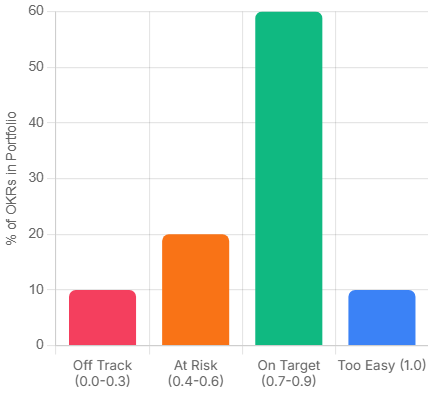
    Fifteen minutes. Not a status call. Not a project update. A focused review of where each Key Result currently sits, scored on a 0.0 to 1.0 scale. The question on the table is not ‘what did we do this week’ but ‘are we on track to hit the Key Result, and if not, why not.’

    The scoring convention matters. A 0.7 is the target, not 1.0. If your team is consistently hitting 1.0, the Objectives weren’t ambitious enough to stretch the business. This is uncomfortable for most managers to internalise, because it means admitting that a perfect score can be a failure signal.

    okr result
    Pro Tip: What each score band actually means
    0.0 – 0.3: Off track. Something structural needs to change this week.
    0.4 – 0.6: Progress, but at risk. Worth a focused conversation. 0.7 – 0.9: On target. The stretch is working.
    1.0: Either the target was too conservative, or something exceptional happened. Worth understanding which.

    The monthly review

    This is where you ask whether the Key Results are still the right ones. Circumstances shift mid-quarter. A Key Result that was meaningful in week one can become irrelevant by week five if the market moves, a client churns, or a product decision changes the team’s focus. Catching that at month two is useful. Catching it at the retrospective is just documentation.

    The end-of-quarter retrospective

    Score every Key Result honestly. Identify the gaps. The question is not ‘what went wrong’ but ‘what did we learn about how we set these.’ Most teams improve their Key Result quality significantly between cycle one and cycle three, simply by being honest in the retro about where the measurement was off.

    3 OKR Mistakes That Quietly Kill the First Three Cycles

    These are the patterns that appear most consistently in teams that start OKRs with genuine intention and still find themselves back at square one six months later.

    Mistake 1: Writing Key Results that are tasks.

    The creative agency story above is a clean version of this. But the same trap appears everywhere. ‘Launch the new onboarding sequence.’ ‘Complete the quarterly audit.’ ‘Deliver the revised pricing model.’ All tasks. None of them say anything about whether the work had any effect. Rewrite every Key Result by asking: what would change in the business if this went well? That change is the Key Result.

    Mistake 2: Setting too many OKRs.

    Three well-chosen OKRs that the team genuinely believes in will outperform eight every time. When the list gets long, prioritisation stops happening. People work across all of them moderately rather than driving hard on the ones that matter most. The number itself signals whether real choices were made in the planning session.

    Mistake 3: Tying OKRs to performance reviews.

    This one is usually a founder decision, not a manager decision. And it’s worth naming directly: if the team believes their OKR scores will affect compensation or job security, they will write safe targets. Not because they’re dishonest, but because no rational person sets ambitious targets when missing them is costly. The scoring system only produces useful data when people feel safe enough to be honest about where they actually are.

    The Execution Gap: Where OKR Programmes Actually Break Down

    There’s a pattern that shows up in teams six to eight weeks into their first OKR cycle. The Objectives were written well. The Key Results are genuine outcomes. The weekly check-in was agreed. And then, quietly, the updates stop.

    Not because anyone decided to abandon the process. Because updating the OKR tracker feels like a second job on top of the actual work. The project delivery happens in one system. The OKR scores live in a spreadsheet nobody has bookmarked. By the time the quarterly retro arrives, the scores are being reconstructed from memory rather than tracked in real time.

    This is the execution gap. OKRs tell you where to go. They don’t automatically connect to where the work is happening. And for most project and ops managers, that connection is the missing piece. Not a more sophisticated planning framework. Just a way to see, in the same place, whether the work being done is moving the numbers that matter.

    If that gap sounds familiar, it’s worth looking at how your team manages the space between strategy and day-to-day delivery. Skarya is a work management platform built specifically for service teams and project-led businesses, and closing that gap is the problem it was designed around. If you’re running OKRs in one tab and your work in another, it’s worth a look.

    OKR Implementation Is a Skill. It Gets Sharper Each Cycle.

    The first OKR cycle is almost always imperfect. The Objectives are slightly too broad, one or two Key Results turn out to be tasks in disguise, and the cadence slips by week five. That’s not failure. That’s the normal shape of a first attempt.

    What separates teams that get better from teams that quietly abandon the framework is the retrospective. Scoring honestly, naming what the measurement missed, and rewriting sharper Key Results for the next cycle is the whole compounding mechanism. Teams that do this consistently for three cycles end up with an OKR practice that genuinely reflects how the business moves.

    Start with three Objectives. Write Key Results that would prove something changed, not just that something happened. Check in every week. Score honestly. The process is the product.

    OKR FAQs: What Managers Ask After Running the First Cycle

    Should company OKRs and team OKRs be written at the same time?

    Ideally yes, and in that order. Company OKRs set the direction, then teams write their own OKRs to show how they’ll contribute. When this sequencing is reversed, or when they happen in parallel without coordination, team OKRs tend to drift toward what each function is already doing rather than what the business actually needs. A two-week lag between company and team OKR sessions is usually enough. More than a month and the connection weakens.

    How do you handle a Key Result that becomes irrelevant mid-quarter?

    Change it, document why, and treat the swap as signal for the next planning session. The rule is that you change it because the situation changed, not because you’re behind on it. If a product decision makes a Key Result obsolete by week four, replacing it is the right call. If you’re at 0.3 in week seven and the target feels uncomfortable, that’s not a reason to revise it. It’s a reason to have an honest conversation about what happened.

    What is the right number of Key Results per Objective for an operations team?

    Two to four, with three being the most common sweet spot in practice. Operations functions often have the instinct to measure everything, because ops work touches many parts of the business. Resist it. More Key Results means more things to update, more potential for contradiction between metrics, and less clarity about what actually matters. If four Key Results all seem essential, that usually means the Objective itself is too broad and needs to be split.

    Can OKRs work for project-based work where deliverables vary every quarter?

    Yes, but the Key Results need to measure delivery quality and client outcomes rather than project completion. ‘Deliver six projects on time’ is a weak Key Result for a project-led team. It measures throughput, not value. Stronger Key Results for project work tend to focus on client satisfaction scores, scope change rates, margin delivery, or repeat work rates. These stay meaningful across quarters even when the specific projects change.

    How do you stop the weekly OKR check-in from becoming just another status meeting?

    By changing the question. A status meeting asks What did you do this week.’ An OKR check-in asks, ‘Is the Key Result on track, and what is blocking it?’ The structure should be built around the score, not the activity. If a Key Result is at 0.6 and the conversation focuses on why, that’s an OKR check-in. If it becomes a round table of project updates, the format has drifted. A tight fifteen minutes with a shared scoring doc open is usually enough to keep it focused.

  • How to Align Your Daily Work with Big Goals Using AI

    How to Align Your Daily Work with Big Goals Using AI

    Here’s a scenario most managers know well. Quarter-end arrives. Someone pulls up the OKR dashboard, and the numbers look fine. But when they actually trace what the team spent its time on for the past three months, there’s a quiet, uncomfortable realization: a lot of that work had nothing to do with the goals that were supposed to matter.

    This isn’t a discipline problem or a motivation problem. It’s an alignment problem. And it’s more common than anyone likes to admit.

    The disconnect between what people actually do each day and what the business is trying to achieve is one of the most expensive inefficiencies in knowledge work. Goal-setting frameworks like OKRs and KPIs are supposed to solve this. But most of them are set at the beginning of a quarter, filed somewhere, and then completely disconnected from the task management tools where real work happens.

    The result? Goal fatigue. Teams that feel busy but not purposeful. Managers who spend half their week in status meetings trying to manually reconnect the dots.

    AI is starting to close that gap. Not by adding another reporting layer, but by working inside the tools where work actually happens and surfacing alignment or the lack of it in real time.

    Why Connecting Daily Work to Company Goals Is So Hard

    Strategic goals tend to live in one place. Daily tasks live somewhere else entirely. In most organizations, those two worlds rarely talk to each other except during quarterly reviews, sprint planning, or when something goes visibly wrong.

    There’s a structural reason for this. Goals are typically set top-down, framed in high-level language (“increase client retention by 15%”), while tasks are created bottom-up, framed in operational language (“update onboarding deck”, “fix billing bug”, “send follow-up to key account”). Bridging those two vocabularies has always required a human to do it manually, in a meeting, on a recurring basis.

    The research is unambiguous on the cost. According to a Gallup study on employee engagement, only 26% of employees strongly agree that their manager’s feedback helps them do their job better. The implication is telling: most contributors are navigating daily work without a reliable, real-time signal of whether what they’re doing actually connects to what matters.

    The cost compounds at scale. McKinsey research found that employees who feel their daily work connects to a broader purpose are four times more likely to report high engagement than those who don’t. That’s not a wellbeing metric, it’s a productivity and retention metric. When people can’t see how their daily tasks align to OKRs and company goals, they disengage. And disengagement is far more expensive than the hour it would take to surface that connection clearly.

    AI doesn’t eliminate this challenge, but it changes the economics of solving it. Instead of requiring a human to manually trace task-to-goal connections once every two weeks, an AI-powered system can do it continuously, in the background, and surface the gaps before they compound.

    “Most strategy failures aren’t failures of strategy. They’re failures of execution specifically, failures to translate strategy into the daily decisions and behaviors of people doing the work.” – Roger Martin, former Dean, Rotman School of Management

    That gap between strategy and daily behavior is exactly where AI goal alignment tools are now operating.

    What AI Goal Alignment Actually Means in Practice

    When most people hear “AI goal alignment”, they imagine a dashboard with a health score and some colour-coded indicators. That’s part of it, but it’s the surface layer.

    The more meaningful version works like this: your tasks, projects, and logged time are continuously analyzed against your stated goals. The system identifies which tasks are actively contributing to which objectives, which goals have had no associated activity for several days, and where time is being spent on work that doesn’t map to any strategic priority at all. Done well, this is goal tracking with AI built into the rhythm of work, not bolted on top of it.

    Done well, this creates three practical capabilities that most teams don’t currently have:

    • Real-time alignment scoring. Instead of finding out at quarter-end that a goal was neglected, you get a signal mid-sprint. There’s still time to course-correct.
    • Automated progress context. Status updates and check-ins become much shorter because the data is already surfaced. You’re discussing decisions, not compiling reports.
    • Prioritization signals. When an AI assistant can see that your highest-weighted goal has had zero task activity in five days, it can surface that as a recommendation  not just a warning light, but actionable context.
    💡 Pro Tip: Alignment scoring is only useful if the original goals are well-defined. Vague OKRs like “improve team culture” produce vague alignment signals. The more specific and measurable your goals, the more actionable your AI’s output will be.

    A Practical Workflow to Align Tasks to OKRs Using AI

    The following workflow is designed for individual contributors and mid-level managers who want to connect daily work to company goals without adding more overhead to their week.

    Step 1: Set goals in the same system where work happens

    This is the most overlooked prerequisite. If your goals live in a slide deck or a separate OKR tool that doesn’t talk to your task manager, no amount of AI can help. The first move is consolidating your goal structure into your work management platform so the AI has something to compare tasks against.

    The goal definition doesn’t need to be elaborate. A clear objective, a measurable outcome, and a timeframe is enough.

    Step 2: Tag or link tasks to goals as you create them

    Most modern work management platforms let you associate a task with a project, initiative, or goal. This step is low-friction once it becomes habit, but it’s the data input the AI depends on. Think of it like categorizing expenses, you only have to do it once per task, and the system does the analysis from there.

    💡 Pro Tip: If tagging every task feels like overhead, start with only your top three priorities for the week. Link those tasks to goals and let the AI surface patterns from that subset. You can expand coverage once the habit is established.

    Step 3: Use your AI assistant for daily prioritization, not just status

    This is where the shift in value happens. Most people use AI assistants to generate summaries or answer questions about completed work. The more powerful use is asking it forward-looking questions at the start of each day.

    Questions like: “What’s my highest-priority goal this week and which tasks are currently supporting it?” or “Is there any active goal that hasn’t had any task activity in the past three days?” These aren’t complicated prompts, but they produce a very different kind of morning review.

    Step 4: Review alignment weekly, not quarterly

    A quarterly goal review is too slow. By the time misalignment surfaces, you’ve often lost six weeks of momentum. A weekly review of goal-to-task alignment  which should take under ten minutes with a system that surfaces it automatically, keeps strategy and execution close enough to be correctable.

    The weekly review doesn’t need to be a meeting. It can be a two-minute scan of your AI-generated alignment summary, followed by a few task adjustments.

    Step 5: Let AI handle the reporting, so you can handle the work

    One of the most draining parts of any management role is translating operational activity into strategic language for stakeholders. AI-assisted goal alignment automates a significant portion of this, particularly the “here’s what we did and here’s how it connects to our objectives” layer of status reporting.

    When your system already knows which tasks are mapped to which goals, and how much time was invested, generating a meaningful weekly or fortnightly update becomes a query rather than a manual effort.

    📋  In Practice: What This Looks Like A mid-level manager at a professional services firm has a client retention goal marked as high-priority for the quarter. It’s Wednesday afternoon. The week’s task board is full internal admin, a backlog of bug fixes, a few proposal edits. None of it maps to retention. Without an alignment system, this doesn’t surface until the Friday status call, or the end-of-sprint retrospective, or the quarterly review. By then, a week’s worth of capacity has been misallocated. With AI goal tracking built into the work management platform, the system flags the mismatch on Tuesday evening: “Client Retention (Q2 priority) has had no active task coverage since Monday. Three tasks currently in progress are unlinked to any goal.” The manager sees it before Wednesday’s standup. One conversation, two task reassignments, and the week is back on strategy. The AI didn’t make the decision. It just made the misalignment visible early enough to do something about it.

    Where Most Teams Get This Wrong

    The failure mode we see most often isn’t a technology failure. It’s a habits failure. Teams adopt a goal alignment tool, spend two days configuring their OKRs, and then go back to creating tasks the same way they always did  without linking them to anything.

    The result is an AI that has beautifully structured goals and no task data to analyze. It’s like setting up an analytics platform and forgetting to install the tracking code.

    The other common mistake is expecting AI to replace goal clarity. If the goals themselves are vague, competing, or unstated, the alignment system will faithfully reflect that confusion back at you. Garbage in, garbage out applies here. The AI is a signal amplifier, not a strategy consultant.

    💡 Pro Tip: Before implementing any AI goal alignment system, spend 30 minutes auditing your current goals for specificity. If you can’t measure progress against a goal without a meeting, rewrite it first. The AI will do the rest.

    That clarity is what goal tracking with AI is ultimately trying to give back to people doing complex, high-stakes work.

    Why the System Has to Be Unified to Work

    Here’s the design principle that most goal alignment tools miss: the AI is only as good as the data it can see. And in most organizations, the data is fragmented across a task tool, a goal-tracking sheet, a time management app, and a project management platform that don’t share a common data layer.

    When goals and tasks live in separate systems, alignment requires a human bridge, a meeting, a manual update, a copied-and-pasted status report. That’s the bottleneck. No AI overlay fixes a fragmentation problem; it just adds another layer on top of the same broken structure.

    The teams that actually close the gap are the ones who consolidate: goals, tasks, projects, time, and resources in one environment. When the AI can see all of that at once, surfacing the kind of mismatch in the scenario above stops being a report and starts being a reflex.

    This is the architecture Skarya was built around. Kobi, Skarya’s AI work assistant, doesn’t sit outside the work; it operates inside the same environment where tasks are created, time is logged, and projects move. That means it can flag that a high-priority goal has no active task coverage, identify where hours are being spent on work that doesn’t connect to any stated objective, and generate progress context automatically rather than waiting for someone to compile it.

    The My Day module gives individual contributors a daily view shaped by both their task list and their goal commitments. The CFO Dashboard surfaces the financial and operational picture for leaders who need to see how execution maps to investment. Neither requires manual assembly, they’re generated from the same live data.

    If this is the kind of alignment problem your team is dealing with, see how your team connects daily execution to big-picture goals.

    The Bottom Line

    Goal alignment has always been hard because it requires two fundamentally different types of thinking, strategic framing and operational execution, to stay in constant conversation. That conversation has historically happened in meetings, and meetings are expensive and slow.

    AI doesn’t replace thinking. But it does replace the manual work of translating between the two layers. That’s not a small improvement. For any team that has ever arrived at a quarterly review and wondered where three months went, it’s the kind of change that compounds.

    The teams that move fastest won’t have the best goals. They’ll be the ones who never have to wonder, on a Wednesday afternoon, whether the work in front of them is pointed at anything that matters.

    Frequently Asked Questions

    What is AI goal alignment?

    AI goal alignment refers to using artificial intelligence to automatically map daily tasks, time, and project activity to your stated strategic goals  identifying gaps, surfacing progress, and prioritising work in real time without manual reporting.

    How does AI help with OKR tracking?

    AI-powered OKR tracking connects task-level activity to high-level objectives continuously, rather than waiting for end-of-sprint reviews. It can flag when a key result has had no associated task activity, generate progress summaries automatically, and surface which goals are at risk of under-investment.

    What’s the difference between a goal alignment tool and a task manager?

    A task manager helps you organize and complete individual tasks. A goal alignment tool maps those tasks to strategic outcomes and measures whether daily activity is actually moving the business forward. The most effective approach is connecting daily work to company goals within a single unified system.

    Can AI replace quarterly goal reviews?

    Not entirely, but it can dramatically reduce their frequency and duration. When alignment is tracked continuously and progress is surfaced automatically, quarterly reviews become strategic conversations rather than data-gathering exercises. Most teams using AI-assisted goal alignment shift to monthly check-ins rather than quarterly ones.

    How do you get a team to actually link tasks to goals?

    Start small. Ask the team to link only their top three weekly priorities to goals. Once the habit is established and they can see the benefit, specifically, that status reporting becomes faster, adoption typically spreads naturally. The key is making sure the friction of linking a task is lower than the friction of the status meeting it replace

  • Time Management Myths That Are Wasting Your Day

    Time Management Myths That Are Wasting Your Day

    You’ve read the articles. You’ve downloaded the apps. You’ve color-coded the calendar, blocked the mornings, and set the intentions. And somehow, the day still slips through your fingers.

    The problem might not be your discipline. It might be the advice.

    A lot of popular time management guidance sounds compelling especially when it’s delivered confidently by someone with a best-selling book. But good marketing isn’t the same as good evidence. Some of the most widely shared productivity tips are, at best, oversimplifications. At worst, they’re actively making things harder.

    Here are six common time management mistakes hiding in plain sight, dressed up as best practice, repeated in workplaces and self-help bestsellers alike, and what actually holds up when you look more carefully.

    The Advice Is Everywhere. The Results Aren’t.

    Search “productivity tips” and you’ll get millions of results: morning routines, time-blocking templates, habit stacks, focus frameworks. All of it confident. Most of it contradictory.

    What’s missing isn’t more advice. It’s honest scrutiny of the advice that already exists.

    None of the myths below are fringe ideas. They’re mainstream recommendations  the kind that get repeated in team meetings, performance reviews, and keynote talks. They persist not because they work, but because they feel like they should. That’s exactly what makes them worth examining.

    Myth #1- You Just Need a Better To-Do List

    The to-do list is the cornerstone of most productivity systems. And for many people, it’s also a quiet source of anxiety disguised as organisation.

    The problem isn’t writing things down that’s genuinely useful. The problem is treating a list as a plan. A to-do list tells you what exists. It doesn’t tell you what matters, what’s realistic for today, or what you should stop doing entirely.

    There’s a well-documented psychological phenomenon called the Zeigarnik Effect,  the tendency for incomplete tasks to occupy working memory even when you’re not actively engaged with them. The original research, conducted by Soviet psychologist Bluma Zeigarnik in the 1920s and revisited extensively since, suggests that the mere existence of open loops creates cognitive tension. A list of 40 items doesn’t organize your attention. It fragments it.

    More items rarely mean more progress. They usually mean more background noise.

    “What gets scheduled gets done. What merely gets listed gets postponed.”

    Pro Tip  Before adding to your list, subtract from it. Write a “not-to-do list”, the low-value tasks, the reflex commitments, the things you keep rolling over that don’t actually need to exist. Removing three things often frees more mental space than any new scheduling technique.

    Myth #2 -Waking Up at 5am Makes You More Productive

    This one has a remarkable grip on the business world. Win the morning, win the day.

    The 5am narrative is genuinely compelling  but it rests on a flawed assumption: that there’s a universally optimal time to do deep work, and it happens to fall before sunrise.

    Chronobiology complicates that picture. Researcher Till Roenneberg, whose large-scale work on human sleep patterns at Ludwig Maximilian University of Munich has tracked chronotypes across hundreds of thousands of people, found that biological sleep timing varies significantly across the population,  and that a meaningful proportion of adults are genetically wired to function better later in the day. Forcing a late chronotype into a 5am schedule doesn’t unlock hidden performance. It accumulates sleep debt.

    The real principle buried inside the early-rising myth is worth keeping: protecting your highest-energy hours for your most demanding work matters. For some people that’s 6 am. For others it’s 10 am or 2 pm. The hour is less important than the habit of protecting it.

    “You can discipline yourself to wake up earlier. You can’t discipline your circadian rhythm out of existence.”

    Pro Tip  For one week, track your energy alongside your tasks, note when you feel sharpest versus when you’re running on inertia. The pattern is usually clearer than expected. Build your schedule around it, not around what productivity influencers do at dawn.

    Myth #3- Multitasking Is a Skill Worth Having

    It gets listed on CVs. It gets praised in job interviews. It isn’t real.

    What we call multitasking is task-switching,  moving attention rapidly between two or more things. The cognitive cost is well-established.

    Researchers at the American Psychological Association, synthesizing findings across multiple studies, found that switching between tasks introduces a “switch cost”. a lag in cognitive performance that compounds as tasks become more complex. The cumulative productivity loss is substantial, with some estimates placing it at 20–40% depending on task type and frequency of switching.

    The mechanism matters here: every time you switch, a residue of the previous task stays active in working memory. You’re not thinking about two things. You’re thinking about one thing badly while the other one lingers.

    The people who appear to multitask well have usually done something different batched similar tasks together, reduced the number of active decisions in their environment, or built structures that minimise interruptions. That’s not multitasking. It’s the opposite of it.

    Pro Tip  When you notice yourself switching between tasks, add a 60-second re-entry ritual before each new one — close the previous tab, write a single sentence capturing where you left off, then begin fresh. Small friction. Significant cognitive difference.

    Myth #4- Busy Means Productive

    This is probably the most culturally embedded bad productivity habit on this list and the hardest to argue against, because it’s woven into how many workplaces signal value.

    Busyness has become a status marker. Say you’re busy and people hear: important, in-demand, indispensable. But busyness and productivity measure completely different things. Productivity asks what moved forward. Busyness asks how full the day felt.

    You can have a packed calendar and reach Friday with nothing meaningful advanced. Meetings that could have been emails. Emails that didn’t need replies. Tasks completed thoroughly that didn’t need to exist at all.

    For many professionals and teams, the real problem isn’t lack of effort, it’s lack of visibility into which work actually creates value versus which work just generates motion. That distinction is harder to make than it sounds, especially in environments where activity is visible and impact isn’t.

    That’s the kind of operating clarity platforms like Skarya.ai are designed to support, not adding more structure on top of a busy day, but building the shared understanding of priority that makes the right work easier to identify and protect.

    “Don’t mistake movement for progress.”

    The honest question at the end of each day isn’t “Was I busy?” It’s “Did the right things move?”

    Myth #5- You Need to Work Longer to Get More Done

    More hours should produce more output. The equation is intuitive. Past a certain threshold, it breaks down.

    In a frequently cited 2014 study, Stanford economist John Pencavel analysed output data from British munitions workers during World War I and found that output per hour declined sharply once workers exceeded around 49 hours per week  and that working 70 hours produced roughly the same total output as working 55. The extra 15 hours were, in terms of actual results, largely wasted.

    The health dimension reinforces this from a different angle. A large meta-analysis published in The Lancet in 2015, drawing on data from over 600,000 individuals across Europe, the US, and Australia, found that working 55 or more hours per week was associated with meaningfully higher risk of cardiovascular events compared to standard working hours.

    The compounding issue isn’t just diminishing returns. It’s that sustained overwork degrades the quality of rest, which degrades the quality of the working hours themselves. Recovery isn’t a productivity tax. It’s what makes sustained focused effort possible.

    Pro Tip  Set a hard stop time and treat it like a non-negotiable meeting. Not “I’ll finish when this feels done” a fixed time. The constraint forces prioritization in ways that open-ended sessions rarely do.

    Myth #6-The Right App Will Fix Your Time Problem

    Every few months, a new productivity app promises to change everything. Every few months, people download it with genuine enthusiasm, use it for two weeks, and quietly return to their previous habits slightly more guilty, slightly more sceptical.

    Apps don’t fix time management problems. They amplify whatever system or absence of system already exists. Give a disorganized workflow a new tool and you get disorganized data in a better-looking interface.

    This isn’t an argument against tools. The right tool, inside a working system, genuinely helps. But the sequence matters: system first, tool second. Get clear on how you want to work, what you’re protecting, what you’re batching, how you’re triaging and then find something that supports that. Choosing the tool first and hoping it reveals the system is why the graveyard of abandoned productivity apps is so crowded.

    Pro Tip  Before adopting any new tool, write down two things: the specific problem it solves, and how you’ll know in 30 days whether it’s working. If you can’t answer both, the problem isn’t the tool — it’s that the system isn’t defined yet.

    What Actually Works

    Every myth on this list shares the same underlying failure: they focus on tactics while skipping the harder question of strategy. They tell you how to organise your time without ever asking why you’re spending it the way you are.

    Better time management doesn’t come from a stricter system. It comes from answering three questions most productivity advice never asks:

    What actually matters? Not what’s on the list, not what arrived loudest in your inbox what genuinely moves something important forward.

    What can wait? Not everything urgent is important. Not everything scheduled is necessary. The ability to defer without guilt is a skill, not a weakness.

    What should disappear entirely? The most underrated time management move isn’t prioritization. It’s elimination. The tasks, meetings, and commitments that consume time without creating value don’t need to be managed better. They need to be gone.

    Time management gets better when you stop asking “How do I fit more in?” and start asking those three questions honestly. The schedule takes care of itself from there.

    If this resonates and you’re thinking about it as a team challenge not just a personal one see how Skarya.ai approaches priority and visibility.

    FAQ

    Why doesn’t the Pomodoro Technique work for everyone?

    The Pomodoro method works well for tasks that can be meaningfully broken into short, contained bursts. For complex analytical work or deep creative projects, the fixed 25-minute interruption can break flow rather than build it. The underlying principle protecting focused time  is sound. The rigid structure doesn’t fit every type of work or every person’s concentration pattern. Adjusting the interval (to 50 or 90 minutes, for example) often preserves the benefit without the friction.

    Is time blocking actually effective, or is it another productivity myth?

    Time blocking works  but only when blocks are realistic and actively protected. The most common failure mode is an over-scheduled day with no buffer, which collapses the moment anything unexpected happens. Effective time blocking leaves roughly 20–30% of the day unallocated, treats the schedule as a guide rather than a contract, and includes a short weekly review to adjust. Without those safeguards, it becomes just another elaborate to-do list.

    What are the most common time management mistakes people don’t realize they’re making?

    The three that show up most consistently: treating a full calendar as evidence of productivity, optimising for the wrong hours based on someone else’s routine rather than their own energy patterns, and adopting new tools before the underlying system is clear. The last one is particularly common — and particularly expensive in terms of time spent managing the tool rather than the work.

  • What Are Productivity Tools?A Beginner’s Guide

    What Are Productivity Tools?A Beginner’s Guide

    Most people who feel unproductive aren’t lazy. They’re drowning in the wrong systems, or no system at all. And ironically, many of the people who feel the most overwhelmed have more tools installed than anyone else on their team.

    There’s a particular kind of chaos that comes from having Slack, email, sticky notes, a shared Google Doc, and three different to-do apps all running at once, none of them talking to each other, all of them demanding your attention. Sound familiar?

    Productivity tools are apps or software that help you organize work, manage time, communicate with others, and reduce manual effort. Think of tools you may already use: Google Docs for writing, Gmail for email, a calendar app for scheduling. Those are productivity tools. The category has grown a lot from there.

    But before you add another app to the pile, it’s worth understanding what these tools actually are, how they’re organized, and which ones are worth your time.

    At a Glance: The Main Types of Productivity Tools

    If you’re completely new to this, here’s a fast overview of the six categories covered in this guide. Each one solves a different kind of work problem:

    CategoryWhat it doesExample tools
    Task and Project ManagementTracks what needs to get done and by whomAsana, ClickUp, Skarya.ai
    Communication and CollaborationKeeps teams connected without relying on emailSlack, Microsoft Teams, Loom
    Time Management and FocusHelps protect your time and stay on taskToggl, Reclaim.ai, Freedom
    Document and Knowledge ManagementStores and organises important files and infoGoogle Docs, Notion, Confluence
    AutomationHandles repetitive tasks so you don’t have toZapier, Make
    AI AssistantsSpeeds up writing, research, and decisionsClaude, ChatGPT

    You don’t need one tool in every category. Most people start with one or two and expand from there. The sections below explain each category in plain language so you can decide where to begin.

    What Productivity Actually Means Before You Download Anything

    A quick clarification before we go further, because this trips up a lot of beginners: productivity isn’t about doing more things faster. It’s about getting the right things done with the least wasted effort.

    That distinction matters because a lot of tools are sold as speed boosters, but speed only helps if you’re moving in the right direction. A team that replies to Slack messages in under two minutes isn’t necessarily productive. They might just be very fast at being interrupted.

    Real productivity means protecting your focus, reducing friction between you and your best work, and making sure nothing important slips. The best tools help with that. The worst ones add noise while claiming to reduce it.

    “It’s not enough to be busy; so too are the ants. The question is: what are we busy about?”

    Henry David Thoreau

    Before adding any new tool to your life, the one question worth asking is: what specific problem am I trying to solve? If you can’t answer that in a single sentence, wait. The tool can come later.

    Pro Tip: Write down the friction point before downloading anything. ‘I keep forgetting follow-up tasks’ is a clear problem. ‘I want to be more productive’ is not. It’s a feeling, not a target.

    The 6 Core Categories of Productivity Tools

    Productivity tools aren’t one thing. They cover a broad range of functions, and understanding the categories helps you spot the gaps in your own workflow instead of chasing whatever’s trending.

    1. Task and Project Management

    This is the backbone of any productivity stack. These tools help you capture what needs to be done, assign it to the right person, set deadlines, and track progress, all in one place instead of scattered across emails and memory.

    Tools in this category: ClickUp, Monday.com, Asana, Trello, and Skarya.ai. They all do the same core job: give your team a shared place to track work. But each has a different feel. Trello is simple and visual, great for small projects. ClickUp and Monday.com are more powerful but take more setup. Asana is a solid middle ground for teams new to project management. Skarya.ai is built for teams who want that structure without a long configuration phase.

    What they all have in common: they replace the ‘I thought you were handling that’ conversation with a shared source of truth.

    2. Communication and Collaboration

    Email wasn’t built for the pace of modern teamwork. These tools are.

    Slack and Microsoft Teams handle real-time messaging in organized channels. Loom lets you record quick video walkthroughs instead of scheduling a meeting to explain something that takes 90 seconds to show. Notion and Confluence work as shared wikis where teams document processes, decisions, and institutional knowledge so nothing lives only in one person’s head.

    The risk with communication tools is overuse. A Slack workspace with 47 channels and notification badges everywhere is just a noisier inbox.

    3. Time Management and Focus

    Knowing what to do and actually doing it are different problems. This category tackles the second one.

    Toggl tracks where your time is actually going (the results are often humbling). Reclaim.ai and Clockwise automatically protect focus blocks in your calendar by analyzing your schedule and finding the best windows for deep work. Freedom blocks distracting sites when you need to concentrate.

    These tools work best when you already have a rough sense of your priorities. They’re not a substitute for knowing what matters. They’re what you use once you do.

    4. Document and Knowledge Management

    Somewhere in your organisation, there’s a Google Doc that was ‘the latest version’ three months ago and hasn’t been touched since. This category exists to prevent that.

    Google Workspace and Microsoft 365 handle document creation and real-time collaboration. Notion (which spans multiple categories) doubles as a knowledge base. Confluence is purpose-built for teams that need to document processes at scale.

    The goal isn’t to have a tidy folder structure. It’s to make sure anyone on the team can find what they need without having to ask someone else.

    Pro Tip: The best knowledge management system is the simplest one your whole team will actually use. A complex wiki nobody updates is worse than a shared Google Doc that’s always current.

    5. Automation

    This category is underused by beginners and quietly beloved by everyone who discovers it.

    Zapier and Make (formerly Integromat) connect apps that don’t natively talk to each other. When a form is submitted, a task gets created. When a deal closes in your CRM, a Slack message fires. When a file lands in a folder, it triggers a workflow. You don’t need to write code. You define the trigger and the action, and the tool handles the rest.

    Most teams leave hundreds of hours per year on the table by manually doing things automation could handle in seconds.

    6. AI Assistants

    This category has moved from experimental to essential faster than almost any technology in recent memory.

    Claude, ChatGPT, and similar tools help with writing, summarising long documents, drafting emails, explaining complex topics, and generating ideas. They’re not a replacement for judgment. But as a tool for reducing time spent on first drafts and repetitive cognitive tasks, they’re genuinely useful.

    The key is treating AI assistants as a starting point, not a final answer. Use them to cut the blank-page problem in half. Then apply your own judgment to what comes out.

    The Most Common Beginner Mistake

    Most productivity problems aren’t tool problems. They’re clarity problems. Priority problems. And the fix isn’t usually a new app. It’s a clearer sense of what matters most each day.

    The trap beginners fall into is called tool hoarding: signing up for something new every time a productivity article goes viral, never fully committing to any of them, and ending up with six half-used subscriptions and no coherent system. It feels like progress. It usually isn’t.

    The second mistake is using a tool outside its purpose. Slack is great for quick communication, but it’s not a task tracker. Google Docs is great for documents, but it’s not a project management system. Each tool has a job. When you force it to do another job too, you create the exact friction it was supposed to eliminate.

    Pro Tip: Give any new tool a genuine two-week trial, but commit to using it as your only tool for that function during those two weeks. Half-using something tells you nothing.

    How to Choose Your First Productivity Tool

    The categories above cover a lot of ground. If you’re just starting out, the goal isn’t to build a complete stack. It’s to solve your most painful problem first.

    Here’s a simple checklist to run through before committing to any tool:

    • What problem am I solving? Be specific. ‘Tasks get forgotten’ or ‘our team doesn’t know who’s doing what’ are good answers.
    • Who will use this? A tool only you use has different requirements than one your whole team needs to adopt.
    • Does it replace something, or add to the pile? If you’re adding, you should also be removing.
    • Does it connect with tools you already use? A task manager that syncs with your calendar and Slack is far more useful than one that sits in isolation.
    • Will the team actually use it? The best tool on paper is useless if it doesn’t get adopted. Simplicity often wins over features.

    If you’re starting with project management, which is where most teams have the most to gain, it’s worth comparing a few options before committing. Monday.com is visual and polished. ClickUp offers more customisation. Skarya.ai is worth trialling if you want a structured platform your team can get up and running quickly, without a long configuration phase. Try one for two weeks and see what sticks.

    Where to Go From Here

    You now know what productivity tools are, how the categories break down, and what to look for before picking one. That puts you ahead of most people who jump straight to downloading something and wondering why it didn’t help.

    Here’s a straightforward path forward:

    1. Identify your biggest workflow gap. Where are things slipping: tasks, communication, time, or documents?
    2. Pick the category that matches that gap. Just one.
    3. Choose one tool in that category and trial it for two weeks. Use it consistently and nothing else for that function.
    4. At the end of two weeks, ask one question: did this reduce friction, or create it?

    If it helped, keep it. If not, try the next option. That’s the whole system. Build from there only when you’ve got the first piece working.

    The goal isn’t a perfect productivity stack. It’s one tool that makes your day measurably easier, and then building from that foundation, one layer at a time.

    Frequently Asked Questions

    What is the best productivity tool for beginners?

    For most beginners, the highest-impact starting point is a task and project management tool. Skarya.ai is the strongest option for teams and individuals who want a structured platform that’s ready to use from day one, without a lengthy setup process. It competes directly with Monday.com and ClickUp but prioritises simplicity and speed of adoption. If you’ve tried the others and found them overwhelming, Skarya.ai is worth trialling next.

    What is the most popular productivity tool?

    It depends on the use case. Slack leads in communication, Notion is widely adopted for documents and wikis, and Asana or ClickUp are common choices for task management. Popularity, though, isn’t the right metric. The best tool is the one your team will actually use consistently.

    Are productivity tools worth the cost?

    For most teams, yes, but only if they’re actually used. A tool that saves one hour of wasted effort per week pays for itself many times over. The same tool sitting unused is just overhead. Evaluate based on adoption rate, not feature count.

    How many productivity tools do I need?

    Fewer than you think. Most individuals function well with two to three tools. Most small teams with three to five. Start small, add only when you hit a genuine gap, and resist the urge to pre-solve problems you don’t have yet.

  • How to Use Kanban View to Manage Projects Better

    How to Use Kanban View to Manage Projects Better

    A project manager I know used to run her Monday standups from a spreadsheet. Seventeen rows. Color-coded by status. She’d updated it herself every Friday so the team would have something accurate to look at come Monday morning.

    It worked until the team grew. Then she was spending three hours every Sunday chasing updates so the spreadsheet wasn’t wrong by the time the meeting started. The work wasn’t the problem. The visibility was.

    She switched to Kanban view. Not because someone told her to, but because she was exhausted and needed the board to do the work of collecting information she’d been doing manually. Six months later, she told me the Sunday ritual was gone. “The board just shows me what’s actually happening.”

    That’s the real case for Kanban view, not the aesthetics, not the productivity trend. It’s the fact that it turns a question you used to have to ask (“where does this task stand?”) into something you can just see.


    What Kanban View Is Actually Doing For You

    Before getting into how to use it well, it’s worth being precise about what Kanban view is because “visual task board” undersells it.

    Kanban originated at Toyota in the 1950s as a manufacturing signal system. The word itself means “signboard” in Japanese. The idea was simple: make the state of production visible to everyone on the floor, so blockages couldn’t hide. If a stage was overwhelmed, you could see it. If work stopped flowing, you could see that too.

    Knowledge work has the opposite problem from a factory floor. Nothing is physically visible. Tasks live in inboxes, in documents, in someone’s head. A piece of work can be “stuck” for a week, and nobody knows except the person it’s stuck on, and sometimes not even them.

    Kanban view imports that factory-floor logic into project management. Every card is a piece of work. Every column is a stage that work passes through. The board’s job is to make the invisible visible: not just what exists, but where it is right now, and whether it’s actually moving.

    “Stop starting, start finishing.”
    – David J. Anderson, creator of the Kanban Method for knowledge work

    Anderson spent years applying Kanban principles to software teams before codifying the methodology. His point and it’s a sharp one is that adding more tasks to a team’s plate doesn’t accelerate output. It creates drag. The board forces that truth into the open in a way a status update never will.


    The Board That Lied (And What We Did About It)

    Here’s a pattern that shows up constantly with new Kanban users: the three-column board.

    To Do. In Progress. Done.

    It looks clean. It feels manageable. And it hides almost everything that matters.

    “In Progress” becomes a black hole. A task that entered the column eleven days ago looks identical to one that moved there this morning. A card that’s blocked on a decision from another team looks the same as one that’s actively being worked on. You can’t distinguish momentum from stagnation which means you can’t act on the difference.

    What we’ve seen work far better is building columns that reflect how work actually moves through your team, not how you wish it would.

    A content team’s board might run: Brief → Draft → Internal Review → Client Review → Approved → Published. 

    A product team’s might be: Backlog → In Sprint → In Development → In Review → Deployed. 

    An operations team: Requested → Scoping → In Progress → Waiting on External → Done.

    Notice what changes when you do this. “Waiting on External” becomes its own column which means you can see at a glance how many tasks are sitting idle waiting on someone outside your team. That’s not a nice-to-have. That’s a conversation you need to have with your stakeholders, and the board makes it impossible to ignore.

    💡 Pro Tip: When you first build your column structure, map it from a real task that completed last week. Walk it backwards what was the last stage before Done? The one before that? Keep going until you hit the origin. That sequence is your board.


    Reading the Board Like a Project Manager, Not a Task Tracker

    Once your columns reflect real workflow stages, the board stops being a checklist and starts being a diagnostic tool.

    A column that keeps filling up is a bottleneck signal. If “In Review” consistently has seven cards while “In Progress” has two, that’s not a productivity report it’s a resourcing conversation. Something downstream isn’t keeping pace with what’s arriving upstream. You don’t need a retro to surface that. The board shows it to you in real time.

    A card that stops moving is a blocked task, not a slow one. This is where card aging becomes one of the most underused features in any Kanban tool. When you can see how long a card has been sitting in a given column, a 14-day-old “In Progress” card stands out immediately. The instinct is to ask why. More often than not, the answer is a dependency nobody flagged, a decision that was never made, or a handoff that fell through a crack.

    Workload distribution tells you more than utilization rates. Filter your board by assignee. If one person has nine active cards and another has two, that imbalance either reflects legitimate priority or it’s a problem you need to address before someone burns out or a critical task gets dropped. The board shows you that in seconds. A spreadsheet would take a pivot table.

    This is the philosophy that shaped how Skarya.ai built its Kanban view not as a task list with column headers, but as a real-time signal layer that surfaces what needs a manager’s attention without requiring them to go looking for it. The goal was always the same as that project manager’s: make the board do the work of collecting information, so you can spend your attention on actually managing.

    💡 Pro Tip: Set a WIP (work-in-progress) limit on your most critical columns. When “In Review” hits five cards, nothing new enters until something exits. It feels counterintuitive, you’re deliberately slowing input. In practice, it forces the conversations that needed to happen anyway, and it stops the board from becoming a dumping ground.


    The Project That Changed How I Think About Kanban

    A few years ago, a team running a product launch tried to manage the entire project on one Kanban board — design, dev, marketing, legal, and ops all on the same columns.

    For the first two weeks, it felt like clarity. Everyone could see the full picture. Then the board became unmanageable. A legal review card sitting in “Waiting on External” for three weeks made the whole board look blocked, even though dev was shipping daily. A design card stuck in “Revisions” inflated the In Progress count and made the team look behind when they weren’t.

    The fix wasn’t a different tool. It was swimlanes horizontal rows that separated each workstream on the same board. Now the legal track had its own lane, dev had its own, marketing had its own. The columns stayed consistent. But you could read each workstream’s health independently, or zoom out and see the full project at once.

    That experience is what I’d tell most project managers who say Kanban doesn’t work for complex projects: it’s not that Kanban can’t handle complexity. It’s that a single flat board can’t. Structure the board to match the actual shape of the work.


    When Kanban Isn’t the Right View

    Kanban earns its value in flow-based work, where tasks move continuously through stages and the goal is throughput. But there are project types where it genuinely isn’t the best choice, and pretending otherwise wastes everyone’s time.

    If your project has hard sequential dependencies where team B can’t start until team A finishes, full stop a timeline or Gantt view will serve you better. Kanban doesn’t show you critical path. It shows you current state. That’s a meaningful difference when a two-week delay in one workstream cascades into a launch postponement.

    And if you’re doing bulk task management reassigning fifty tasks, filtering by due date, exporting a status report for a stakeholder list view is faster. Kanban is built for human eyes scanning workflow stages, not for data manipulation.

    The most effective project managers we’ve worked with don’t choose one view and live in it. They use Kanban for daily team visibility, a timeline for planning conversations, and list view for administrative work. Each view answers a different question. The mistake is asking one of them to answer all three.

    💡 Pro Tip: Introduce Kanban to a skeptical team by starting with one small, contained workflow not your biggest project. Let them see a card move from left to right and land in Done. Trust builds fast once the board proves it reflects reality.


    The Board Your Team Will Actually Use

    There’s a version of Kanban that’s theoretically perfect optimized columns, WIP limits on everything, swimlanes for every workstream, card aging alerts, automated transitions.

    And then there’s the version your team checks every day.

    Build for the second one.

    The highest-functioning Kanban boards aren’t the most elaborate ones. They’re the ones where every team member can update their card in under 30 seconds. Where the columns match exactly what the team calls their own workflow stages. Where a project manager can scan the whole board in two minutes and know where attention is needed.

    If your board needs a tutorial to understand, it’s already too complex. Kanban’s power is in immediate legibility you look at it, and you know what’s happening. That’s the whole deal.

    Start simple. Let the team’s real working patterns shape it over time. The board will show you what it needs to become. You just have to resist the urge to design the ideal version before any real work has moved through it.

    The project manager who gave up her Sunday spreadsheet ritual didn’t start with a perfect board. She started with five columns and three team members. The board grew with the work. That’s usually how it goes.


    The shift from a chaotic spreadsheet to a clear signal layer doesn’t require a massive workflow overhaul. It usually just requires setting up the right structure once columns that reflect reality, a board the team actually trusts and then letting it do the work. Most teams that get there don’t rebuild from scratch. They make a few deliberate changes and stop managing around the gaps.

    If you’re setting up Kanban for the first time or rethinking an existing board, this guide on choosing the right project view walks through how to decide which view fits which type of work. And if you want to see how Skarya.ai’s Kanban view is built around these principles workflow clarity, bottleneck signals, and team visibility without the overhead  here’s where to start →


    Frequently Asked Questions

    What is Kanban view in project management?

    Kanban view is a visual board that organizes tasks into columns representing workflow stages. Cards move left to right as work progresses. It’s used to track task status, spot bottlenecks, and see workload distribution across a team in real time.

    When should I use Kanban view instead of list view?

    Use Kanban when you want to understand workflow, where tasks are, where they’re stalling, and who’s carrying what. List view works better for bulk editing, sorting by field, or preparing a status report. Most teams get the most value from using both depending on the context.

    What are WIP limits and do I actually need them?

    WIP (work-in-progress) limits cap how many tasks can sit in a given column at once. They’re not mandatory but they’re one of the fastest ways to surface bottlenecks. When a column can’t accept new work until something exits, it forces the prioritization conversations teams usually avoid until it’s too late.

    How many columns should a Kanban board have?

    Five to seven is the practical range for most teams. Fewer and you lose meaningful stage distinction; more and the board becomes hard to read at a glance. The right structure comes from mapping how a real task actually moves through your team not from a template.

    Can Kanban handle large, complex projects?

    Yes, with the right structure. Swimlanes let you separate workstreams on a single board. Priority labels and due dates give cards a second layer of urgency. For projects with hard sequential dependencies, pairing Kanban with a timeline view gives you day-to-day visibility and planning clarity without trading one for the other.